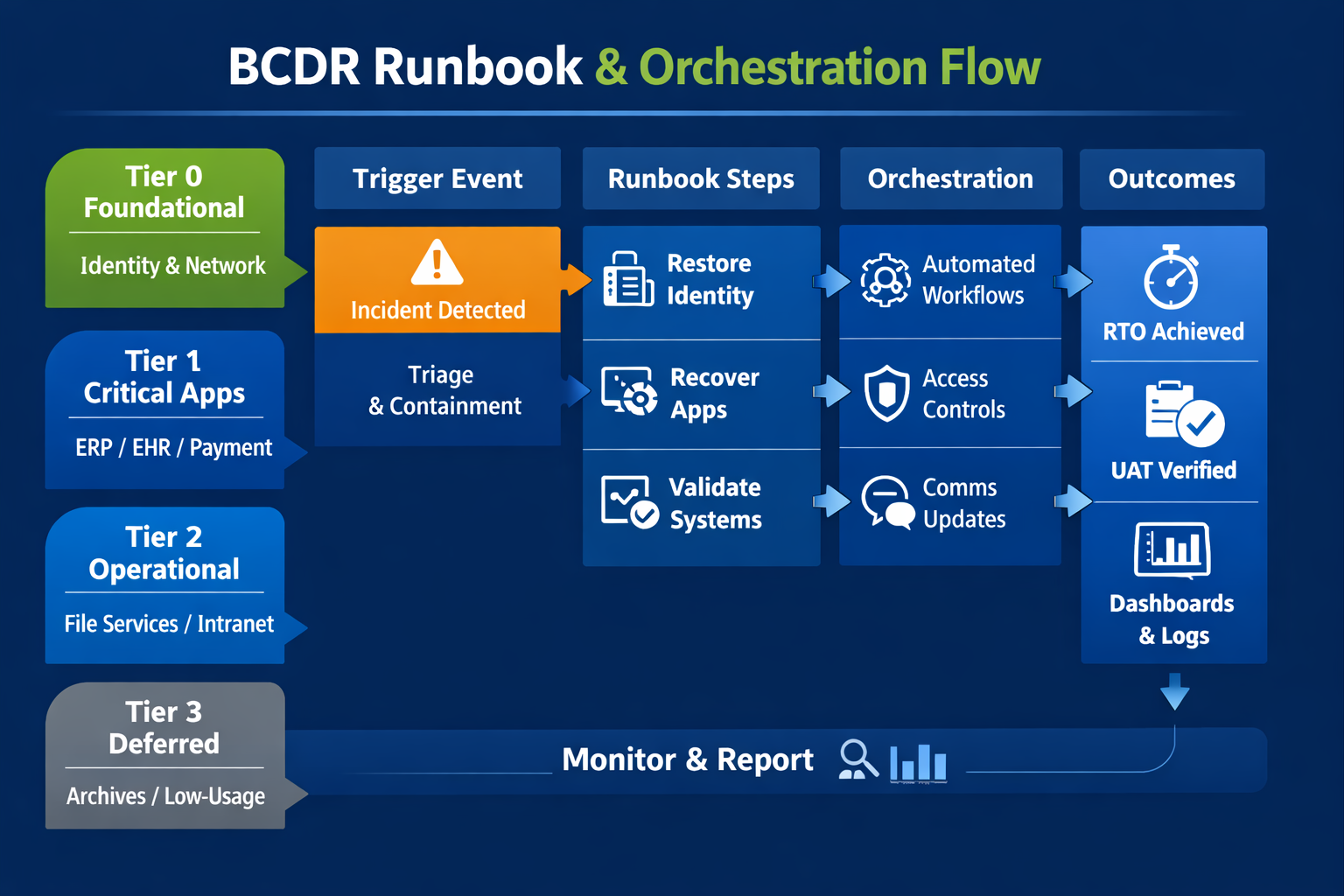
Backups store data; continuity restores operations. The difference is orchestration, testing, and time to value. In this guide, we unpack what separates a basic backup from a resilient recovery capability—and how to close the gap with practical runbooks, realistic testing, cost modeling, and right-sized automation.
Executive summary
Most teams equate “we have backups” with “we’re resilient.” In reality, untested backups provide a snapshot—not an outcome. Resilience is the ability to restore customer-facing and employee-critical services to agreed performance levels within agreed times, even under stress. That outcome requires three ingredients that backups alone lack: orchestration (the order and automation of recovery), testing under load (proving performance when it matters), and time-boxed runbooks (repeatable steps owned by specific people).
This article gives you a concrete path: a tiering model, sample runbook elements, a ransomware timeline, guidance for SaaS and Microsoft 365, vendor and supply-chain considerations, a cost model, metrics and dashboards, and a 90-day plan to move from “copying data” to “restoring business.” Use it to align executives, IT, security, and operations around one goal: measurable continuity.
Why backups without tested recovery leave a dangerous gap in resilience
It’s tempting to equate “we have backups” with “we can recover.” But a backup is an artifact—a copy of data. Continuity is an outcome—your ability to bring critical services back online, meet SLAs, and keep customers and employees productive. Organizations discover this distinction the hard way during ransomware events, cloud outages, and hardware failures when a usable backup exists, but the path to a functioning business service is unclear, slow, or blocked by dependencies.
Consider an ERP platform: data volumes may be safely stored in an immutable repository, but restoring the full service requires domain controllers, identity providers, middleware, certificates, DNS records, network paths, firewall rules, licenses, and end-user endpoints. If even one prerequisite is missing—or out of sequence—the restore stalls. Downtime compounds. The board asks for updates. Costs escalate.
Backups without tested recovery also mask three common blind spots:
- Hidden dependencies: Modern apps are collections of services, not monoliths. Recovery must respect inter-service order and configuration drift.
- Identity and access: After an incident, MFA, conditional access, and privileged roles may be unavailable or revoked. Rebuilding secure access is part of recovery, not an afterthought.
- Performance under load: A restore that works in a quiet lab can fail under real user traffic. You need to plan for concurrency, data rehydration, and cache warmups.
“The purpose of BCDR isn’t to store bytes—it’s to restore business outcomes.”
Myths vs. facts
Myth 1: Multiple backup copies mean we’re safe.
Fact: Copies reduce the risk of data loss but don’t reduce the time to restore services. Orchestration, prepared landing zones, and identity rebuilds determine recovery time.
Myth 2: Cloud platforms back up everything for us.
Fact: Most SaaS providers operate on a shared responsibility model. You must protect your data and have a plan to recover from deletion, corruption, or tenant-wide incidents.
Myth 3: Our last test passed, so we’re good.
Fact: Recovery readiness decays with every change to apps, identity, and networks. Treat DR like security—continuous, automated, and measured.
Myth 4: DR is too expensive for mid-market firms.
Fact: Right-sized approaches—tiering, targeted hot-standby for Tier 1, and cold for Tier 3—fit most budgets and shrink downtime dramatically.
How to design DR runbooks that restore systems, apps, & workflows end-to-end
Runbooks translate intent into executable recovery steps. They knit together infrastructure, platforms, and people. The most effective runbooks are short enough to act on during an incident yet precise enough to remove guesswork.
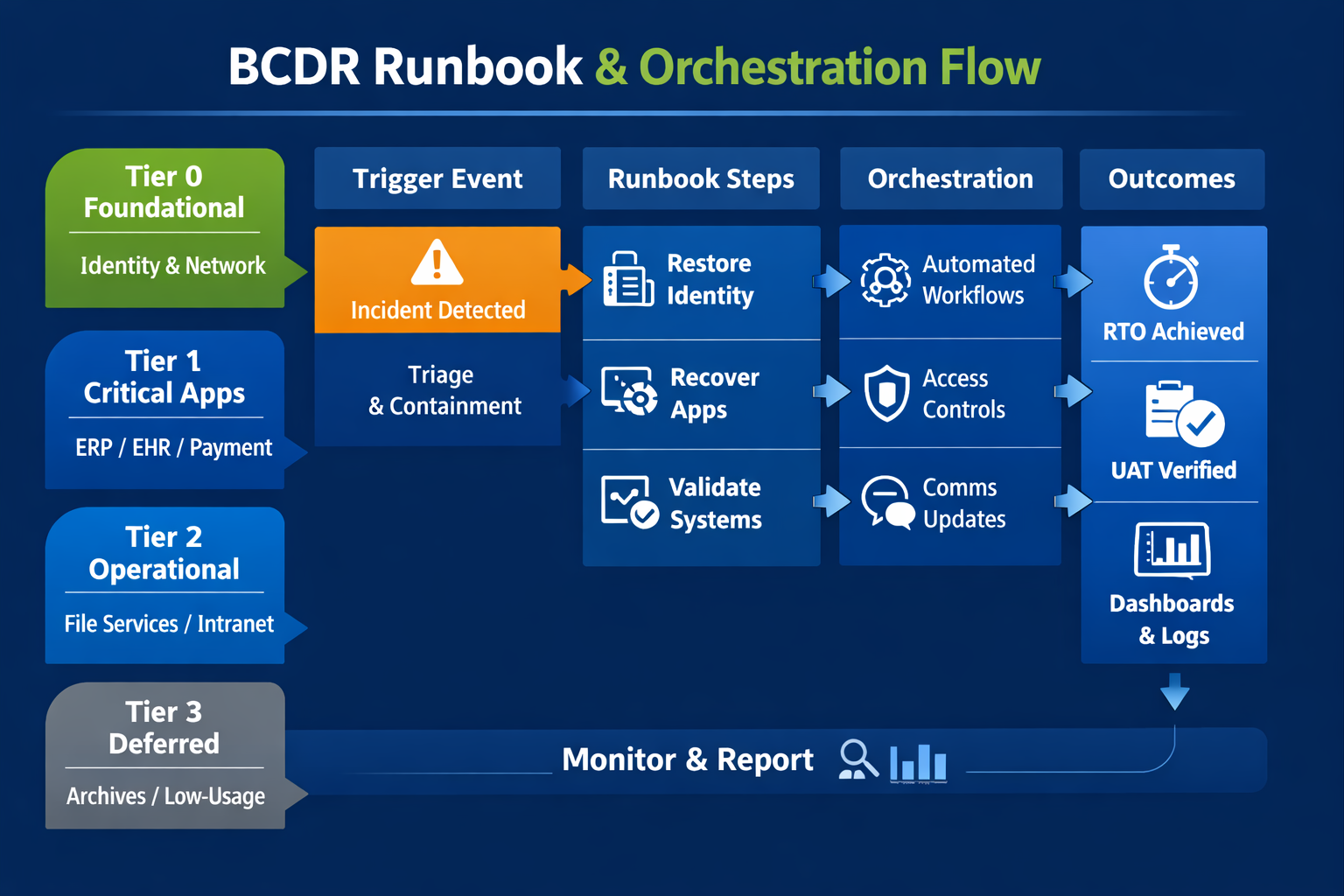
Elements of a high-value runbook
- Clear trigger conditions (e.g., Ransomware containment complete).
- Named owner and alternates with on-call rotation.
- Prerequisite checklist (identity, licenses, networking, certificates).
- Sequenced steps with end-state validation and screenshots.
- Rollback and “abort” conditions.
- Time-stamped communication plan (executive, legal, customers, staff).
- Links to vendor docs and internal knowledge base articles.
Keep recovery human-friendly
During incidents, cognitive load is high. Favor simple, numbered steps. Use screenshots and commands that can be copied. Wherever possible, automate repetitive tasks with scripts or orchestration platforms and reference them in the runbook.
For each critical business service, build a runbook that starts with the desired outcome (“Order processing at 95% of normal throughput within 2 hours”) and works backward to the enabling steps. Treat dependencies—identity, networking, data stores—as first-class citizens. Then instrument the process with measurable checkpoints to capture real RTO data during exercises.
1) Define app tiers & dependencies
Not all workloads are equal. Tiering lets you invest where downtime hurts most while controlling costs elsewhere. Start by mapping business capabilities to systems and datasets, then classify each workload by impact and urgency.
| Tier | Business impact | Typical RTO / RPO | Examples | Recovery notes |
|---|---|---|---|---|
| Tier 0 (Foundational) | Without it, nothing else recovers | RTO: 15–60 min / RPO: minutes | Identity (AD/AAD), DNS, DHCP, core network, key management | Protect copies offline/immutable; pre-stage hardware/landing zone; strict change control. |
| Tier 1 (Revenue/Care) | Direct revenue or safety impact | RTO: < 2 hours / RPO: < 1 hour | ERP, EMR/EHR, payment systems, contact center | Warm or hot standby; cross-region replication; scripted failover. |
| Tier 2 (Operational) | Material productivity impact | RTO: 4–24 hours / RPO: same-day | File services, intranet, analytics marts | Automated rehydration; capacity burst planning. |
| Tier 3 (Deferred) | Low short-term impact | RTO: 2–7 days / RPO: daily/weekly | Archives, low-usage apps | Cold storage acceptable; document workarounds. |
With tiers defined, chart dependencies using a simple graph: which services must be available before you can restore the target app? Capture these in your runbooks and your orchestration platform so the order of operations is enforced consistently.
2) Orchestrate sequence & access
Orchestration is how you compress RTOs from hours to minutes. It encodes sequence, validation, and access in software rather than in tribal knowledge. Depending on your environment, orchestration might live in your backup platform, your cloud provider’s DR service, a workflow tool, or a combination.
Principles for effective DR orchestration
- Start with identity. Rebuild domain controllers or rehydrate cloud tenants early. Without identity, you can’t enforce least privilege or MFA for recovery actions.
- Gate each step with validation. Don’t proceed from database restore to application start unless health checks pass (ports open, logs clean, synthetic transactions succeed).
- Automate access provisioning. Use just-in-time privileged access for recovery roles and tear it down automatically after the event.
- Abstract environments. Promote workflows from lab → staging → production recovery. The same playbooks should run in each with only variables changing.
- Make comms part of orchestration. Notify stakeholders at key milestones and capture timestamps automatically for audit and insurance.
3) Test restores under load
Testing is where you convert paper confidence into operational truth. A test that mirrors real conditions forces weak points to surface—before an attacker or outage does. Treat tests as learning exercises, not pass/fail audits.
What to test & how often
- Foundations Quarterly: Identity, DNS, DHCP, and core network paths. Validate you can reach consoles, decrypt keys, and authenticate admins.
- Tier 1 bi-monthly: Simulate a failover of mission-critical apps with representative data volumes and live-like traffic replay.
- Tier 2 semi-annually: Include end-user workflows such as file restores and report generation.
- Tabletop monthly: Walk through decision points with executives, legal, HR, communications, and vendor partners.
Make the load real
Use traffic generators or recordings of real user sessions to replay activity against the restored environment. Pre-warm caches, rebuild search indexes, and plan for long-running rehydration jobs. Capture performance metrics to tune capacity for the next exercise.
4) Verify user acceptance & SLAs
Recovery is successful when users can do their jobs and customers can complete transactions. Bake user acceptance testing (UAT) into every exercise. Translate SLA terms (RTO/RPO) into role-specific tasks that users can validate in minutes.
Fast UAT for common roles
- Billing: post an invoice, reconcile a payment.
- Sales: create a quote, send a contract, log an activity.
- Clinical/Operations: open a record, update status, print/route.
- HR: onboard a user, assign access, and complete compliance training.
Turn results into service facts
Record outcomes as time-stamped facts: “ERP order entry available at T+78 minutes; average response 820ms; 62 users served concurrently.” These facts replace assumptions in board updates, cyber insurance questionnaires, and customer commitments.
What ransomware recovery really looks like
Ransomware is the scenario most likely to reveal the difference between backup and continuity. Here’s a realistic, condensed timeline that shows where orchestration and runbooks pay dividends.
- 0–2 hours: Containment and scoping. Disable lateral movement, isolate infected hosts, preserve evidence. The communications lead assembles an incident bridge.
- 2–6 hours: Clean room and access. Stand up an isolated admin environment; provision just-in-time credentials and enforce MFA. Validate that identity stores are clean or prepared to restore.
- 6–12 hours: Tier 0 recovery. Restore directory services, DNS, DHCP, and core network paths from immutable snapshots; rotate secrets and certificates. Health checks must pass before moving on.
- 12–24 hours: Tier 1 app restoration. Execute orchestrated workflows for ERP/EHR/payment systems. Rehydrate databases, validate data integrity, rebuild application servers, and run synthetic transactions.
- 24–36 hours: UAT and controlled go-live. Business owners perform UAT sequences; the comms team informs customers and staff of phased restoration. Monitor user experience and scale capacity.
- 36–72 hours: Tier 2 recovery and backlog burn-down. File shares, analytics, and reporting come online. Address deferred tickets, reconcile transactions, and finalize post-incident reports for regulators and insurers.
Don’t forget SaaS & Microsoft 365
Many continuity plans stop at IaaS and on-prem servers. But SaaS apps—and especially Microsoft 365—carry critical data and workflows. Deletions, malicious insider activity, sync errors, and tenant-level misconfigurations are all common causes of data loss or downtime.
Microsoft 365
Protect Exchange Online, SharePoint, OneDrive, and Teams with policy-based backups and granular restore. Include runbooks for restoring entire sites and reconstructing Teams with channel/file/permission fidelity.
CRM/ERP SaaS
Check vendor export/restore capabilities and rate limits. Document how to rebuild integrations, webhooks, and SSO connections after a tenant rollback.
Line-of-Business SaaS
Inventory every app in your SSO portal. For high-impact tools, arrange BAA/DPAs, verify data residency, and include vendor-assisted recovery contacts in runbooks.
Apply the same discipline: tier SaaS apps, orchestrate identity first, and run periodic restores into a sandbox to validate data integrity and access controls.
Cloud, hybrid, & on-prem: choosing a landing zone
Your landing zone is the “place you’ll run from” during recovery. Options include a secondary on-prem data center, a cloud DR region, or a hybrid of both. The right choice depends on latency needs, compliance, and cost tolerance.
- On-prem to cloud: Popular for mid-market teams without a second data center. Replicate to object storage and recover into IaaS with templated networks and images.
- Cloud-to-cloud: For cloud-native stacks, failover between regions or providers. Ensure your orchestration doesn’t rely on the impacted control plane.
- On-prem to on-prem: Necessary when data sovereignty, low latency, or specialized hardware is required. Keep infrastructure patched and test regularly.
Third-party & supply-chain dependencies
Your continuity is only as strong as your weakest integration. Map vendors that sit on the critical path—payment gateways, EDI partners, identity brokers, couriers—and document how to operate if they’re down.
- Contracts: Capture recovery SLAs, support tiers, and emergency contacts in your runbooks.
- Alternates: Pre-approve backups or manual workarounds (e.g., paper tickets, offline batch uploads) for Tier 1 processes.
- Security alignment: Validate vendors’ backup, immutability, and incident response practices; request evidence during due diligence.
Dashboards, metrics, &evidence
Executives don’t want theory; they want evidence. Build a concise dashboard backed by data from your orchestration platform and monitoring tools.
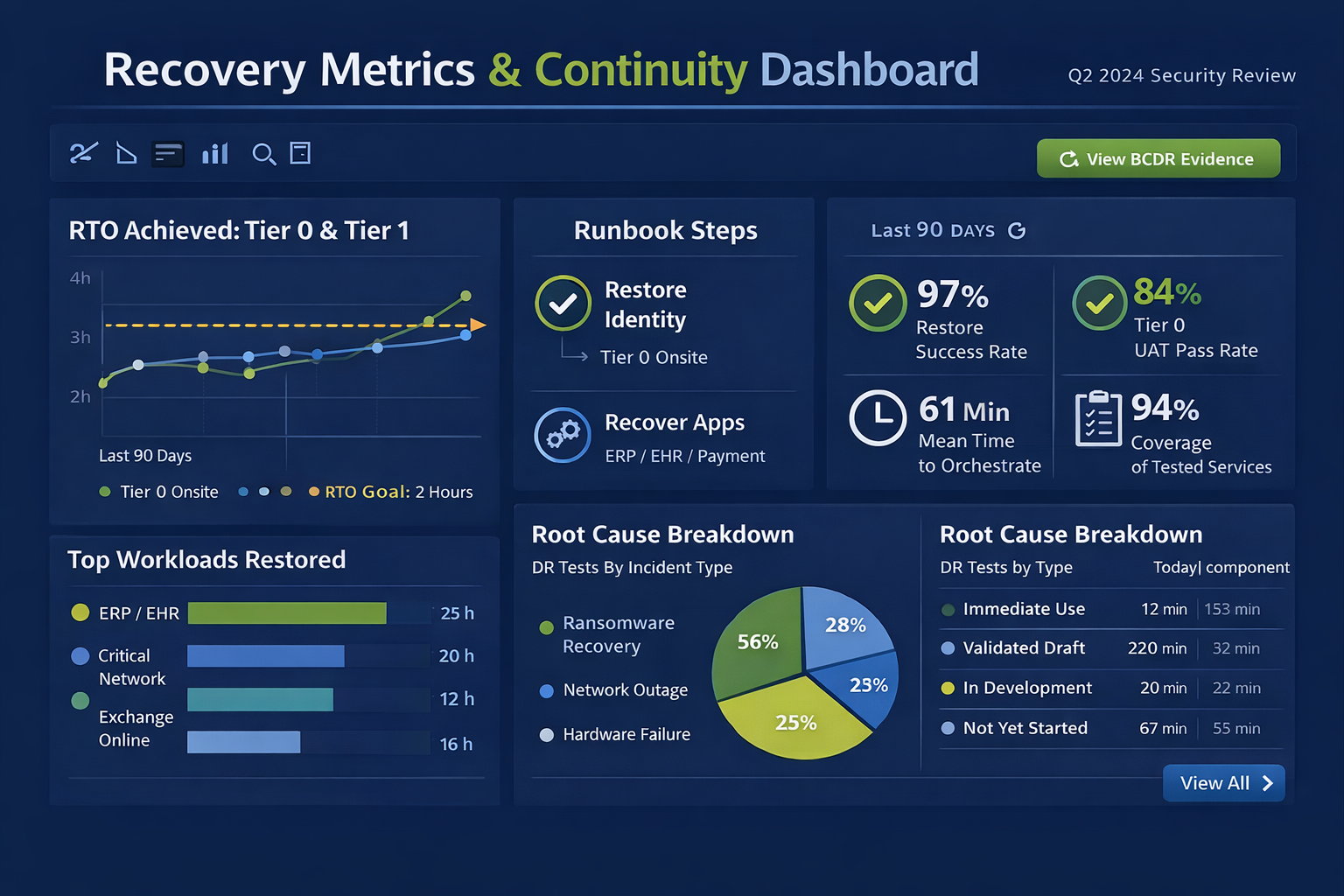
Continuity KPIs
- RTO achieved for Tier 0/1 workloads in the last 90 days
- Restore the success rate across random sample tests
- Coverage: % of services with documented, tested runbooks
- Mean time to orchestrate: from trigger to app availability
- UAT pass rate and user-reported experience (Apdex)
Evidence package
For boards, auditors, and insurers, keep a “BCDR evidence” folder with test plans, time-stamped logs, screenshots, synthetic transaction results, and sign-offs from business owners.
Cost modeling: the price of downtime
Budget conversations become far easier when you quantify the business impact of downtime. Use a simple model that multiplies revenue loss, productivity loss, recovery over time, and potential penalties by expected hours of disruption. Then compare two scenarios: backups-only versus orchestrated recovery.
| Cost component | Formula | Scenario A: Backups-only | Scenario B: Orchestrated DR |
|---|---|---|---|
| Revenue impact | Hourly revenue × % impacted × hours | $120,000 × 0.6 × 24 = $1,728,000 | $120,000 × 0.3 × 8 = $288,000 |
| Productivity | Avg. loaded wage × affected staff × hours | $55 × 450 × 24 = $594,000 | $55 × 450 × 8 = $198,000 |
| Recovery overtime | IT overtime + contractor hours | $85,000 | $40,000 |
| Penalties/fees | SLAs, chargebacks, and regulatory | $250,000 | $60,000 |
| Total | $2,657,000 | $586,000 |
In this hypothetical mid-market example, orchestrated recovery reduces estimated incident costs by over $2M for a single event. Even a modest investment in landing zones and runbook automation pays for itself quickly.
Industry playbooks: healthcare & manufacturing
Healthcare
What’s unique: Patient safety, clinical throughput, and HIPAA obligations. Many environments blend EHR, PACS, HL7 interfaces, imaging modalities, and medical IoT.
Continuity approach: Tier 0 identity + network first, then EHR and core ancillary systems. Pre-stage a clinical landing zone in a secondary site with secure remote access for clinicians. Use synthetic patient transactions to validate orders, medication administration, and results routing.
Testing nuance: Include pharmacy formulary syncs, badge auth, and downtime procedures for radiology and lab. Ensure printers/labelers are mapped in the recovery environment.
Manufacturing
What’s unique: OT/IT convergence, plant-floor uptime, MES/SCADA dependencies, and supplier commitments.
Continuity approach: Segmented networks with dedicated jump hosts, pre-imaged HMI/engineering workstations, and offline recipes/bills-of-materials. Prioritize ERP, MES, and quality systems with runbooks that include PLC/firmware validation.
Testing nuance: Simulate a production run post-recovery, including barcode scanning, weigh-scale integration, and palletization/release steps. Validate EDI with suppliers and carriers.
Buying checklist: evaluating DR tooling
Use this checklist during vendor reviews to separate marketing from operational value.
| Capability | Why it matters | What good looks like | Questions to ask |
|---|---|---|---|
| Immutability | Prevents tampering/ransomware | Write-once, MFA delete, air gap options | How do you enforce WORM? Can admins bypass it? |
| App-aware restores | Integrity for complex apps | Transaction-consistent, item-level, cross-platform | How do you handle distributed apps/microservices? |
| Orchestration | Compresses RTO | Declarative workflows, health checks, and role-based access | Show me a runbook JSON/YAML and an example execution log. |
| Landing zone automation | Eliminates manual plumbing | Prebuilt VNET/VPC, security groups, images, IaC templates | How quickly can you stand up a clean environment? |
| Observability | Validates outcomes | Synthetic transactions, UX metrics, API access | Can we export evidence automatically per test? |
| SaaS protection | Coverage beyond IaaS | M365, Salesforce, popular LOB apps | How do you restore permissions and relationships? |
| Security model | Least-privilege in recovery | JIT access, audit trails, hardware-backed keys | Where are secrets stored and rotated? |
| Cost transparency | Budget predictability | Clear storage/egress/pricing tiers | What are the real costs during a 24-hour failover? |
Sidebar: Zero Trust in recovery
Zero Trust isn’t suspended during incidents—it’s more important. Use clean-room admin workstations, enforce MFA for recovery roles, and require device health checks even for jump hosts. Re-issue certificates, check for privileged persistence, and verify software supply chain integrity before promoting restored workloads to production.
Sidebar: Cyber insurance evidence pack
Insurers increasingly ask for proof that you can recover quickly. Package these artifacts after each test:
- Signed test plan and scope
- Time-stamped orchestration logs and screenshots
- UAT sign-offs from business owners
- Measured RTO/RPO achieved, plus deltas vs. targets
- List of corrective actions with owners and dates
Your practical BCDR stack: capabilities that matter
Technology should simplify, not complicate, recovery. Here’s a pragmatic capability stack that works for SMB and mid-market teams:
- Backups, but better: Immutable, air-gapped copies with strong encryption and multifactor delete.
- Snapshot + replication: For Tier 0/1 workloads, pair backups with low-latency replication or application-aware snapshots for minimal RPO.
- DR orchestration engine: Declarative workflows, health checks, role-based access, and built-in evidence capture.
- Landing zone(s): Pre-built recovery environments in a secondary data center or cloud region with network, security groups, and images ready.
- Observability: Synthetic transactions, log analytics, and user experience monitoring to validate availability and performance.
- Security by design: Zero Trust principles in recovery: re-issue certificates, validate identities, and use clean-room administration jump hosts.
Mini case study: from backups to business outcomes
Company: Midwest manufacturing firm, 600 employees, two plants. Situation: Nightly file and VM backups, no documented runbooks, and a single on-prem data center. Catalyst: A failed firmware update corrupted a storage array, taking ERP and file services offline.
What happened before our engagement: IT had clean VM backups, but recovery stalled at identity: domain controllers were on the same array, and backup catalog access required the domain. Networking routes to the off-site repository also changed during a previous firewall refresh. After 18 hours of trying to bootstrap identity and storage, leadership called for outside help.
Our approach: We established an out-of-band admin network, restored Tier 0 from immutable snapshots, and orchestrated ERP recovery into a cloud landing zone. Synthetic transactions validated database health; business owners performed UAT for order entry and shipping. We then created runbooks, implemented hot standby for ERP, and scheduled quarterly tests.
Outcome: Post-program, the company’s measured RTO for ERP dropped from “unknown” to 90 minutes. Insurance premiums decreased, and the next audit passed with zero DR findings. Most importantly, confidence improved—leaders had evidence that operations could return quickly.
A pragmatic 90-day plan
Days 1–15: Baseline & prioritize
- Inventory services; assign owners; capture business impact.
- Classify tiers and set target RTO/RPO by tier.
- Map dependencies for Tier 0/1 systems.
- Confirm backup immutability and isolation.
Days 16–45: Build foundations
- Stand up landing zone(s) and out-of-band admin access.
- Choose an orchestration tool; model two runbooks end-to-end.
- Automate identity recovery and privileged access.
- Draft comms templates and executive dashboards.
Days 46–90: Prove & iterate
- Run a timed Tier 0/1 exercise with traffic replay.
- Capture evidence; refine steps and SLAs.
- Extend runbooks to Tier 2; schedule recurring tests.
- Brief the board on metrics and a funding roadmap.
Common pitfalls to avoid
- Assuming SaaS is “self-backup.” Validate provider capabilities and your responsibilities.
- Ignoring identity rebuilds. Without directory services and MFA, privileged actions stall.
- Testing in silence. Always include communications, vendor coordination, and UAT.
- Under-sizing recovery capacity. Plan for bursty traffic and parallel rehydration.
- Letting runbooks age out. Update after every major release or architecture change.
Runbook starter templates
Use these outlines to accelerate documentation. Replace placeholders with your specifics, then validate during a test.
Template 1: Tier 0 Identity Restore
- Trigger: posted in #incident-bridge.
- Owner: Identity lead; Alternates: On-call rotation.
- Prereqs: Clean-room admin, vault keys, backups validated, immutable.
- Steps: Provision landing subnet → restore DC images → seize FSMO roles → rotate KRBTGT twice → validate replication and time sync.
- Validation: SSO to admin portal succeeds; synthetic auth transactions pass.
- Comms: Post timestamps to exec channel; update status page.
Template 2: Tier 1 ERP Restore
- Trigger: Identity health check green.
- Prereqs: DB snapshots available; licenses assigned; DNS records prepped.
- Steps: Rehydrate DB → restore app servers → import certs → warm caches → run synthetic order entry.
- Validation: UAT: 5 sales reps create quotes; 5 warehouse picks complete; SLA <1.5s response.
- Rollback: If data integrity checks fail, revert to T-1 snapshot; notify legal.
Glossary
- RTO: Recovery Time Objective—the maximum tolerable time a process can be offline.
- RPO: Recovery Point Objective—maximum tolerable data loss measured in time.
- Landing zone: A pre-provisioned environment where recovered workloads run.
- Immutability: Storage that prevents modification or deletion for a set period.
- Synthetic transaction: A scripted, automated action that verifies an application function.
BCDR readiness checklist
Use this checklist to gauge progress from “we have backups” to “we can recover operations.”
- We maintain a current service catalog with owner, tier, RTO, RPO, and dependencies.
- We have documented and tested runbooks for Tier 0/1 workloads with screenshots and scripts.
- Our recovery environment (cloud region/data center) is pre-provisioned and reachable out-of-band.
- Backups are immutable and isolated, with quarterly restore tests validated by application owners.
- We automatically orchestrate identity restoration and privileged access for recovery roles.
- We conduct load tests using traffic replay to capture real RTOs and performance.
- We track and report UAT outcomes and SLA adherence after each exercise.
- Executives participate in tabletops and receive concise status dashboards during tests/incidents.
Frequently asked questions
ISN’T HAVING MULTIPLE BACKUP COPIES ENOUGH?
Redundancy helps, but recovery is a process, not an inventory count. Copies don’t solve for sequence, identity, or performance. Only runbooks and orchestration do.
How is disaster recovery different from business continuity?
Disaster recovery (DR) focuses on restoring IT systems; business continuity (BC) ensures that critical business processes continue to run. You need both. DR runbooks enable BC outcomes when they include people, communications, and workarounds.
What’s a realistic test cadence for a mid-market company?
Quarterly for foundations, bi-monthly for Tier 1, semi-annual for Tier 2, and monthly tabletops. Increase frequency after major changes or incidents.
How do we justify the investment?
Quantify downtime costs (lost revenue, overtime, penalties) and compare them to a right-sized stack. Most organizations reduce mean time to recover by 50–80% after implementing orchestration and pre-provisioned landing zones.
What roles should be on the DR team?
Incident commander, DR lead, identity/security lead, network lead, platform/app owners, communications lead, legal/compliance, and a vendor liaison. Assign alternates and publish an on-call rotation.
How do cyber insurance requirements factor in?
Insurers increasingly ask for evidence of immutable backups, MFA on admin accounts, tested incident response and recovery, and the ability to meet RTO/RPO. Your evidence package and dashboard streamline renewals and can reduce premiums.
Ready to close the continuity gap?
Cyber Advisors helps organizations of every size—from fast-growing SMBs to multi-site healthcare networks and national manufacturers—go beyond “we have backups” to measurable continuity. Our team blends runbook design, DR orchestration, identity rebuilds, and realistic testing to restore operations, not just data, across diverse environments and industries. If you’re ready to turn backups into resilient, time-boxed recovery, let’s build a plan that fits your risk, budget, and compliance needs.