
Break/fix creates hidden costs and chaos; proactive managed IT prevents issues and stabilizes the business. In this guide, we’ll explain why small and mid-sized organizations are leaving reactive IT behind, what changes when you adopt managed services, and how to build a practical transition plan—complete with automation, remote monitoring, and a strategic roadmap.
What “Break/Fix” Really Means for SMBs
For many growing businesses, break/fix support began as a practical choice: call a technician when something fails. You pay for time and materials, get the system back up, and move on. At a small scale, that can feel cost-effective. But as your operations add cloud apps, remote workers, SaaS integrations, VoIP, and compliance requirements, a reactive model introduces uncertainty, risk, and inconsistency that your customers (and auditors) won’t tolerate.
Break/fix is inherently reactive. It does not include continuous monitoring, standardized maintenance, or an IT strategy. Nobody is incentivized to stop problems before they start, and there’s no long-term plan to harden the environment. The result is a cycle of recurring incidents—password resets, printer issues, slow file shares, recurring Wi-Fi outages, surprise updates that break integrations, and security patching that always seems a month late.
When margins are tight, these interruptions rarely look like line items on the P&L. Yet they show up as lost orders, missed SLAs, churned customers, overtime, and employee burnout. Over time, chronic friction becomes cultural: staff expect technology to break, managers plan around outages, and the business grows less ambitious with digital initiatives because the foundation is shaky.
SMBs aren’t abandoning break/fix because it’s unfashionable—they’re leaving because it can’t support modern, always-on operations.
The True Cost of Downtime (& Why It’s Avoidable)
Downtime is expensive—and avoidable. Consider the tangible and hidden costs when systems fail:
- Lost revenue and productivity: sales can’t invoice, support can’t access tickets, production pauses, and knowledge workers sit idle.
- Customer impact: late shipments, missed SLAs, and reputational damage.
- Staff time diversion: managers firefight instead of coaching; executives get pulled into vendor escalations.
- Security exposure: emergency fixes bypass change control; patches are skipped; backups fail silently.
- Opportunity cost: projects slip, features arrive late, and competitors move first.
Most of these costs are preventable with remote monitoring and management (RMM), automation, and a steady cadence of standardized maintenance. In proactive environments, alerts surface anomalies before they become incidents, and routine tasks—patching, updates, backups, policy enforcement—run predictably across all devices and locations.
Why Reactive Support Increases Risk—While Proactive Management Prevents Outages
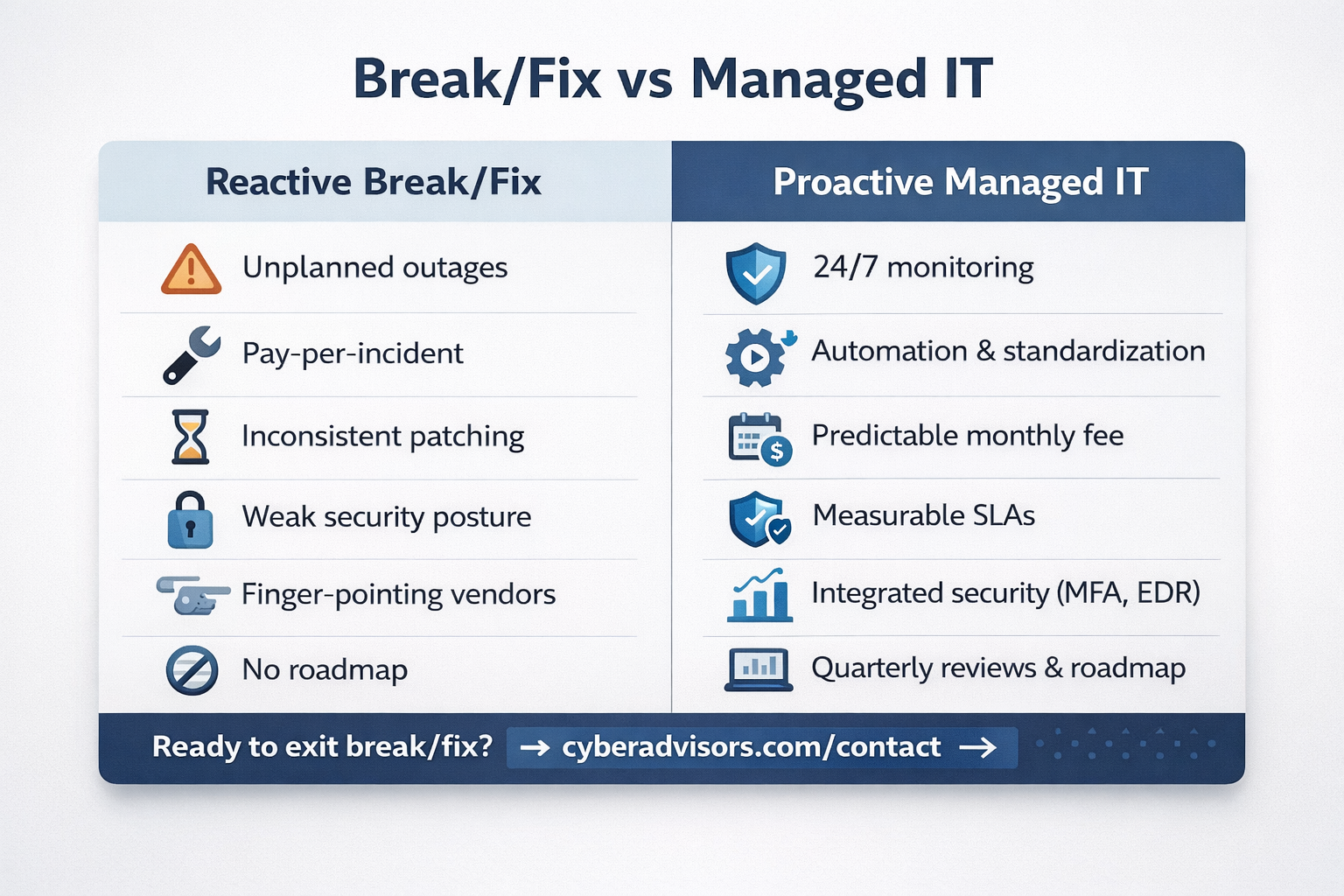
Reactive IT is a gamble. Every day without monitoring, policy, and automation is a day when a small issue can blossom into a company-wide outage. Here’s how risk creeps in:
Reactive IT (Break/Fix)
- No baseline standards; every device is a snowflake.
- Patching is ad hoc; critical updates lag weeks or months.
- Backups are assumed, not verified; restores are untested.
- Security depends on user vigilance; phishing wins too often.
- Vendors point fingers during incidents; no single throat to choke.
Proactive Management (Managed IT)
- 24/7 monitoring with thresholds and alerting.
- Automation enforces baselines; drift is corrected quickly.
- Patch, backup, and policy compliance are measured and reported.
- Security controls (MFA, EDR, web filtering) are consistent.
- Root cause analysis eliminates repeat incidents.
When your provider is responsible for outcomes—uptime, response, resolution, security posture—they’re incentivized to prevent issues. That means building guardrails, standardizing configurations, and relentlessly closing gaps. For SMBs, this is the difference between “IT breaks and we call a tech” and “we run on an IT platform that just works.”
What Managed IT Looks Like: Monitoring, Automation, & Measurable SLAs
Managed IT services turn IT into a predictable utility, backed by service-level agreements (SLAs). While every provider is different, a modern managed services model typically includes:
1) Remote Monitoring & Management (RMM)
Agents on endpoints and servers continuously track performance, patch status, disk health, and security events—not just during business hours, but around the clock. If a critical service crashes, a backup job stalls, storage starts to fail, or CPU and memory usage spike beyond normal thresholds, the operations team is immediately alerted with clear context. They can troubleshoot remotely, restart services, re-run backups, or schedule targeted maintenance—often before users notice anything is wrong or data is at risk. Over time, these signals build a rich picture of trends and weak points, so you can fix chronic issues at the root instead of reacting to symptoms. This is the foundation that replaces surprises with observability and turns IT into a measurable, managed system.
2) Automation & Standardization
Scripts and policies enforce consistent, hardened configurations across your fleet—covering password standards, local firewall rules, EDR agents, DNS protection, BitLocker/FileVault encryption, browser hardening, and more. Instead of each machine being configured by hand, new devices are imaged or auto-enrolled into management with an approved baseline profile that sets these controls from day one. Existing devices are scanned for drift, then automatically remediated back to the standard, so you’re not relying on tribal knowledge or one-time fixes. Over time, this creates a predictable, supportable environment where every workstation and server meets the same security and configuration requirements.
3) Managed Security Controls
Core protections like MFA, endpoint detection and response (EDR), email security, and web filtering operate as a managed stack—not a loose collection of tools. Policies are standardized, configurations are hardened, and every control is monitored for health and coverage gaps. Alerts from these systems pipe into a 24/7 SOC or response team for triage, enrichment, and escalation, so potential threats are investigated before they become business‑impacting incidents. Policy exceptions are tracked, risk‑ranked, and resolved on a defined timeline—not granted ad hoc and forgotten—so your security posture improves continuously rather than drifting over time.
4) Cloud & Collaboration Management
For Microsoft 365 and Google Workspace, managed IT goes beyond basic license management. It includes identity governance to ensure users have the right access at the right time, conditional access policies that adapt to risk (device health, location, role), data loss prevention (DLP) rules to keep sensitive data from leaving the organization, and configuration hardening across email, collaboration, and storage. This means standardized baselines for MFA, mailbox and SharePoint/Drive sharing controls, Teams/Meet configuration, and mobile device access—monitored and adjusted as your business changes.
Cloud solutions—IaaS, PaaS, or SaaS—are continuously monitored for performance, security, and configuration drift, with tagging, rightsizing, and lifecycle policies in place to control spend. Resources are cost-optimized to avoid sprawl, unused subscriptions, and surprise overages, so you get the capacity you need without bill shock at the end of the month.
5) Backup, DIsaster Recovery, & Business Continuity
Backups are verified regularly, immutable offsite copies are maintained, and both recovery point and recovery time objectives (RPO/RTO) are tested against real production scenarios—not just assumed on paper. Runbooks document who does what during regional outages, hardware failures, and ransomware events, with clear steps for failover, communication, and restoration. Instead of gambling on an old tape or a dusty NAS, you know exactly how long it will take to bring critical systems back, what data you might lose, and which workflows come online first—so you can recover with confidence and keep the business moving.
6) Reporting & Reviews
Monthly reports show patch compliance, endpoint health, ticket trends, risk status, and progress against the roadmap—giving you a clear, executive-level view of whether IT is getting healthier month over month. You can see which sites, business units, or device groups are driving noise, which systems are lagging on patches or backups, and how quickly incidents are being resolved. That data becomes the basis for targeted improvements instead of guesswork.
Quarterly business reviews (QBRs) take that telemetry and connect it directly to the business. Your provider walks through what’s been accomplished, what risks remain, and which initiatives should move up or down the priority list based on your growth schedule, hiring plans, CapEx/OpEx constraints, and upcoming audits. The result is an IT plan that’s aligned with how the company actually operates—not a generic checklist or a one-time slide deck.
Bottom line: Managed IT replaces ad hoc fixes with a system—one that uses monitoring and automation to catch issues early, remove toil, and keep your environment in a known-good state. Instead of reacting to every outage as a one-off emergency, you run on a managed platform where reliability, security, and user experience are measured, reported, and improved in a continuous cycle.
From Firefighting to Strategy: Building a 12–18 Month IT Roadmap
Without a roadmap, it’s impossible to forecast spend, sequence projects, or measure progress. A managed IT roadmap translates business priorities into a plan with deliverables, budgets, and timelines. Typical pillars include:
- Stability: standardize devices, patching, backups, and identity.
- Security: MFA everywhere, EDR, email security, privileged access controls, vulnerability management, and user training. See our cybersecurity services for details.
- Scalability: modernize the network, Wi-Fi, and cloud foundations to support growth and hybrid work.
- Productivity: automate provisioning, implement self-service, and streamline collaboration and workflows.
- Resilience: DR testing, incident response exercises, and tabletop simulations.
Every initiative should tie back to measurable outcomes—reduced tickets, faster onboarding, cutover to a more secure email gateway, improved patch SLAs, lower cloud spend, or a shorter RTO. This is how IT becomes an enabler of revenue rather than a cost of doing business.
How to Transition from Break/Fix to a Proactive, Automated Service Model
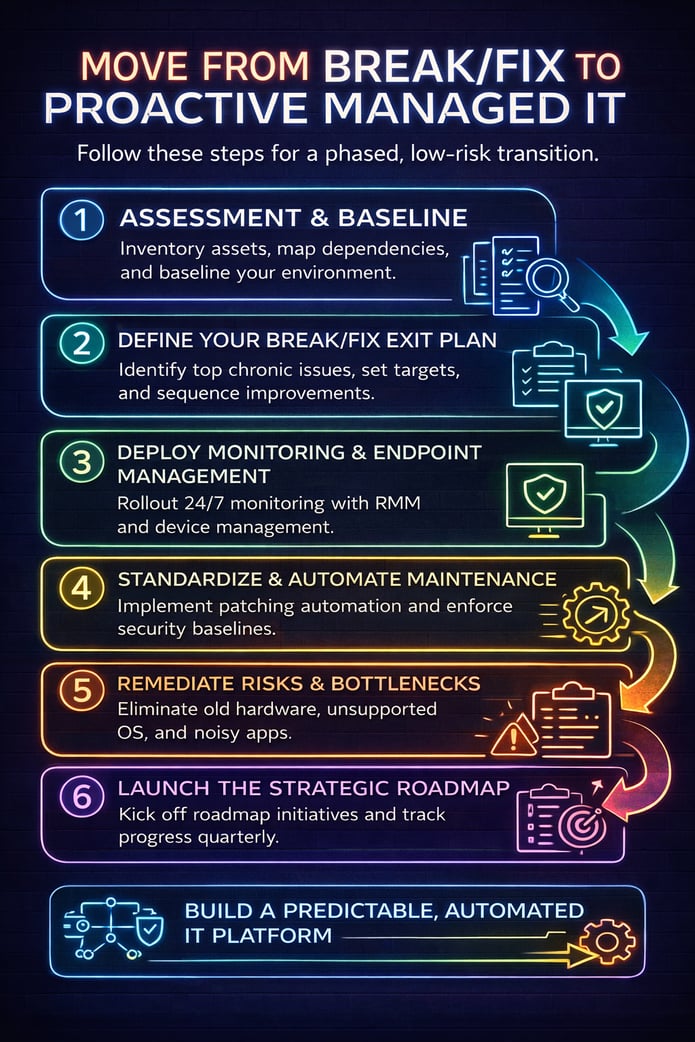
Moving away from break/fix doesn’t require a risky big-bang change. Use a phased approach that delivers quick wins while building long-term capability. Start by targeting the most visible sources of pain—recurring tickets, unstable systems, and obvious security gaps—so users and leadership see immediate improvement in stability and responsiveness. In parallel, begin putting the foundational pieces in place: standardized configurations, automated patching, verified backups, and 24/7 monitoring.
As you progress, each phase should build on the last—expanding automation, tightening security controls, and aligning projects to a 12–18 month roadmap—so your environment steadily moves from reactive firefighting to a predictable, well-managed platform. This reduces risk at every step, keeps the business running smoothly during the transition, and makes it easier to demonstrate ROI as you scale from quick wins to a fully proactive, automated service model.
Step 1: Assessment & Baseline
Start with an environment assessment. Go beyond a simple asset list and build a clear picture of how your technology actually supports the business today. Inventory hardware and software, OS and application versions, warranties and support contracts. Collect data on security controls and patch posture across servers, endpoints, and network gear. Review backup jobs, retention policies, and restore success so you know what you can reliably recover—and how fast. Map your critical business applications, their integrations, and upstream/downstream dependencies, including cloud services and on‑prem systems. Finally, interview key stakeholders and document user experience pain points: slow logins, unstable Wi‑Fi, VPN issues, printing problems, and recurring application glitches that drain productivity. The outcome is a current‑state baseline, a prioritized risk list, and a clear view of which issues to tackle first for maximum impact.
Step 2: Define Your Break/Fix Exit Plan
Create a Break/Fix Exit Plan with clear milestones and ROI targets. Start by mining your ticket data and stakeholder interviews to identify the top 10 chronic issues driving the most downtime, user frustration, and emergency invoices. Commit to eliminating those issues in the first 60–90 days through standardization, automation, and targeted remediation.
Next, sequence the remaining improvements into logical waves—stability (patching, backups, hardware refresh), security (MFA, EDR, email/web filtering), and productivity (onboarding automation, self-service, collaboration optimizations). For each initiative, document:
- Executive sponsor and technical owner
- Start and finish dates with interim milestones
- Success metrics (e.g., tickets per user per month, MTTR, patch compliance, failed backup rate, mean time between incidents)
- An estimated reduction in tickets, unplanned work hours, and business downtime
Translate these improvements into financial impact by estimating reclaimed productive hours, avoided outages, and reduced reactive spend. The result should be a one-page summary showing how moving from break/fix to managed IT will reduce incidents, stabilize operations, and pay for itself within the first 2–3 quarters.
(Want help? Ask us for a Break/Fix Exit Plan.)
Step 3: Deploy Monitoring & Endpoint Management
Roll out RMM agents and endpoint management (Intune or equivalent) across all supported devices—servers, workstations, and key mobile endpoints. Standardize enrollment so that any new device is automatically brought under management on day one, with tags or groups that map to sites, departments, and criticality. Establish clear alert thresholds for disk, CPU, memory, patch status, and security events, then define ticket routing and escalation paths so the right team is notified with the right priority every time. Integrate alerts directly into your ITSM or ticketing system, with rules for auto-ticket creation, runbook attachment, and on-call notifications for after-hours issues.
Even before you make major architectural changes, this visibility alone will surface failing disks, out-of-date agents, unsupported operating systems, noisy line‑of‑business applications, and early indicators of user impact—slow logins, repeated application crashes, and intermittent network drops. With that data in hand, you can start targeted remediation, standardization, and hardware refreshes based on evidence rather than anecdotes, cutting down on surprise outages as you build out the rest of your proactive service model.
Step 4: Standardize & Automate Maintenance
Implement automated patching by risk tier so that critical updates deploy within hours, high- and medium-risk changes follow defined maintenance windows, and low‑risk changes batch into scheduled cycles. Enforce standardized security baselines for operating systems, applications, identity, and endpoint protection so every device is configured to the same hardened standard. Verify backup success daily with automated reporting and exception alerts, and perform regular test restores so you know data is recoverable—not just theoretically protected. Configure centralized logging and event forwarding into your RMM, SIEM, or logging platform so you can correlate issues, spot patterns, and investigate incidents quickly. Wherever possible, replace manual tasks with scripts, policies, and scheduled jobs so that every device continuously converges toward the standard without relying on one-off fixes or hero efforts.
Step 5: Remediate Risks & Bottlenecks
Use the early data to remove the top sources of variance—old hardware, flaky switches, unsupported OS versions, insecure configurations, and noisy line‑of‑business applications. Prioritize simple, high‑impact fixes first: replace failing endpoints, stabilize core network paths, retire or upgrade out-of-support systems, and standardize configurations so every device conforms to a hardened baseline. When noisy applications are unavoidable, tune thresholds, logging, and alert rules so your team sees actionable incidents rather than constant false alarms. Track results in your ticketing metrics—tickets per user, incident categories, MTTR, and repeat tickets—to prove impact and show how each remediation step reduces noise, stabilizes operations, and frees your IT team to focus on roadmap work instead of firefighting.
Step 6: Launch the Strategic Roadmap
Kick off roadmap initiatives (identity modernization, MFA everywhere, EDR, email filtering, network refresh, DR testing). Translate each initiative into a defined project with a charter, timeline, and budget so everyone understands scope and impact. Document what “done” means in business terms—for example, 100% of users protected by MFA, 95%+ of endpoints covered by EDR, or successful DR failover within your target RPO/RTO.
Assign an executive sponsor and an operational owner to every initiative, along with cross-functional stakeholders from operations, finance, and compliance where appropriate. Establish success metrics, owners, and a clear finish line, then track progress in a shared dashboard so leadership can see status at a glance and remove roadblocks quickly.
On a quarterly cadence, review progress against these initiatives in your QBRs. Validate what’s working, what’s stuck, and where new threats, compliance requirements, or business goals (mergers, new sites, production changes) require you to adjust. Retire completed items, re-rank priorities, and add new projects so the roadmap remains a living plan rather than a one-time exercise.
Calculating ROI: Turning IT from a Cost Center into a Value Engine
Managed IT isn’t just a different billing model; it’s a different economic model. Here’s how to think about ROI:
- Reduce Downtime: If your 50-person company averages just one hour of lost productivity per user per month due to chronic IT issues, that’s 600 hours a year. Multiply by loaded hourly rates, and the revenue impact, and prevention pays for itself quickly.
- Eliminate Toil: User provisioning, patching, and permissions changes are automated. Your internal IT team (if you have one) is freed up to work on projects that drive revenue or improve the customer experience.
- Avoid Security Incidents: Phishing and malware events that once caused days of cleanup become blocked or contained, reducing risk exposure and cyber insurance headaches.
- Predictable Spend: A simple monthly fee replaces variable invoices and emergency escalations, enabling accurate budgeting.
- Faster Growth: Stable platforms enable faster rollouts of new locations, products, and integrations. IT becomes a multiplier instead of a bottleneck.
Translate those benefits into numbers your CFO will respect: fewer tickets per user per month, improved mean time to resolution (MTTR), higher patch compliance, lower incident severity, and shorter onboarding time for new employees. If a program can cut ticket volume by 25–40% and avoid one significant outage per year, the ROI is typically clear within the first two quarters.
How to Choose the Right Managed Services Partner
Not all managed service providers (MSPs) are equal. Some answer tickets; others function as an extension of your operations and security teams. Use these criteria to separate proactive partners from reactive vendors—especially if you operate in regulated, high-uptime environments:
- Outcomes over hours: They commit to SLAs and publish monthly performance reports.
- Standardization mindset: Baselines and golden images, not one-off heroics.
- Automation first: Clear evidence of scripts, policies, and self-service that reduce tickets.
- Security integrated: Managed EDR, MFA, email security, and vulnerability management—not bolt-ons.
- Cloud fluency: Guidance on Microsoft 365 hardening, Azure governance, and cloud cost optimization.
- Strategic cadence: QBRs, roadmap ownership, and business alignment (not just tech talk).
- Documented onboarding: A clear 30/60/90 day plan with artifacts you keep.
- References and case studies: Proven results for companies like yours.
Mini Case Study: Cutting Tickets 40% with Automation
Background: A 120-employee professional services firm relied on break/fix support from a local shop. Patching was inconsistent, onboarding took a week, and Wi-Fi outages plagued meetings. The leadership team wanted predictable IT and better remote work support.
Approach: After a two-week assessment, we prioritized five quick wins: (1) deploy RMM and set alert thresholds, (2) standardize laptops with Intune and a hardened baseline, (3) enable MFA and conditional access for Microsoft 365, (4) replace consumer-grade Wi-Fi with managed APs, and (5) fix backup gaps and implement immutable offsite copies.
Results (first 90 days): Ticket volume dropped 28% as recurring incidents disappeared. Patching compliance rose from 62% to 96%. New-hire setup time shrank from 10 hours to under 2 hours. By month six, tickets were down 41%, and users reported a smoother experience—especially on meeting days.
Lesson: The wins weren’t random fixes; they were standardized policies and automations that kept devices and services in a known-good state.
Break/Fix Exit Checklist
Use this list to structure your move to a proactive model:
- Inventory assets, versions, warranties, and critical app dependencies.
- Baseline patch, backup, identity, and security posture.
- Define the top 10 chronic issues to eliminate in 60–90 days.
- Deploy RMM and endpoint management across all devices.
- Enforce security baselines (MFA, EDR, DNS/web filtering, encryption).
- Automate patching by risk tier and verify backup success daily.
- Remediate unsupported OS and hardware; modernize flaky network gear.
- Document and test DR/BC runbooks; perform a restore test.
- Launch a 12–18 month roadmap aligned to business goals and budget.
- Implement QBRs with metrics: tickets/user, MTTR, compliance, risk.
FAQ
IS MANAGED IT MORE EXPENSIVE THAN BREAK/FIX?
In most cases, no. Managed IT replaces unpredictable incident invoices with a predictable monthly fee. Instead of paying a premium every time something breaks, you’re investing in continuous monitoring, automation, and standardized maintenance that prevent many of those incidents in the first place. When you account for the cost of downtime, staff disruption, and security incidents—as well as the internal time spent firefighting and coordinating vendors—proactive management usually reduces the total cost of ownership and makes your IT spend far more transparent and defensible to finance and operations leaders.
Do we need to replace our internal IT team?
Not at all. Many SMBs prefer a co-managed model in which the MSP handles 24/7 monitoring, automation, and service desk support. At the same time, your internal team focuses on projects, vendor management, and user-facing improvements.
How long does the transition take?
Most organizations see meaningful stability gains within the first 60–90 days after deploying monitoring, standardizing patching, and closing a handful of high-impact gaps. Full roadmap execution typically spans 6–18 months, depending on scope.
What about cybersecurity?
Security is integrated into managed IT: MFA, EDR, email security, web filtering, vulnerability management, and employee training. Explore our Cybersecurity Services for details.
What results should we expect?
Common outcomes include fewer tickets (often 25–40% reduction), faster resolution times, higher patch/backup compliance, lower incident severity, smoother onboarding, and greater confidence to scale.
Key Points (TL;DR)
- Downtime is expensive and avoidable.
- Monitoring catches issues early.
- Automation removes toil and variance.
- A strategic roadmap replaces ad-hoc fixes.
Ready to Leave Break/Fix Behind?
Transitioning from break/fix to managed IT is more than a technology change—it’s an operational shift that requires planning, discipline, and the right partner. Cyber Advisors helps SMBs make that transition with confidence by combining deep technical expertise, proven automation, and a business-first approach to IT strategy. From assessing your current environment and building a clear Break/Fix Exit Plan, to implementing monitoring, security, and standardization, and supporting your organization long-term with measurable outcomes, Cyber Advisors focuses on preventing problems—not reacting to them. The result is predictable IT, reduced risk, fewer disruptions, and a technology foundation that supports growth instead of holding it back.
We’ll baseline your environment, identify quick wins, and build a roadmap to lower risk and stabilize growth.
See Managed IT Services
Promotional Snippets
LinkedIn: Ditch break/fix—move to proactive IT. #ITOps #SMB
X/Twitter: Stop paying for outages. #ProactiveIT
Email teaser: Still paying for surprises? See a better way than break/fix.