
When indicators of compromise appear, the clock starts—and the most damaging mistakes happen in the first day. The first 24 hours are when teams accidentally erase evidence, tip off an attacker, or create confusion across executives, legal, cyber insurance, and vendors. You need speed, but you also need discipline: contain first, preserve evidence, then communicate. This guide gives IT leaders a practical, hour-by-hour checklist you can run under pressure, with clear decision points to keep your team from improvising.
Important note: This post is operational guidance for the “first day” response. It is not legal advice. In regulated industries, coordinate early with counsel and your insurer, and follow your organization’s incident response plan.
Why the first 24 hours matter more than the next 24 days
A breach is not one event—it’s a sequence of decisions. On the first day, the wrong decision can:
- Expand the blast radius (because the attacker keeps moving while you debate).
- Increase downtime (because containment was sloppy and reinfection occurs).
- Increase liability (because evidence is lost, timelines are unclear, and notifications are delayed or inaccurate).
- Increase cost (because you trigger unnecessary rebuilds, pay for avoidable forensics, or lose leverage with insurers).
- Damage trust (because customers and employees hear inconsistent messages).
The objective in the first 24 hours is not “solve everything.” It is to stabilize the situation, stop the bleeding, preserve what you’ll need to investigate and recover, and set up the next steps with clarity.
Before you start: define “incident” vs “IT issue”
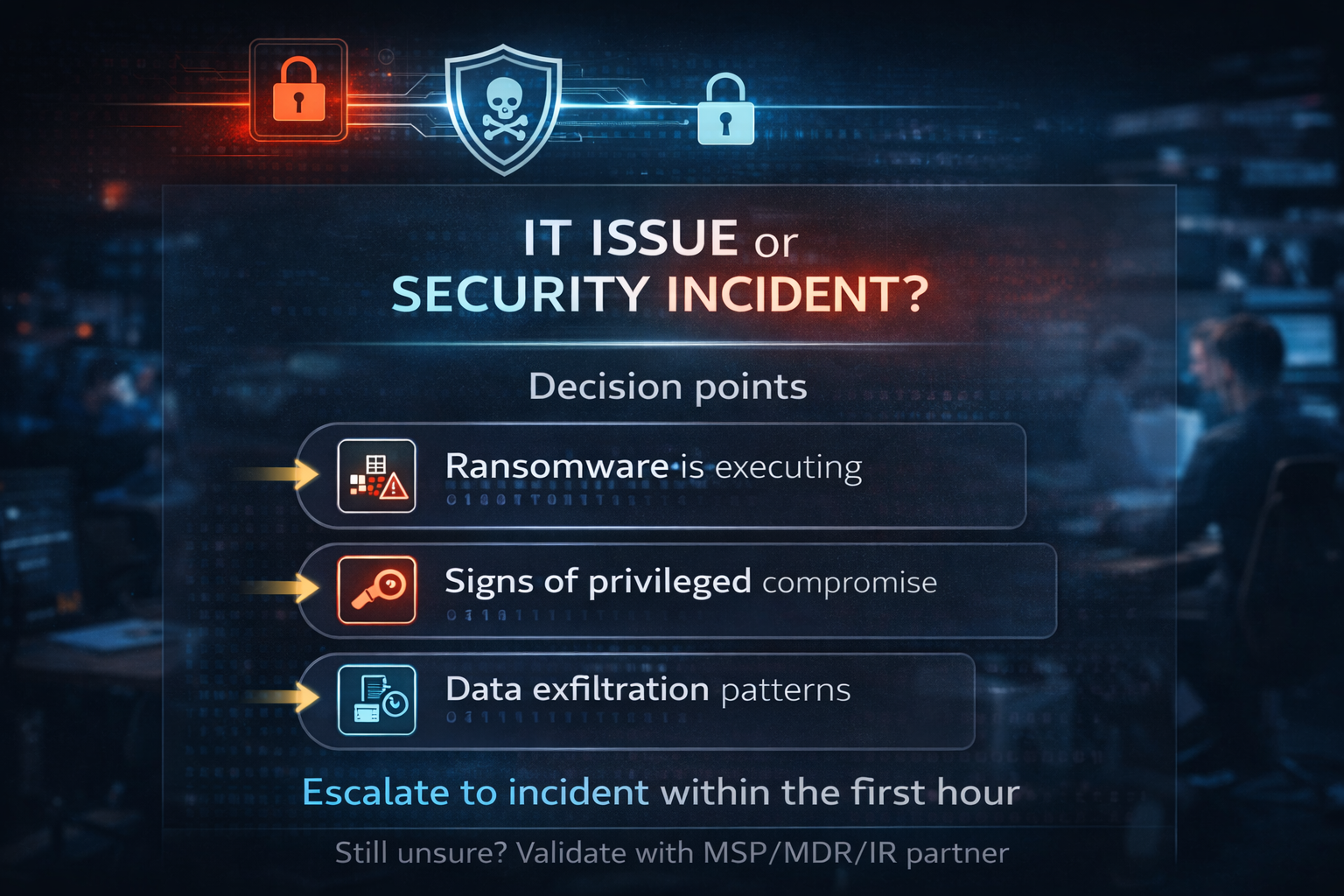
Decision gate for the first hour: when to treat it as an incident and escalate.
Not every alert is a breach, but you must assume it could be until proven otherwise. Treat an event as a security incident when you have one or more of these:
- Confirmed malware or ransomware execution.
- Unexplained privileged account activity or new admin accounts.
- Suspicious sign-ins (impossible travel, atypical locations, MFA fatigue attacks).
- Data access patterns that don’t match business use (bulk exports, mailbox rules, mass downloads).
- Command-and-control communications, beaconing, or known bad IP/host indicators.
- Integrity changes (unexpected configuration changes, disabled logging, altered GPOs).
- Business disruption paired with signs of compromise (files encrypted, services stopped, VoIP issues aligned with network anomalies).
If you’re on the fence, escalate. The cost of treating a real incident like “just IT” is far higher than the cost of an early escalation.
Your “speed with discipline” principle
In most breaches, these priorities stay consistent:
- Contain first: stop active access and limit spread.
- Preserve evidence: don’t destroy the story you’ll need to tell to forensics, insurers, regulators, and your board.
- Communicate: align internal and external messaging to avoid confusion or legal exposure.
This guide follows that order.
Roles to assign immediately (even if you’re a small IT team)
You don’t need a 30-person war room. You need clear ownership. Assign:
- Incident Commander (IC): one person responsible for decisions, priorities, and task assignments.
- Technical Lead(s): endpoint, identity/M365, network, and application owners as needed.
- Scribe: captures a real-time incident log (who/what/when/why) and keeps artifacts organized.
- Comms Owner: coordinates internal updates and external drafts with leadership and counsel.
- Vendor Liaison: manages MSP/MDR, forensics, cyber insurance, and other third parties.
If you are a small shop, one person may wear multiple hats—but the hats still matter.
Set up your incident log
Your incident log should start immediately and include:
- Time of discovery (first alert, first report).
- Systems and users involved (hostnames, usernames, IPs).
- Actions taken and by whom (containment steps, resets, blocks).
- Evidence collected (locations, hashes, timestamps).
- Decisions and approvals (insurer contacted, counsel engaged, forensics retained).
- Communications sent (who received what and when).
Use a shared, access-controlled location. If you suspect M365 has been compromised, do not rely solely on M365 to store your notes—use an out-of-band system or a secure vault.
Hour 0–1: Confirm & Stabilize
The first hour is about triage and stabilization. Move quickly, but don’t “panic-click” your way into evidence loss.
1) Confirm the signal without over-handling
Goal: Determine whether you have a credible incident and capture the earliest facts.
- Identify the triggering indicators: EDR alert, SIEM detection, user report, M365 anomaly, firewall alert, ransomware note, vendor notification.
- Take screenshots of key console views (EDR timelines, SIEM queries, M365 sign-in logs) with timestamps.
- Record the initial scope as “known now,” not “final truth.” Example: “Possible compromised account: j.smith; suspect endpoint: WS-014; suspicious sign-ins from X location; mailbox rule creation observed.”
2) Decide: “IT issue” or “security incident”
Decision point: If you have strong indicators, treat it as an incident now.
- If ransomware is executing, don’t wait for certainty. Proceed to containment.
- If you see signs of privileged compromise, proceed to containment.
- If you see data exfiltration patterns, proceed to containment.
If you still can’t decide, escalate to your MSSP/MDR or incident response partner for rapid validation.
3) Stabilize critical services
Goal: Prevent additional damage while keeping the business running.
- If encryption is active, isolate impacted systems quickly (network isolation, not power-off unless necessary).
- If you suspect identity compromise, prioritize account control and token revocation.
- If you suspect email compromise, limit forwarding/exfiltration and lock down admin changes.
4) Establish your “do not” list for the first day
To preserve evidence and avoid making things worse, communicate these rules to responders:
- Do not wipe or reimage systems in the first day unless directed by forensics.
- Do not run random “cleanup tools” that alter timestamps or delete artifacts.
- Do not delete emails, logs, or cloud audit records.
- Do not communicate externally without an approved message path.
- Do not pay ransom or negotiate without leadership, counsel, and insurer involvement.
5) Start the incident bridge & war-room hygiene
- Create a dedicated incident channel (separate from normal IT tickets).
- Use a bridge line that doesn’t rely on potentially compromised systems if you can.
- Confirm who can approve major actions (service shutdowns, password resets at scale, public statements).
Hour 1–4: Contain Without Chaos
Containment is where many teams either overreact (breaking systems) or underreact (letting the attacker keep moving). Your goal is to cut off access and stop the spread with minimal collateral damage.
1) Isolate endpoints & servers safely
Goal: Stop active attacker control while preserving artifacts.
- Prefer network isolation over power-off. Isolation keeps memory and disk state intact while stopping command-and-control.
- If your EDR supports “isolate host,” use it for high-confidence compromised machines.
- For servers, coordinate with application owners before isolating. If you must isolate immediately, document why and what business services are affected.
- Avoid “turn everything off” unless you have confirmed widespread encryption or active destruction.
2) Disable compromised accounts & tokens
Goal: Remove attacker access fast, especially in cloud identity.
- Disable suspected user accounts. If privileged accounts are involved, disable or lock them immediately.
- Reset passwords for compromised accounts, but remember: password resets alone may not stop active sessions.
- Revoke refresh tokens and sign-out sessions (e.g., in Microsoft Entra ID / Azure AD).
- Require MFA re-registration for high-risk accounts if you suspect MFA bypass or token theft.
- If you suspect OAuth app abuse, review and remove suspicious enterprise applications and consent grants.
3) Block egress & known IOCs
Goal: Stop data leaving and stop attacker callbacks.
- Block known malicious IPs/domains from the firewall and DNS filtering.
- If you have secure web gateway controls, tighten rules temporarily (with a documented change window).
- Increase alerting on unusual outbound traffic (large transfers, rare destinations, unusual ports).
- If you can, segment and restrict lateral movement paths (SMB, RDP, WinRM) while you investigate.
4) Capture a “containment snapshot” of your environment
Goal: Make sure you can later explain what changed and when.
- Document which hosts were isolated and when.
- Document which accounts were disabled or reset and at what time.
- Document firewall/DNS blocks and the time applied.
- Save configuration exports if possible (firewall rules, conditional access policy changes, EDR containment actions).
5) Decide: when to engage forensics, counsel, and your cyber insurer
This is a key decision point, and it should not be made ad hoc.
- If you carry cyber insurance, many policies require prompt notice and may require the use of approved vendors. Contact your insurer early.
- If regulated data may be involved (PII, PHI, PCI, or financial data), engage counsel early to guide you on notification obligations.
- If ransomware is present, engage specialized incident response and negotiation expertise through approved channels.
A practical rule: if the incident could plausibly become a reportable event, treat it as if it will and bring in counsel/insurer early.
Hour 4–8: Preserve Evidence & Establish Facts
Now that you’ve stopped the immediate bleeding, shift to evidence preservation and fact-finding. The aim is to build a reliable timeline: what happened, how they got in, what they touched, and whether data left.
1) Snapshot systems before wiping or rebuilding
Goal: Preserve disk and, where feasible, memory state.
- For high-value systems (domain controllers, critical servers, key endpoints), take forensic images or snapshots if tools and storage allow.
- In virtual environments, consider VM snapshots, but coordinate with your forensics partner—snapshots can be useful, but are not always a complete substitute for forensic imaging.
- If you must rebuild urgently to restore service, preserve artifacts first (logs, disk images, key directories, registry hives).
2) Collect core artifacts (EDR, M365, firewall, & identity)
Create an “evidence package” that includes:
Endpoint/EDR
- Detection timeline, process trees, command lines, and file hashes.
- Quarantine actions taken, isolation status, device details.
- Any lateral movement indicators (PsExec, WMI, RDP, SMB).
Identity/M365 (Microsoft 365 / Entra)
- Sign-in logs (interactive and non-interactive), risk events, and MFA prompts.
- Audit logs (admin actions, mailbox rule creation, app consents, role changes).
- Mailbox message trace and forwarding rules.
- Conditional access policy changes and MFA method changes.
Network/Firewall
- Netflow or session logs showing outbound traffic.
- DNS logs (queries to rare domains).
- VPN logs, remote access logs, and RDP gateway logs.
Servers/Directory
- Domain controller security logs, authentication events, and group membership changes.
- GPO changes, scheduled task creation, service installs.
If logging retention is short, export now. Many teams discover too late that the data they needed has rolled off.
3) Establish your “known facts” timeline
Your IC and scribe should synthesize a timeline with:
- Initial access: the earliest known suspicious activity.
- Execution: when malware or attacker tools ran.
- Persistence: accounts created, services installed, scheduled tasks, registry changes.
- Privilege escalation: when higher privileges were obtained.
- Lateral movement: which systems were accessed next.
- Exfiltration: evidence of data staging or transfer.
- Impact: encryption, outages, and business processes affected.
Keep it honest. “Unknown” is acceptable. Guessing is not.
4) Identify the likely intrusion path
Common intrusion paths include:
- Phishing leading to credential theft and session token compromise.
- Compromised VPN credentials or weak remote access controls.
- Exploited public-facing applications (unpatched appliances, web apps).
- Misconfigured cloud apps and OAuth consent abuse.
- Stolen credentials reused across services (password spraying).
You don’t need the final answer in hour 8, but you do need a hypothesis to drive containment and hunting.
5) Expand hunting based on what you’ve found
Use indicators from compromised systems to hunt for:
- Similar processes or command lines on other endpoints.
- Same source IPs hitting other accounts.
- Same toolmarks (Cobalt Strike beacons, RMM tools, unusual scheduled tasks).
- Lateral movement patterns (admin shares, remote service creation).
- Similar mailbox rules or OAuth apps across users.
If you rely on an MSP/MDR, this is where pre-aligned “who does what” matters. If your partner doesn’t have clear authority to hunt across your environment, you’ll lose time.
Hour 8–16: Coordinate Stakeholders
In this window, the technical response must be matched with stakeholder coordination. Poor coordination is how incidents become crises.
1) Align with leadership using a simple executive update template
Executives don’t need packet captures—they need risk, impact, decisions, and next steps. Use a consistent update structure:
- What happened (what we know now): 3–5 bullets, plain language.
- Current status: contained/not contained; systems impacted; business impact.
- What we’re doing next: investigation, containment expansion, and restoration steps.
- Key risks: data exposure potential, downtime projections (with uncertainty), and regulatory considerations.
- Decisions needed: approve the forensics vendor, approve the insurer notice, approve the service shutdowns, and approve the comms approach.
- Next update time: set a cadence (e.g., every 2 hours or twice daily).
Send updates on schedule, even if the update is “no new facts.” Silence creates rumors.
2) Decide communication triggers (internal, customer, vendor)
Not every incident requires immediate external communication, but you must define triggers now:
- Internal: employees need to know whether passwords must be changed, whether MFA must be re-registered, or whether certain systems are unavailable.
- Customers: if customer-facing services are impacted or if there’s a credible risk of data exposure, prepare messaging with counsel.
- Vendors: you may need to coordinate with SaaS providers, payment processors, telecom/VoIP vendors, or MSPs.
Create a single source of truth for messaging. One unapproved email can create legal and reputational harm.
3) Engage counsel & insurer
If you haven’t already:
- Notify your cyber insurer per policy requirements. Ask about panel vendors for IR/forensics and negotiation.
- Engage counsel experienced in breach response to guide privilege, notification obligations, and communications review.
- Clarify who is authorized to approve vendor retention and spend.
Decision point: If ransomware is involved, do not allow “shadow negotiations.” Negotiation and payment decisions should be tightly controlled, documented, and coordinated with insurer/counsel.
4) Coordinate with your MSP/MDR/IR partner
Establish:
- Scope of authority: what they can do without approval (isolate hosts, disable accounts, change firewall rules).
- Access: ensure they have the access needed now (not after hours of onboarding).
- Evidence handling: who collects what, where it is stored, and the chain-of-custody needs.
- Restoration plan ownership: who rebuilds, who validates, who signs off.
If you use multiple partners (MSP, security firm, and telecom vendor), appoint one vendor liaison to prevent conflicting actions.
5) Prepare for operational impacts (IT + business continuity)
Work with business owners to:
- Identify critical workflows and minimum viable operations.
- Determine acceptable downtime for key systems.
- Decide whether to take systems offline proactively to prevent further harm.
- Review backup availability and restore priorities.
This is where IT maturity shows. If backups are untested or segmented poorly, your options narrow quickly.
Hour 16–24: Scope, Remediate, & Plan Next Moves
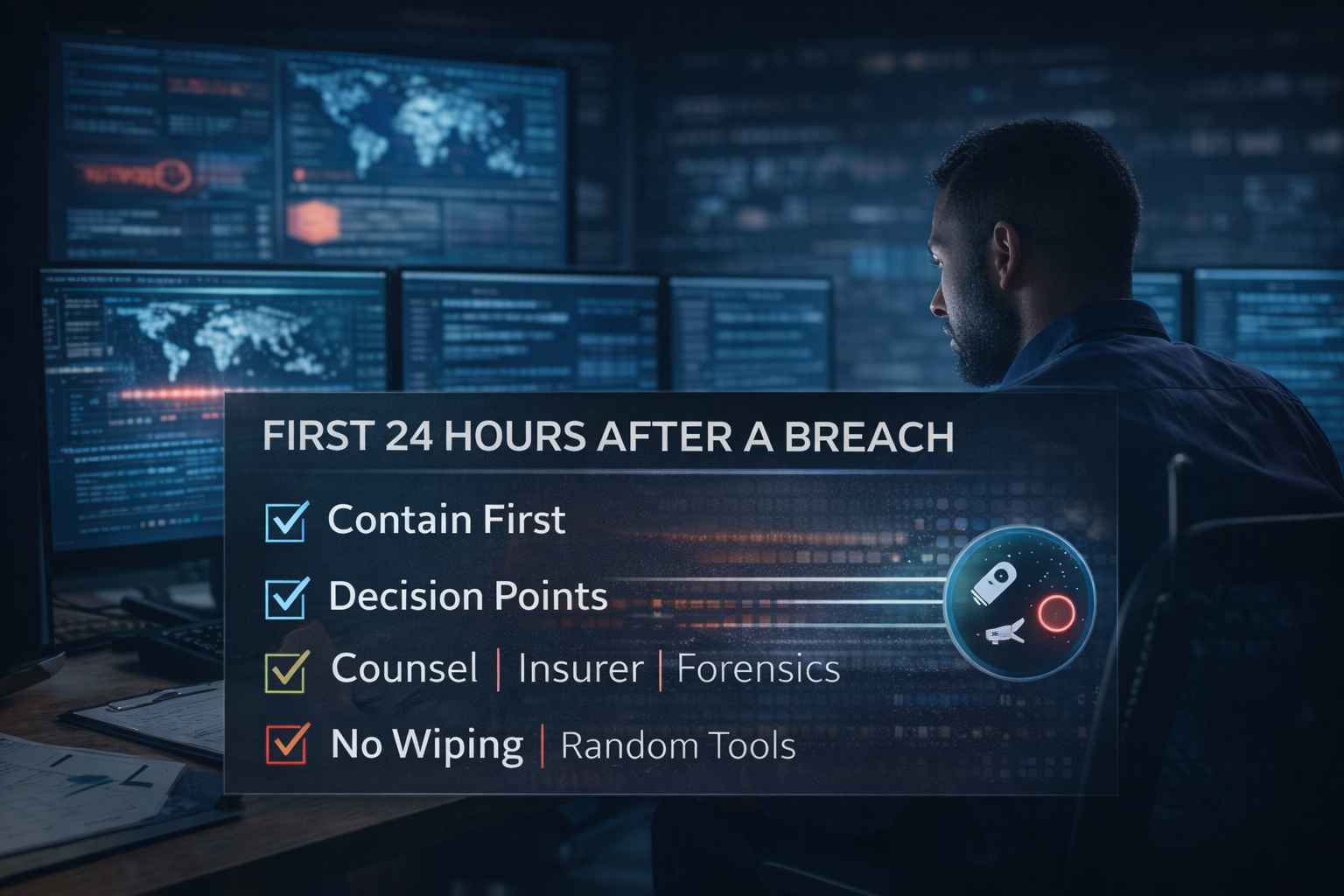
The first-day priorities: contain, preserve evidence, use decision points—don’t improvise.
By the end of the first day, you should have: containment in place, evidence preserved, a working timeline, aligned stakeholders, and a plan for days 2–7. You likely will not have “closure,” and that’s okay.
1) Validate containment & monitor for re-entry
Containment is not “we changed passwords once.” Validate by:
- Monitoring for continued suspicious sign-ins, token use, and anomalous admin actions.
- Checking whether isolated machines attempt to reconnect or beacon.
- Confirming that blocked IOCs are no longer seen.
- Reviewing whether new persistence mechanisms appear (new scheduled tasks, new services, new OAuth apps).
If you see continued activity, assume you have incomplete containment and expand your scope.
2) Scope impacted systems & data
Your goal is a defensible statement about:
- Which systems were accessed?
- Which accounts were used?
- Whether data was accessed, staged, or exfiltrated.
- Which business processes were impacted?
Be careful with language. “No evidence of exfiltration” is not the same as “no exfiltration.” Use counsel to guide the right wording.
3) Begin remediation in a controlled way
Remediation should follow facts and be staged:
- Close the intrusion path (patch, configuration changes, disable exposed services, tighten conditional access, remove malicious apps).
- Remove persistence mechanisms.
- Rebuild or restore compromised systems only after you are confident about the path of compromise and containment.
- Harden before bringing systems fully back online (MFA, least privilege, segmentation, logging).
A common mistake is restoring too early, only to get re-compromised because the original access path remains open.
4) Recovery sequencing & backup validation
Before you restore:
- Validate that backups are clean (scan backup sets; confirm that restore points predate the compromise).
- Confirm backups include what you actually need (application configs, SaaS exports, VoIP configs, not just file shares).
- Prioritize restores based on business impact, not IT convenience.
- Plan for credential resets and rekeying (API keys, service accounts, certificates) as part of the recovery process.
If ransomware is involved, your recovery plan should include whether you can restore without paying, how long it will take, and what critical data may be unrecoverable.
5) Plan next moves (day 2–7)
By hour 24, document:
- What you know and what’s still unknown.
- What tasks are in progress (forensics, hunting, remediation, restores).
- A schedule for leadership updates.
- Decision deadlines (notification, customer comms, regulatory, insurer milestones).
- Immediate control improvements (MFA enforcement, admin role reviews, endpoint isolation policies, logging retention).
This is also when you should start a lessons-learned log, because details fade quickly.
Common mistakes to avoid in the first 24 hours
1) Wiping or reimaging too early
Rebuilding feels productive, but it can destroy evidence you’ll need for root cause, insurance claims, and legal defensibility. Preserve first, then rebuild.
2) Assuming password resets end the threat
Modern attacks often involve session tokens, OAuth apps, and persistence that survives password changes. Revoke tokens, check app consents, and hunt for persistence.
3) Communicating before you have a coherent story
Inconsistent statements create mistrust and legal risk. Establish a message path and speak with one voice.
4) Failing to engage the insurer early
Policies can have notification requirements and vendor constraints. Engage early to avoid coverage issues and access approved specialists.
5) Treating an M365 incident like “just email”
Mailbox compromise can be the front door to broader access: OneDrive data, SharePoint, Teams, and identity. Scope beyond the inbox.
6) Over-containment that breaks the business unnecessarily
Shutting down everything can harm operations and erode trust in leadership. Contain surgically where possible, and document tradeoffs.
7) Under-containment that lets the attacker linger
The opposite mistake is “monitoring” while the attacker moves. If the signal is credible, isolate and lock down quickly.
8) Not documenting decisions & timestamps
In every serious incident, someone later asks: “When did you know?” and “What did you do?” Your log is your memory and your protection.
Printable 24-Hour Breach Checklist
Use this as a runbook summary. Print it, save it offline, and adapt it to your environment.
Hour 0–1: Confirm & Stabilize
-
Capture initial indicators (screenshots, alert details, timestamps)
-
Start incident log and assign Incident Commander + Scribe
-
Decide “incident” vs “IT issue” (escalate if uncertain)
-
Stabilize critical services; isolate actively impacted systems if needed
-
Communicate first-day “do not” list (no wiping, no ad hoc tools, no external comms)
-
Set up incident channel/bridge and approvals path
Hour 1–4: Contain Without Chaos
-
Isolate compromised endpoints/servers safely (prefer network isolation)
-
Disable suspected compromised accounts; reset passwords as needed
-
Revoke sessions/refresh tokens; enforce MFA re-registration for high-risk accounts
-
Review/remove suspicious OAuth apps and mailbox rules
-
Block known IOCs and tighten egress controls
-
Document containment actions and time applied
-
Decision point: notify insurer; engage counsel; retain IR/forensics as needed
Hour 4–8: Preserve Evidence & Establish Facts
-
Snapshot/forensic image key systems before rebuilding
-
Export logs: EDR timelines, M365 sign-ins/audit, firewall/DNS/VPN, DC security logs
-
Build an initial timeline: access → execution → persistence → movement → impact
-
Identify likely intrusion path; prioritize closure actions
-
Hunt for related indicators across environment; expand scope as needed
Hour 8–16: Coordinate Stakeholders
-
Send executive update using template; set update cadence
-
Define communication triggers (employee, customer, vendor) with counsel
-
Confirm vendor roles/authority (MSP/MDR/IR/telecom) and evidence handling
-
Align business continuity priorities and acceptable downtime
-
Decision point: ransomware negotiation pathway (if applicable) with insurer/counsel
Hour 16–24: Scope, Remediate, Plan Next Moves
-
Validate containment; monitor for continued activity or re-entry
-
Scope impacted systems/accounts/data; document “known” vs “unknown.”
-
Remediate root cause: patch/close exposure, remove persistence, harden identity
-
Validate backups and restore sequencing; confirm restore points predate compromise
-
Create day 2–7 plan: tasks, owners, deadlines, communications, decisions
How Cyber Advisors helps you win the first 24 hours
Most organizations don’t fail in a breach because they “did nothing.” They fail because they do the wrong things in the wrong order—often under stress, without clear decision rights, and without the evidence needed to recover quickly and defend their decisions.
Cyber Advisors helps SMB and mid-market organizations build the readiness and response discipline that reduces downtime, cost, and risk:
- Cyber Maturity Review: Identify the gaps that turn incidents into outages—logging, identity controls, segmentation, backup resilience, and governance—then prioritize fixes that actually reduce the impact of breaches.
- Incident Response Readiness: Define roles, decision points, runbooks, and vendor pathways so your first 60 minutes are organized—not improvised. Tabletop exercises make the checklist real. [Internal link: Incident Response Readiness.
- Microsoft 365 Security Hardening: Lock down identity, conditional access, MFA, admin roles, OAuth app controls, mailbox protections, and audit retention—because M365 is often the control plane attackers target. [Internal link: Microsoft 365 Security Hardening
- Secure Network & VoIP Review: Reduce lateral movement and service disruption risk by tightening network segmentation, firewall rules, remote access, and voice infrastructure resilience.