If you run an SMB or mid-market IT team, you’re being asked to reduce cyber risk, hold budgets flat, and “show progress by next quarter.” You’re also dealing with hybrid work, SaaS sprawl, aging line-of-business systems, and a staff that’s already stretched thin. The board wants assurance, your CFO wants predictability, and your operations leaders just want systems to stay up.
The fastest, most defensible way to hit those targets is identity-first security—not buying a bigger firewall, adding yet another point solution, or standing up a sprawling new platform your team doesn’t have time to run. Identity-first security focuses on the controls that stop the most common attacks at the login screen and contain damage when something slips through.
In this guide, you’ll get a practical blueprint you can actually execute with a small team: where to focus first, how to scope Zero Trust in a way that fits your environment, the KPIs that matter to executives and auditors, and the quick wins you can run immediately—using mostly tools you already own and without adding headcount.
Why This Matters
The old perimeter assumed users, apps, and data lived behind the same wall. Today, your people authenticate from everywhere—home offices, plant floors, client sites, and mobile devices—often using SaaS applications that sit entirely outside your traditional network. Critical IP, customer data, and financial systems now live in multiple clouds, and machine identities (service accounts, APIs, bots, and OT/IoT devices) outnumber humans by a wide margin.
Attackers don’t need to “break in” when they can simply log in with stolen credentials, abuse weak MFA, or ride unused service accounts and over-privileged access that no one is watching. Business email compromise, vendor fraud, and lateral movement after a single phished login are all symptoms of the same issue: identity is poorly governed and inconsistently enforced.
That’s why identity is the new control plane. When you treat identity as your primary security boundary—supported by strong authentication, least privilege, and ongoing risk assessment—you can significantly lower the chances of unauthorized access, reduce attacker movement, and make all other controls (email, endpoint, backup) much more effective.
- Identity: MFA coverage, conditional access, admin hygiene, and service account controls stop unauthorized access early.
- Email: Advanced phishing protection and domain hygiene blunt the most common initial vector.
- Endpoints: EDR, patching, and hardening catch what bypasses the inbox.
- Backups: Immutable, isolated, and tested backups convert worst-day incidents into recoverable events.
A Right-Sized Approach for SMB & Mid-Market Teams
Identity-first doesn’t mean “rip and replace.” It means sequencing the highest-value controls first, aligning them to business risk, and instrumenting them with simple metrics. The framework below fits small security teams and hybrid IT shops.
| Phase | Objective | Top Controls | Owner | Evidence/KPI |
|---|---|---|---|---|
| 0–30 days | Stop easy identity abuse | MFA for admins & high-risk users, conditional access baselines, disable legacy auth, mailbox & forwarding policies | IAM / M365 Admin | MFA coverage %, legacy protocols disabled, risky sign-in trend |
| 31–60 days | Reduce blast radius | Privileged access separation, just-in-time (JIT) elevation, local admin removal, device compliance enforcement | Endpoint / IAM | Admins with JIT enabled, devices compliant %, local admin accounts removed |
| 61–90 days | Detect & contain faster | EDR response automation, high-fidelity alerts to MDR, phishing simulation & reporting, and incident playbooks | SecOps | Mean time to contain, phishing report rate, playbook time-to-execute |
| Quarterly | Assure recoverability | Immutable backups, offline copy, monthly restore tests, RTO/RPO alignment | Infra / DR | Last successful restore test, RPO met %, protected workloads % |
Tip: Keep project scope small and measurable. Assign named owners, automate evidence where possible, and report progress the same way every month.
How to Implement Identity-First Security
Below is a focused, four-track plan that aligns with the controls that move the needle most—identity, email, endpoints, and backups—and sequences them in a way a small team can execute while still running day-to-day operations.
1) Clarify Risk Appetite & Design Guardrails
Security design starts with business goals. A brief risk-tolerance statement guides your teams on acceptable tradeoffs—such as how much downtime is tolerable, what data exposures are unacceptable, and where safety and compliance are non-negotiable. This statement acts as the guiding principle for every security decision, from how strictly you enforce MFA to how you manage exceptions for legacy systems.
Pair it with clear guardrails—strict rules that keep systems safe as the business moves quickly. Guardrails turn intent into action: which controls are mandatory, which configurations are prohibited, and which approvals are needed before making an exception. When your team understands the boundaries upfront, they can deploy changes faster, follow proven patterns, and only escalate the real edge cases instead of debating basic security principles in every project meeting.
- Publish a one-page Risk Appetite doc focused on availability, confidentiality, integrity, safety, and compliance priorities.
- Define Exception Handling: who can approve, how long exceptions last, and how they’re tracked.
- List Guardrails such as “No accounts without MFA,” “No shared admin identities,” and “Backups must be immutable and off-domain.”
- Map the above to NIST CSF functions so your board and auditors recognize the structure.
2) Design with Identity-First Principles
Treat authentication and authorization as your main security boundary. Consider every user, device, and service as needing to earn trust at each access point—and keep earning it as risk evolves. Use strong verification methods, such as phishing-resistant MFA whenever possible. Enforce least privilege so identities only get the access they require for as long as necessary, and continuously assess session risk based on behavior, device health, and sign-in patterns. Structure your environment so that the most critical controls are at the identity layer: focus on people and service identities first, then align network controls, segmentation, and monitoring around those identity decisions rather than the other way around.
- MFA Everywhere feasible, starting with admins and high-privilege roles. Eliminate SMS fallback where possible in favor of phishing-resistant methods.
- Conditional Access using device compliance, location, and risk signals; block legacy protocols.
- Privileged Access Management: dedicated admin identities, just-in-time elevation, and break-glass accounts with out-of-band MFA.
- Service Account Controls: inventory, vault credentials, and replace with managed identities wherever possible.
- Least Privilege: role-based access, periodic entitlement reviews, and removal of persistent local admin rights.
3) Scope Zero Trust the Practical Way
Zero Trust isn’t a product; it’s a way to reduce implicit trust one boundary at a time. Think of it as continuously tightening who can access what, from where, and under which conditions—not installing a single “Zero Trust box” and calling it done.
Start with a focused pilot where the business actually feels pain and where you already have solid tools in place—for many organizations, that’s sensitive data in Microsoft 365 (executive mailboxes, finance SharePoint sites, HR files, and high-value Teams workspaces). Work with business owners to clearly define the protect surface: the specific identities, data sets, and applications you care about most, rather than your entire environment.
Once you’ve identified that protect surface, map how users and service principals currently access it: which groups and roles they use, from which locations, on what device types, and through which apps or protocols. Use that picture to design policies that enforce verified access and segmentation—conditional access rules that require strong MFA, device compliance, and low sign-in risk; network or app-based restrictions for higher-risk scenarios; and role-based access that limits who can see or move critical data.
From there, iterate. Tighten policies in stages, monitor impact, and adjust based on real-world usage so you don’t break key workflows. As you gain confidence and show measurable risk reduction—fewer risky sign-ins, reduced over-privileged access, cleaner audit trails—you can expand the same Zero Trust approach to additional protect surfaces across finance, HR, production, and your most critical operational systems.
- Choose a protect surface: e.g., executive email and SharePoint sites with confidential financials.
- Map flows: who accesses what, from where, using which devices and apps.
- Set policy: “Only compliant devices; require MFA; block risky sign-ins; restrict downloads on unmanaged devices.”
- Enforce & monitor: conditional access, DLP, and session controls; review weekly for legitimate workflow breaks.
- Expand: roll out to finance, HR, and then key production apps.
4) Protect Data Where It Lives
When identity is strong, data protection becomes manageable—and auditable. Start by classifying your most critical data (financials, IP, regulated records) and tagging it consistently in tools like Microsoft 365 so you can apply differentiated controls. Use those tags to drive context-aware policies that automatically adjust protection based on who’s accessing the data, from where, on what device, and through which application. Combine this with modern email security—advanced phishing protection, impersonation defenses, and strict domain authentication—to prevent sensitive information from being exfiltrated, misrouted, or abused in payment fraud and business email compromise.
- Data classification tags with default policies in collaboration tools.
- DLP for outbound sharing and downloads to unmanaged devices.
- Secure email with advanced phishing protection, impersonation defense, and DKIM/DMARC alignment.
- Backups with immutable storage, separate credentials, and routine restore testing.
Governance & Metrics Leaders Understand
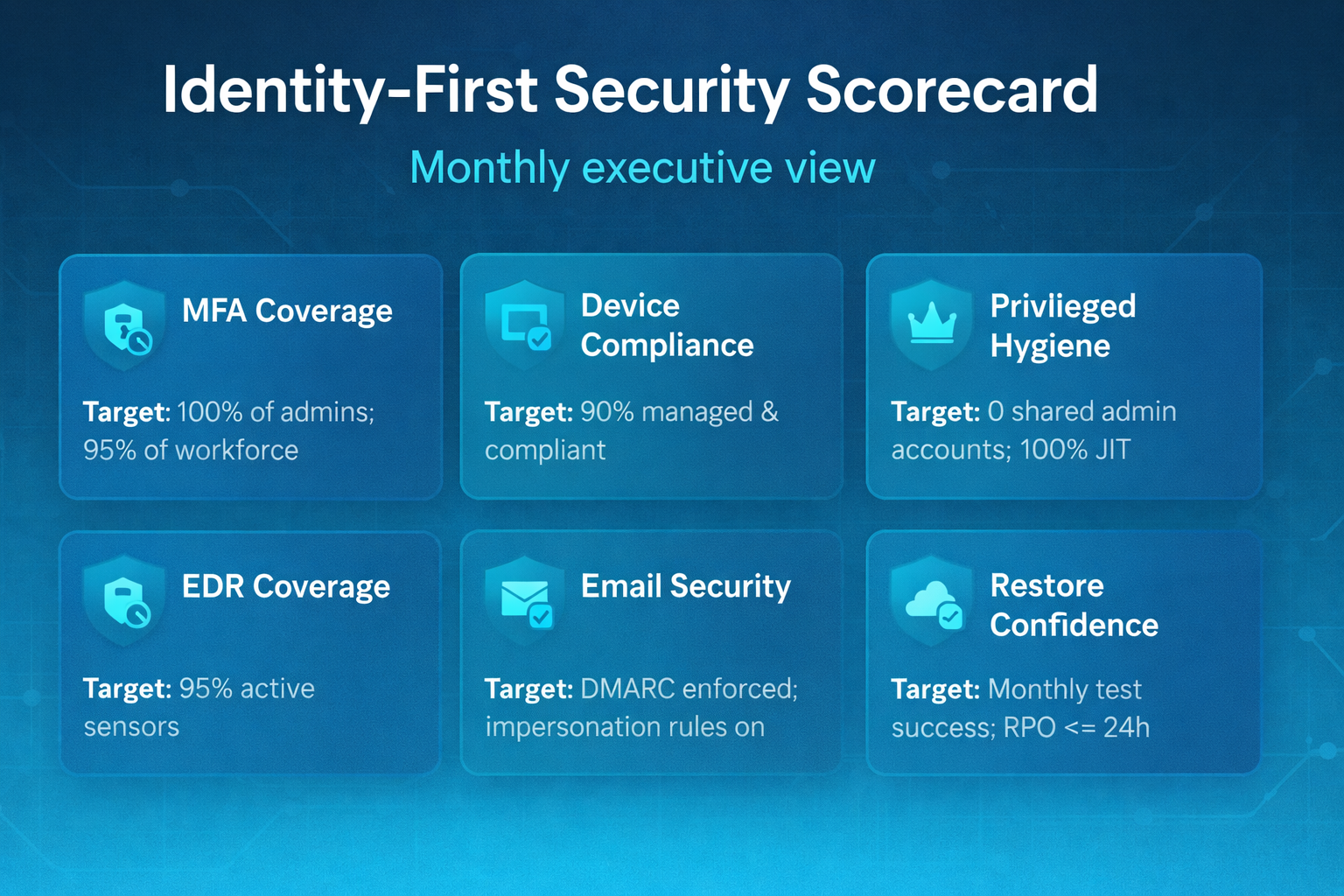
Executives need a straightforward, consistent view of risk posture—not a 40-page technical appendix. Base reporting on a one-page scorecard that highlights the few key metrics, with just enough detail behind each to support decisions, justify budgets, and track progress over time.
Keep the scorecard visually simple and easy to review in under two minutes. Group KPIs by themes leadership cares about—such as identity, email, endpoints, and recovery—and display current status, target, and trend (improving, flat, or slipping). Use plain business language like “Can we recover from ransomware within 24 hours?” alongside technical metrics so non-technical leaders can instantly grasp the impact.
Where possible, automate evidence collection from your existing platforms (IdP, EDR, backup, email security) so numbers update with minimal manual effort and can be refreshed before every steering meeting or board session. Set clear quarterly targets for each KPI, align them with risk appetite, and use deviations—particularly below target—as the basis for funding requests and project prioritization.
Below is a sample you can adapt to your environment and tools.
Target: 100% of admins; 95% of workforce
Target: 90% managed & compliant
Target: 0 shared admin accounts; 100% JIT
Target: DMARC enforced; impersonation rules on
Target: 95% active sensors
Target: Monthly test success; RPO <= 24h
Board Reporting That Works
Keep board decks predictable: five pages, same order every quarter. That consistency reduces prep time for your team, sets clear expectations for directors, and makes quarter-over-quarter progress obvious at a glance.
Start with a summary scorecard that consolidates your key KPIs—MFA coverage, endpoint protection, backup test success, incident trends—into a clear, color-coded display directly aligned with your stated risk tolerance. Use this first page to address the questions every board member has: “Are we within tolerance? Where are we off track? What changed since last quarter?”
From there, communicate trend lines rather than raw point-in-time stats. Show how identity, email, endpoint, and recovery metrics are moving over the last three to four quarters so directors can see whether investments are actually bending risk curves down. Call out key inflection points (e.g., “MFA rollout completed,” “EDR fully deployed,” “immutable backups implemented”) so improvements and residual gaps are easy to connect to specific decisions.
Translate tech work into risk language throughout: instead of “enabled conditional access policies,” say “reduced unauthorized access risk for executive mailboxes and financial data by enforcing strong authentication and compliant devices.” Frame every major initiative in terms of impact on availability, financial exposure, regulatory risk, safety, or brand trust.
Conclude with a 90-day roadmap and clear funding requests. List the top projects, responsible owners, expected results, and the KPIs each project aims to impact. Link budget requests to risk reduction and resilience improvements, such as “X reduces time-to-recover from ransomware from 72 hours to under 24” or “Y eliminates shared admin accounts by Q3.” This approach keeps the focus on business outcomes instead of tools and makes it easier for the board to approve investments confidently.
- Page 1: Scorecard & risk heat map (top 3 risks; change since last quarter)
- Page 2: Identity posture (MFA, privileged access, conditional access effectiveness)
- Page 3: Detection & response (incident volume, time-to-contain, automation coverage)
- Page 4: Resilience (backup tests, RPO/RTO met, critical apps covered)
- Page 5: Roadmap & investment (projects, owners, committed benefits)
Top 5 Reasons to Start with Identity-First Security (Not Firewalls)
Here’s the business case your CFO and CEO will understand.
Reason 1: Identity Controls Neutralize the Most Common Attacks
Most breaches start with account compromise or social engineering. Strong MFA, conditional access, and proper admin management prevent these attacks at the login stage—before malware touches a device or crosses a network boundary. When you combine phishing-resistant MFA with policies that block risky sign-ins, disable legacy authentication, and keep admin accounts separate from regular email accounts, you eliminate the attacker’s easiest route: logging in as a trusted user. Tight controls on service accounts and privileged roles further limit opportunities for abuse, making it much harder for attackers to escalate privileges or move laterally after stealing a credential. You can measure this prevention weekly with clear metrics like MFA coverage, risky sign-in trends, and the number of shared or unmanaged admin accounts still in use.
Reason 2: Least Privilege Shrinks Blast Radius
When accounts only have the access they need—and only when they need it—attackers can’t move far, even if they compromise a user. By minimizing standing privileges and tightly scoping what each identity can do, you turn what could have been a full-domain breach into a contained incident with limited business impact. Just-in-time elevation and removal of persistent local admin rights convert critical vulnerabilities into minor nuisances: an attacker may get a foothold, but they won’t be able to install persistence, push ransomware broadly, or harvest additional credentials from a highly privileged device. In practice, that means compromised accounts are easier to address, incident response is quicker, and your operations team can keep plants running and users working while security manages and fixes the issue.
- Dedicated admin identities separate from email accounts
- Privileged access workstations or hardened profiles
- Time-bound roles with approval workflows
Reason 3: Clear Governance Accelerates Decisions
Risk appetite, exception handling, and guardrails remove ambiguity. Teams ship changes faster because they know what’s allowed, who can approve exceptions, and how to document tradeoffs. Instead of debating policy in every project meeting, they follow a consistent playbook: if a change falls within the guardrails, they proceed; if it doesn’t, they activate the exception process with clear approvers, time limits, and compensating controls. This ensures security stays engaged at the right moments—high-impact changes, legacy dependencies, and true edge cases—without hindering routine work.
For operations and IT leaders, that shift is tangible. Project timelines become more predictable, auditors can see exactly why a decision was made and how long an exception will remain in place, and executives get assurance that “fast” does not mean “reckless.” Security becomes a service, not a roadblock—embedded as an enabler that helps teams deliver safely, document risk clearly, and keep the business moving while staying within agreed tolerances.
Reason 4: Metrics Turn Security into a Business Conversation
A one-page scorecard with six to ten KPIs becomes your operating rhythm. Because evidence is automated (e.g., MFA coverage from your IdP, EDR coverage from your console, backup test status from your DR platform), you spend time improving posture rather than compiling reports. Over time, the scorecard becomes the single source of truth you review in your weekly 30-minute operating meeting: what moved, what stalled, and where risk is creeping above tolerance.
For each KPI, define three elements: the exact data source, the owner, and the action you’ll take when it drifts out of bounds. For example, if MFA coverage dips below target, the IAM owner gets a task to close the gap; if restore tests fail, the DR owner must remediate and re-test before the next meeting. This transforms metrics into a management system—not just a dashboard—so your team always knows which levers to pull and leadership can see a clear, evidence-backed path from investment to reduced risk.
Reason 5: It’s Cheaper & It Works with What You Own
Most organizations already license robust identity, email, and endpoint controls within platforms like Microsoft 365 or their EDR solution. Identity-first security prioritizes turning on the right features and operationalizing them with playbooks so they run the same way every time—no matter who is on call. That means enabling capabilities like conditional access, phishing-resistant MFA, safe links and attachments, device compliance policies, and automated EDR response, then wiring them into clear “if X, then Y” workflows your team can execute quickly.
Instead of chasing every new tool, you invest in process and expertise: tightening configuration baselines, closing legacy gaps, and training your staff to live inside a small set of well-understood consoles. The outcome is a more predictable operating model—lower false positives, fewer blind spots, and faster, repeatable incident handling—built primarily on platforms you already pay for rather than stacking point solutions that add cost, complexity, and integration overhead.
Operational Playbooks: Compress Time-to-Response
Good controls prevent incidents; well-crafted playbooks reduce the impact of ones that still occur. When something goes wrong at 2 a.m., your team shouldn’t be guessing what to do next or hunting through old tickets. They should be able to grab a concise, role-specific guide and move step-by-step from “something’s wrong” to “contained and recovering” in just a few minutes.
Build short, role-based guides anyone can run in minutes—even at 2 a.m.—with clear triggers, actions, and decision points for IT generalists, security analysts, and operations leads. Each playbook should specify who is responsible for each step, which tools to use (IdP, EDR, backup, ticketing), and what “done” means to ensure consistent execution regardless of who is on call. Treat them as living documents: test them during tabletop exercises, refine them after real incidents, and keep them tightly aligned to your identity, email, endpoint, and backup controls.
Below are examples you can adapt to your environment, tooling, and staffing model.
Suspected Compromised Account Playbook
- Trigger: High user risk or multiple impossible-travel alerts.
- Contain: Force sign-out, reset credentials, revoke tokens, require MFA re-registration.
- Harden: Review mailbox rules/forwarding; remove risky OAuth consents.
- Eradicate: Check endpoint for persistence; confirm device compliance.
- Recover: Restore access with least privilege; add user education.
- Report: Update ticket with timestamps, controls that worked, and lessons learned.
Ransomware Detected on Endpoint Playbook
- Isolate device via EDR; disable account tokens.
- Snapshot and preserve volatile artifacts; open an incident case.
- Check backup coverage; initiate bare-metal or file-level restore on clean hardware.
- Hunt for lateral movement; rotate credentials where needed.
- Close with evidence: dwell time, time-to-contain, last known good restore point.
Next Steps: A 90-Day, Identity-First Roadmap
If you need a starting point, run this plan and report progress monthly.
Days 0–30: Foundation
- Publish risk appetite, guardrails, and exception policy; get executive sign-off.
- Enable MFA for admins and high-risk roles; block legacy authentication.
- Turn on baseline conditional access; protect mail forwarding and impersonation vectors.
- Inventory service accounts, vault credentials, and disable unused accounts.
- Stand up a one-page scorecard with 6–10 KPIs.
Days 31–60: Reduce Privilege & Harden Endpoints
- Implement just-in-time privileged elevation; remove persistent local admin rights.
- Enforce device compliance for access to critical apps/data.
- Deploy EDR to all managed endpoints; integrate with MDR for 24×7 coverage.
- Run a phishing simulation; train users to report suspicious messages.
Days 61–90: Prove You Can Recover
- Implement immutable, isolated backups with separate credentials.
- Conduct tabletop exercises for account compromise and ransomware.
- Test restores for a tier-1 app and a representative file share; record RTO/RPO.
- Finalize the quarterly roadmap and present the scorecard and lessons learned to leadership.
FAQ
Is a bigger firewall still useful?
Yes—perimeter controls still matter. However, for many organizations, larger firewalls provide diminishing returns compared to strengthening identity, email, endpoints, and backups. Consider adopting a "both/and" approach with an identity-first strategy for your early investments.
What if we have legacy applications that can’t support modern authentication?
Use compensating controls and a clear exception path: place legacy apps behind application proxies, enable conditional access with network-based restrictions, and set a retirement roadmap with accountable owners.
How do we keep from overwhelming our small IT team?
Start with the 90-day plan, automate evidence collection, and lean on partners for 24×7 detection and incident response. Establish a weekly 30-minute operating review: review KPIs, clear blockers, and confirm next actions.
How should we brief the board?
Use the five-page format in the Governance section: open with a scorecard, keep language business-first, and show a short roadmap with measurable benefits. Consistency builds trust.
Cyber Advisors is Ready To Help Protect Your Business
Cyber Advisors helps teams put identity-first security to work—fast. We start with a brief Cyber Maturity Review to align risk appetite and guardrails, then design and implement the building blocks that crush the most risk: MFA and conditional access, privileged access management with just-in-time elevation, service-account controls, phishing-resistant email protections, EDR coverage, and immutable, tested backups. Our engineers harden what you already own (Microsoft 365, endpoint and backup platforms), automate evidence collection for your one-page scorecard, and deliver lightweight playbooks so your IT staff can resolve incidents in minutes, not days.
From there, we help you climb the maturity curve—moving beyond identity-first protection into a durable Zero Trust operating model. That means scoping protect surfaces, segmenting access, enforcing least privilege by default, integrating detection with 24×7 MDR, and proving recoverability through routine restores and tabletop exercises. Each quarter, we update your roadmap, owners, and KPIs so progress is visible to leadership and funding decisions are simple. If you’re ready to turn identity into your strongest control plane—and build toward higher levels of resilience that safeguard your data and business assets long term—book a Cyber Maturity Review and let’s map your next 90 days.