If you lead IT at a growing company, you don’t have spare people. You’re juggling tickets, projects, and outages—and “doing more security” usually means stealing hours from something else. Good news: you don’t need extra headcount to make real progress against ransomware.
This practical playbook shows how SMB and mid-market teams can cut risk quickly by fully using the tools you already own, tightening a few high-impact processes, and publishing a one-page scorecard that proves to executives that risk is actually going down. You’ll learn where to focus first (identity, email, and endpoints), what “good enough” looks like with Microsoft 365, EDR, and modern backup platforms, and how to operationalize the work with the staff you already have.
Who this is for: IT directors, CIOs, and security leads in SMB/mid-market organizations using Microsoft 365, EDR, and modern backup platforms who need fast, durable improvements without hiring—leaders who are accountable for uptime, safety of critical data, and audit/compliance outcomes, but who can’t justify adding a full security team.
What’s at Stake
Ransomware is a business risk disguised as a technical problem. The modern attack sequence reliably targets the three places most SMBs are weakest: identity (phished credentials, unprotected admin sessions), email (malicious links and attachments), and endpoints (lateral movement and data destruction). Attackers count on fatigue: default settings left unchanged, gaps between tools, and heroic manual response that doesn’t scale.
The fix is not more people; it’s a smaller set of high-leverage controls and the discipline to run them the same way every week. The ten actions below are the shortest path to meaningful risk reduction without expanding your team.
Common Failure Patterns
- Partial MFA coverage. Users have MFA, but service accounts, break-glass accounts, and admins do not.
- Legacy protocols are still enabled. IMAP/POP and basic authentication allow password-only logins.
- Unenforced email security features. Anti-phish policies exist, but aren’t tuned for your org.
- EDR is not ubiquitous. A few critical servers or remote endpoints lack modern detection/response.
- Backups are mutable and untested. Snapshots exist, but there’s no immutability and restores aren’t rehearsed.
- Unclear response ownership. Incidents route through email threads, not playbooks with named owners.
- No feedback loop. Leadership sees spend, not outcomes—so momentum fades.
“Security fails in the seams. Your goal is not more tools—it’s tighter seams and automatic proof that the seams are holding.”
The Top 10 Ways to Avoid Ransomware (No Extra Headcount)
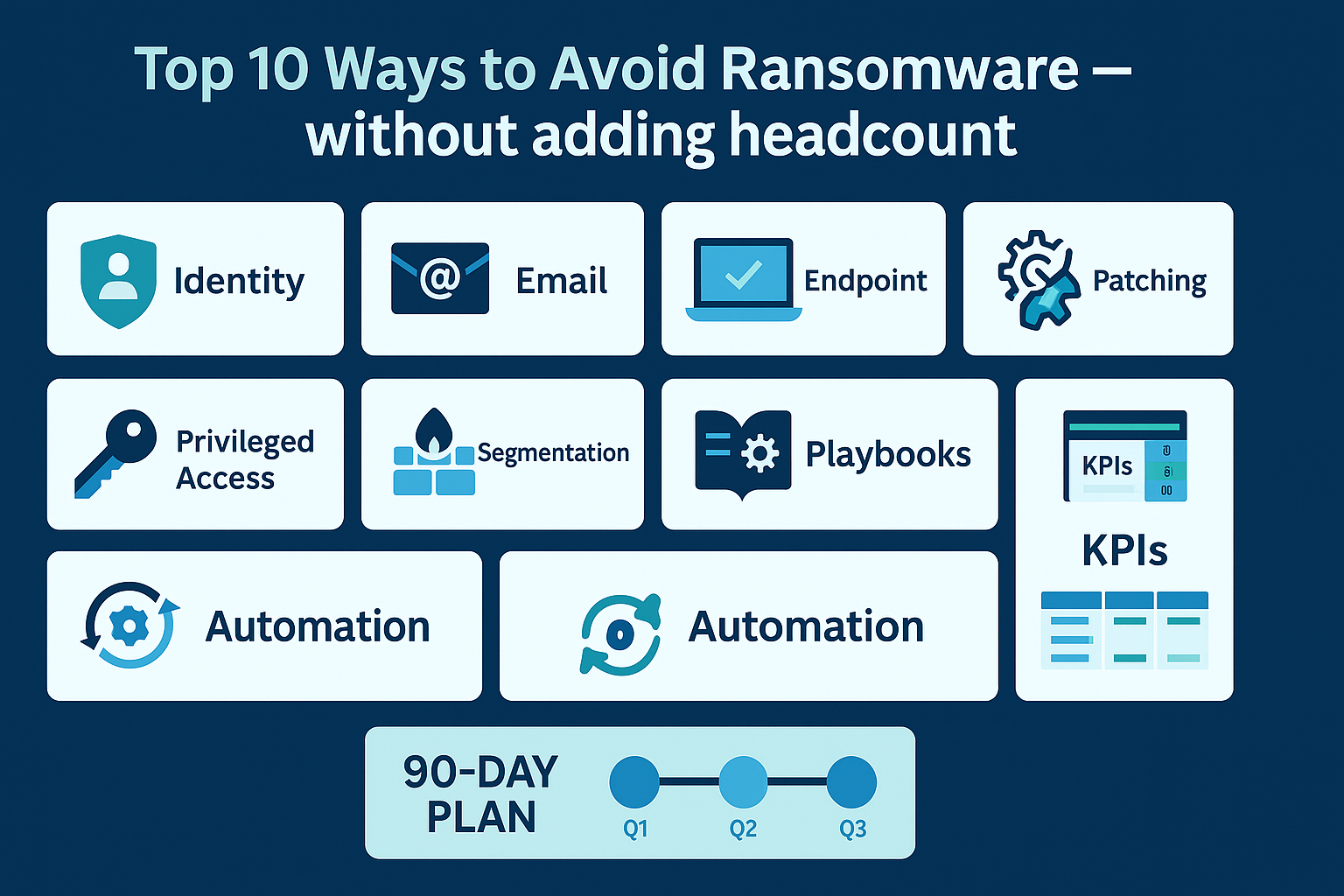
1) ENFORCE MFA EVERYWHERE—INCLUDING ADMIN, SERVICE, AND BREAK-GLASS ACCOUNTS
Move beyond “MFA for most users.” Require MFA for every interactive login, including privileged, emergency, and high‑risk roles such as finance, HR, and IT operations. In Microsoft 365, implement Conditional Access with security defaults off and explicit policies on: enforce MFA for all cloud apps, block sign‑ins from unsupported countries and anonymous IPs, and require compliant or hybrid‑joined devices for admin sessions. Regularly review sign‑in logs and risky‑user reports so exceptions don’t quietly accumulate over time.
For service accounts that can’t do MFA, treat them as high‑value targets. Restrict them to app-only authentication where possible, lock them down to specific approved applications, and rotate secrets on a defined schedule. When delegated permissions are unavoidable, use the least-privilege model with granular scope, restrict interactive sign‑ins entirely, and monitor these accounts with alerts for anomalous behavior (new locations, atypical workloads, spikes in failed logon attempts).
- Turn off legacy/basic authentication organization-wide.
- Require phishing-resistant methods (e.g., app push with number matching or FIDO2).
- Create two break-glass accounts with long random passwords, excluded from Conditional Access, monitored 24×7.
2) Kill Legacy Protocols and Risky Mail Flows
Attackers love POP/IMAP, SMTP AUTH, and auto-forwarding rules because they bypass modern controls and continue to work even after a password reset. Treat them as hostile by default. Globally disable basic authentication for all mail protocols, then only re-enable it in tightly controlled, time-bound exceptions with fine-grained scopes and documented owners. Block external auto-forwarding at the tenant level so a single phish can’t silently exfiltrate an entire mailbox. Turn on auditing for inbox rule creation and modifications, and send alerts on high-risk patterns (e.g., “delete + mark as read,” forwarding to external domains, or rules created by service accounts). Where available, enable mailbox intelligence and anomaly detection so the platform can flag unusual forwarding behavior, suspicious delegation, or impersonation patterns before they become a full incident.
3) Turn On & Tune Advanced Email Protection
Most organizations already have powerful email controls, but leave defaults in place, which allows common ransomware entry points to remain open. Raise the bar: enable attachment sandboxing so unknown files detonate in a safe environment before users can open them; turn on time-of-click URL rewriting so links are inspected when a user actually clicks, not just when the message is delivered; and enforce spoof protection and impersonation detection to make it harder for attackers to pose as executives, vendors, or trusted brands.
Tighten policies so that any message flagged as high risk—suspicious attachment, newly registered domain, lookalike sender, or failed authentication—routes to a review queue owned by IT or security. Define simple, repeatable criteria for releasing or blocking messages so reviews don’t become a bottleneck. In parallel, publish short, plain-language guidance for employees that shows how to recognize the review banner, how to request release of legitimate mail, and what to do if they clicked before realizing something was off. This combination of tuned controls, clear ownership, and lightweight user guidance dramatically cuts successful phishing without overwhelming your team.
4) Ensure 100% EDR Coverage & Auto-Isolation
Ransomware dwell time is measured in hours. Your EDR should be everywhere your users and servers are—on every workstation, every VM, every remote laptop, and every cloud workload—and able to automatically isolate a host the moment it exhibits suspicious behavior (unusual encryption patterns, mass file changes, credential dumping, or known C2 traffic). Configure policies so that isolation is the default automated action for high‑confidence detections, with clear workflows for IT to review, confirm, or release.
Run a weekly device inventory using your EDR console, MDM, and directory tools, and reconcile the results. Any asset without EDR becomes a tracked exception with an owner, a documented reason (e.g., compatibility or operational constraints), and a due date to remediate, replace, or formally accept the risk. Report EDR coverage and open exceptions on your scorecard so leadership sees that gaps are shrinking over time.
- Block uninstallation or disabling by standard users.
- Enable tamper protection.
- Pre-approve isolation exceptions for critical servers to avoid delays.
5) Patch the Right Things on the Right Cadence
You don’t need perfection; you need velocity on what matters: domain controllers, internet-facing systems, and high-risk apps like VPN clients, browsers, and remote-management tools. Prioritize anything that, if compromised, gives an attacker privileged access or a direct path into your environment. Maintain a simple, living inventory of these tier‑0 and tier‑1 assets so you always know what’s in scope, who owns it, and where it lives.
Define a “patch SLO” that your team and leadership can agree on and measure: critical patches applied to tier‑0 systems within 7 days, with a documented emergency process for zero‑day exploitation. For everything else, set a slightly longer but still aggressive target (for example, 14–30 days for tier‑1 business systems) and stick to it. Use existing tools—your EDR, RMM, or configuration management platform—to generate weekly reports that show which systems are missing critical patches, who owns remediation, and when they will be updated. Track adherence to the SLO on your scorecard so executives can see that the highest‑impact vulnerabilities on your crown jewels are shrinking every month.
6) Make Backups Ransomware-Proof: 3–2–1, Immutability, & Restore Drills
Backups that can be deleted aren’t backups. Treat them as a last line of defense that must survive the worst day in your environment. Use immutability or object-lock on backup targets so data cannot be modified or removed for a defined retention period—even by compromised admin accounts. Segment backup credentials into a dedicated identity plane with strict least privilege, and keep them out of your primary Active Directory where possible. Where you must integrate with AD, remove domain trust and avoid shared service accounts so ransomware can’t simply reuse production credentials to destroy your safety net.
Don’t stop at configuration. Schedule quarterly restore rehearsals that prove you can recover a representative workload—files, a key VM or application, and at least one SaaS data set—within your defined RTO/RPO. Measure how long restores actually take, document any gaps (missing data, failed jobs, unexpected delays), and convert those into remediation tasks with owners and due dates. Record both the technical results and follow-up actions on the scorecard so leadership sees not just that backups exist, but that you can reliably bring the business back without paying ransom.
7) Harden Privileged Access & Remote Admin Paths
Attackers move laterally by stealing tokens and over‑privileged credentials, then using them to impersonate admins and high‑value users. Treat every privileged identity and session as if an attacker is actively trying to hijack it. Minimize standing admin rights with just‑in‑time elevation using tools like PIM/JEA or role-elevation workflows, so accounts gain elevated permissions only for a specific task and time window, with approvals and logging built in. Require separate admin workstations (or cloud-based secure browser sessions) that are used only for privileged activity—no email, web browsing, or general productivity apps—so a single phish on a user device can’t immediately become a domain compromise.
Back this up with continuous monitoring and clear detection rules. Baseline normal administrator sign-ins and privilege elevation events, then alert on deviations: risky sign-ins from new countries or anonymous IPs, impossible travel, unusual token issuance patterns, or admin activity originating from non‑admin workstations. Turn on token theft and session anomaly detections in your identity and EDR platforms, and make sure the output routes to a queue your team actually uses. When you see suspicious behavior—sudden privilege elevation, unexpected PowerShell or remote management use, or token replay attempts—your default action should be rapid containment: force reauthentication, revoke sessions, reset credentials, and, when warranted, isolate the affected endpoint.
8) Segment What Matters: Identities, Networks, & SaaS
Flat networks and monolithic permissions turn one phish into a company-wide outage. Implement lightweight segmentation that your current team can actually manage: restrict lateral SMB/RDP between workstations, put servers on their own VLANs or security groups, and separate domain controllers, file shares, finance/HR systems, and management tools from general user traffic. In SaaS platforms, replace “everyone is an admin” with role-based access and least-privilege, and routinely review high‑risk roles (global admin, billing, app installers) to keep access aligned with job function rather than convenience.
If you handle voice, manufacturing, or other OT systems, treat those networks as high-value environments. Terminate remote access through well-controlled gateways, use firewalls or ACLs to tightly restrict which IT systems can communicate with OT, and log all access to and from those segments. Even simple controls—jump hosts, dedicated VPN profiles, and locked-down management interfaces—significantly reduce the chance that a workstation phish turns into plant downtime or a phone-system outage.
9) Publish Small Playbooks & Practice with Tabletop Drills
When something triggers an alert, your team should know exactly who does what in the first 30 minutes—and they should never be debating the process while an attacker is still moving. Define and document concise 5–7 step playbooks for your most common and highest‑impact scenarios: ransomware suspicion (EDR alert, unusual encryption patterns), credential compromise (impossible travel, risky sign‑in, leaked password), suspicious or reported email (phish/escalated from help desk), and lost or stolen device (laptop, mobile, or shared kiosk). Each playbook should clearly spell out: the trigger, who is on point, immediate containment steps, what to capture for evidence, and when to escalate to formal incident response or legal/compliance.
Don’t leave them on a shared drive to collect dust. Validate and refine these playbooks with focused 60–90 minute tabletop exercises that include IT, security, and at least one executive sponsor from operations or finance. Walk through a realistic scenario end‑to‑end: who isolates endpoints, who resets credentials, who talks to leadership and external partners, and who makes the call to restore from backup. Capture gaps—missing contacts, unclear decisions, tool access issues—and update the playbooks the same day. Over time, these short, practiced runbooks become muscle memory, so when a real alert lands at 2 a.m., your team moves quickly and consistently instead of improvising under pressure.
10) Automate the Boring Stuff (So It Actually Gets Done)
A small team can still be high-performing by automating joins/leaves, group management, EDR enforcement, and backup checks. Many tools include built-in policy automation and health reports—turn them on, route exceptions to a queue, and close the loop weekly. Where possible, standardize this into simple workflows: HR triggers account creation and deprovisioning, your identity platform auto-assigns licenses and security groups, your EDR flags any unmanaged device, and your backup system reports failed or missing jobs. The only work your team should do manually is review and resolve exceptions, not run the checks themselves. Over a few weeks, this shifts you from “best-effort” to a predictable system in which identity hygiene, endpoint coverage, and backup health stay within tolerance even when you’re busy fighting fires.
How to Act with Existing Staff
The two biggest blockers are context switching and unclear ownership. Below is a pragmatic operating model that works in teams of three to ten:
- Establish an “identity, email, endpoint” triad. Assign a single owner for each pillar—even if it’s the same person wearing two hats. Tie every action in this post to one pillar.
- Run a weekly 30-minute risk stand-up. Review exceptions (e.g., machines missing EDR), approve remediations, and record KPI deltas. Keep it to 30 minutes.
- Create mini-playbooks (one page each). Each playbook lists: trigger, first actions, containment steps, communication template, and decision to escalate to IR.
- Use change windows and templates. Most improvements are configuration changes. Batch them into a weekly window with pre-approved templates and rollback steps.
- Escalate to managed detection and response (MDR) for 24×7. Let experts watch telemetry and isolate hosts while your team focuses on fixes and root cause.
KPIs That Prove Progress
Executives don’t want a technical weather report—they want proof that the risk is shrinking. Publish a monthly one-page scorecard with a simple color scale (red/amber/green) and targets. Start with these:
| KPI | Target | Why it matters |
|---|---|---|
| MFA coverage (all users and admins) | ≥ 99% | Stops stolen credentials from becoming compromise. |
| Legacy/basic authentication status | Disabled globally | Eliminates password-only logins that attackers exploit. |
| Phishing simulation failure rate | < 5% per quarter | Improves user resilience to the most common initial access. |
| EDR deployment coverage | 100% of endpoints and servers | Ensures visibility and rapid isolation across the estate. |
| Patch compliance (critical on tier-0) | ≥ 95% within 7 days | Reduces the exploitability of your crown jewels. |
| Backup immutability & quarterly restore tests | Pass | Guarantees you can recover without paying ransom. |
| Mean time to detect (MTTD) | < 1 hour | Shortens attacker dwell time. |
| Mean time to contain (MTTC) | < 2 hours | Limits spread and data destruction. |
| Privileged account hygiene | 0 shared admin accounts; JIT enabled | Hardens the main lateral movement path. |
Keep the dashboard short. The goal is to provoke action: any red item gets an owner and a due date; the following month, you show deltas, not excuses.
Next Steps & 90-Day Plan
Here’s a realistic 90-day timeline you can execute with a small team, without pausing day‑to‑day operations. Treat it as a working plan: if any step is already complete or mostly in place, pull it forward, tighten the configuration, and use the saved time to accelerate the steps that follow. Focus first on closing obvious gaps, then on hardening what you’ve turned on, and finally on proving the results to leadership with simple, repeatable reporting.
Days 1–30: Close the Front Door
- MFA enforced for all users and admins; legacy auth disabled; break-glass accounts created and monitored.
- Email security tuned: sandboxing, impersonation protection, URL rewriting; block external auto-forwarding.
- EDR coverage audit; push to 95%+ with isolation on suspicious behavior.
- Publish v1 of the ransomware suspicion and credential compromise playbooks.
Days 31–60: Limit Blast Radius
- Patch SLO defined; tier-0 systems on 7-day cadence.
- Credential exposure hunting: remove dormant and shared admin accounts; implement just-in-time elevation.
- Network segmentation basics: restrict SMB/RDP lateral movement, separate servers on VLANs, and implement SaaS role-based access.
- Backup immutability configured; first restore drill completed.
Days 61–90: Operationalize & Prove
- Weekly risk stand-up running; exceptions tracked and burned down.
- Second wave of EDR hardening; reach 100% coverage and enable tamper protection everywhere.
- Phishing simulation + micro-training; report failure rate to leadership.
- First cross-functional tabletop exercise; update playbooks based on lessons learned.
- One-page KPI scorecard published; deltas discussed at the IT leadership meeting.
Get a No-Cost Cyber Maturity Review
Want help prioritizing the “do this next” list for your environment? Our team will review your identity, email, and endpoint posture and provide a 90-day plan tailored to your stack—no added headcount required.
Book a Cyber Maturity Review →
Deeper Dive: Control Checklists You Can Use Tomorrow
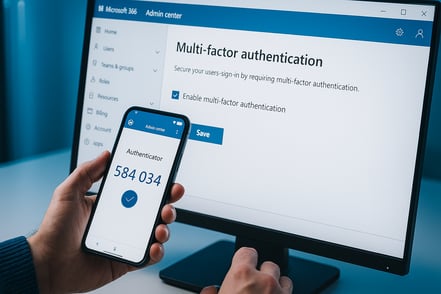
Identity & MFA
- Conditional Access policies enforce MFA for all interactive logins.
- Disable basic/legacy auth org-wide; enable only via narrowly scoped exceptions.
- Number matching or FIDO2 for phishing-resistant MFA.
- Break-glass accounts: 2, long random passwords stored in a physical safe, real-time alert on use.
- Privileged access workstations or secure cloud admin sessions for elevation.
Email Security Tuning
- Attachment detonation/sandboxing enabled for all users.
- Time-of-click URL protection and rewriting enabled with safe-list governance.
- Anti-impersonation policies with mailbox intelligence.
- External auto-forwarding blocked; rule creation alerts enabled.
- DKIM, SPF, DMARC configured; monitor DMARC aggregate reports.
Endpoint Protection
- EDR deployed to 100% of devices; deployment exceptions tracked with owners.
- Tamper protection and automatic isolation policies enabled.
- Application control policies for high-risk servers.
- Local admin locked down; remove shadow IT agents and tools.
Backup Recoverability
- Backups stored with immutability / object lock.
- Backup network and credentials isolated from Active Directory.
- Quarterly restore drills for a representative workload (file, VM, SaaS data).
- Document RTO/RPO per system; measure actuals after each drill.
User Awareness (Short & Effective)
- Quarterly phishing simulations; five-minute follow-up training for those who fail.
- Slack/Teams card: “Report Suspicious Email” button with auto-triage.
- Once-per-quarter 10-minute security update at the all-hands; show KPI trend, not fear.
FAQ
What’s the single most impactful first step?
Enforce MFA for every interactive login and disable basic/legacy authentication. This blocks the easiest path for attackers.
Do we need to switch EDR vendors?
Usually not. Most value comes from deploying your existing EDR to 100% of assets, enabling isolation, and turning on tamper protection.
How do we manage this with a small team?
Assign owners for identity, email, and endpoints, run a 30-minute weekly risk stand-up, and automate health checks and exceptions.
What should our tabletop drill include?
Simulate a realistic ransomware infection: who isolates endpoints, who communicates to leadership/legal, who decides to invoke backup restore, and who handles customer notifications.
What proves to my CEO that this is working?
Your monthly one-page scorecard. Show movement on MFA coverage, EDR ubiquity, phishing fails, patch SLOs, restore tests, and mean time to detect/contain.