

Ransomware doesn’t just encrypt production data anymore—it hunts your backups. That’s why “we have backups” is no longer a recovery plan. For small and mid-market IT teams, the challenge isn’t understanding that backups matter; it’s translating best-practice frameworks into real architecture, real permissions, and real operating habits that survive an actual attack.
The 3-2-1-1-0 backup strategy is one of the most practical, field-tested frameworks for ransomware-resilient backup. It’s simple enough to remember, but deep enough to drive the right technical decisions: keep multiple copies, use different media, store at least one offsite, add an immutable or offline copy, and aim for zero errors through verification and restore testing.
This guide breaks down what 3-2-1-1-0 means (and what it doesn’t), how attackers commonly break recovery, and the controls that prove your backups are both protected and restorable. We’ll cover immutability and air-gap design, hardened backup administration, verification that goes beyond “job succeeded,” routine restore drills, and retention decisions that hold up under legal and compliance pressure.
If you’re responsible for keeping the business running—whether you’re a one-person IT shop, an IT manager, or a CIO with lean staff—this is the blueprint to make 3-2-1-1-0 real.
What 3-2-1-1-0 Means
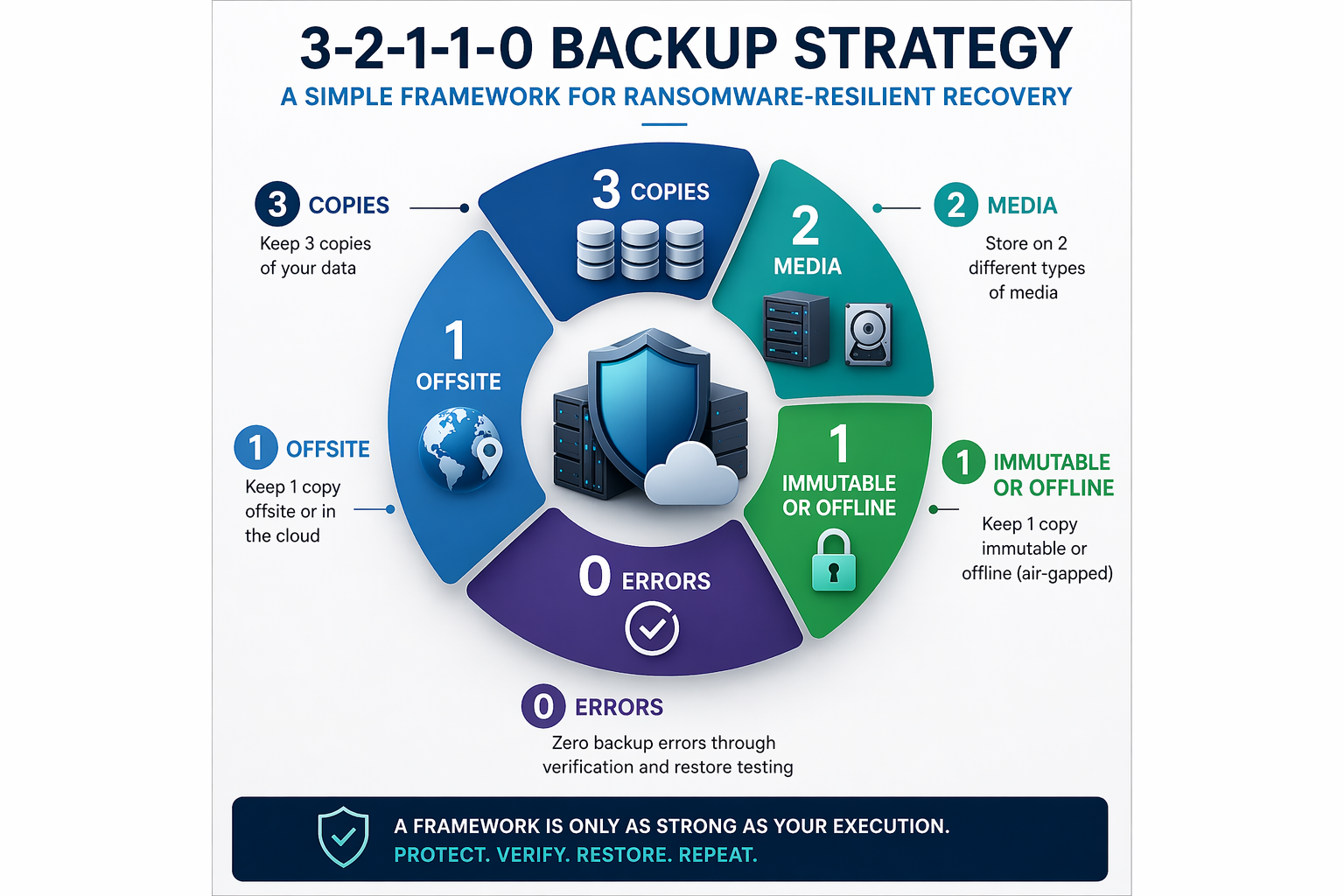
At a high level, 3-2-1-1-0 stands for:
- 3 copies of your data
- 2 different media types
- 1 copy stored offsite
- 1 copy that is immutable or offline (air-gapped)
- 0 errors—meaning your backups are verified and recoverable
It’s tempting to treat that as a checklist. But 3-2-1-1-0 is more valuable as a design lens: it forces you to plan for both technical failures (hardware, human error, cloud misconfigurations) and adversarial failures (ransomware, credential theft, malicious deletion).
Here’s what 3-2-1-1-0 does NOT mean:
- It doesn’t mean “three backup jobs.” You can run three jobs and still have a single logical copy if they all depend on the same identity, console, storage account, or network path.
- It doesn’t mean “cloud equals offsite.” Cloud storage can be off-site, but only if it’s isolated from the blast radius of your credentials and your management plane.
- It doesn’t guarantee recovery unless you test restores. “Job success” is not “data is recoverable.”
- It doesn’t replace business continuity planning. You still need to define recovery priorities, RTO/RPO targets, and a plan for getting people and systems back online.
Think of 3-2-1-1-0 as the minimum viable structure for ransomware-ready recovery. The rest of this post focuses on how to implement it in small and mid-market environments without overbuilding or overspending.
Designing for Ransomware: Where Immutability & Air-Gap Fit
Ransomware groups are professional. They know that if they can destroy backups, they can maximize pressure and payment. In many environments, the earlier steps are stealthy: credential theft, privilege escalation, lateral movement, and a quiet campaign to find and weaken your recovery paths.
To build a ransomware-resilient backup architecture, you have to design for two outcomes:
- Production will be compromised.
- Your attackers will try to compromise backup administration and backup storage next.
That’s where the extra “1” in 3-2-1-1-0 matters: an immutable or offline copy that cannot be modified, encrypted, or deleted—even by an administrator account that has been hijacked.
The Difference Between “Offsite” & “Out of Reach”
Many organizations have an off-site copy, but it’s still reachable by the same credentials used every day. If your backup server authenticates to cloud storage with a key stored on the backup server, and ransomware compromises that server, your “offsite” copy may be one API call away from deletion.
Ransomware-resilient offsite storage should be:
- In a separate security boundary (separate tenant/account where possible)
- Protected by immutability (WORM/object lock) or offline workflows
- Accessible through tightly scoped, time-bound permissions
- Monitored for anomalous deletions or configuration changes
If “offsite” is still within the same administrative blast radius, it’s not a true recovery anchor.
Practical Options for the Immutable/Offline Copy
Immutability can be implemented in more than one way. The best choice depends on your workloads, budget, and operational maturity. Common approaches include:
1) Immutable object storage (cloud or on-prem S3-compatible)
Many backup platforms integrate with object storage that supports retention locks (often called Object Lock or WORM). Once a backup object is written, it cannot be altered or deleted until the retention period expires—even if an attacker gains administrative access.
- Use governance or compliance mode appropriately (compliance mode is stronger but less flexible).
- Separate the identity used to write backups from the identity used to configure retention.
- Log and alert on changes to the retention policy.
2) Hardened appliances with immutable repositories
Some vendors offer appliances or repository designs with built-in immutability features. These can be effective, but only when paired with strong admin isolation and patching.
3) Offline rotation
Offline rotation can range from removable media to a tape library workflow. Offline copies are powerful because they’re literally disconnected. The trade-off is slower restore and more process overhead.
- Long-term retention requirements
- “Last resort” recovery copies
- Scenarios where cloud access is limited or cost-prohibitive
4) Cross-account or cross-tenant replication with immutability
Replicating backup data into a separate account/tenant with separate admin control can dramatically reduce the chance that a single credential compromise destroys everything.
Mapping 3-2-1-1-0 to Common SMB Stacks
Your organization probably has a mix of:
- Microsoft 365 or Google Workspace (SaaS data)
- Endpoints and laptops (remote/hybrid)
- On-prem servers or hypervisors
- Cloud workloads (IaaS/PaaS)
- Line-of-business applications and databases
A practical 3-2-1-1-0 implementation might look like this:
- Copy 1: Production
- Copy 2: Primary backup repository (fast restore)
- Copy 3: Secondary copy (replication)
2 media types: disk/object for speed + immutable/offline for ransomware resiliency.
1 offsite: cloud repository, secondary site, colocation, or replicated region.
1 immutable/offline: object lock/WORM or offline rotation.
0 errors: automated verification + routine restore drills with documentation.
Hardening Backup Administration & Credentials
If there’s one point that repeatedly shows up in real incidents, it’s this: attackers didn’t “hack the backup,” they logged into it. Backup systems are high-value targets because they control your ability to recover.
In many SMB and mid-market environments, backup administration lives on the same Active Directory domain as everything else. Admins use their everyday accounts, and the backup console is accessible from regular workstations. That’s convenient—right up until it’s catastrophic.
Your backup environment needs a higher standard of identity and access management than most other IT systems.
Separate Admin Tiering for Backup Systems
Minimum controls to implement:
- Dedicated backup admin accounts not used for email/browsing/daily work
- Strong MFA on every backup admin login (including service provider access)
- RBAC: limit who can delete jobs, edit retention, or access encryption keys
- Separate credentials for backup storage with least privilege
For small teams, “separate admin tier” can be as simple as a dedicated admin account + a dedicated admin workstation or jump box, plus conditional access that blocks privileged logins from regular endpoints.
Lock Down Console Access & Network Paths
- Restrict console access to a management VLAN or jump host
- Use firewall rules to limit inbound access to backup servers
- Disable unnecessary services and close unused ports
- Enforce TLS and modern ciphers
- Monitor failed logins and unusual access times
Protect Backup Encryption Keys & “Delete” Capabilities
- Store keys in a hardened KMS where possible
- Restrict key access to a minimal set of roles
- Enable immutable retention so “delete” is ineffective during retention windows
- Turn on tamper protection and audit logging
Patch & Harden Backup Infrastructure Like It’s Critical
- Keep backup software and OS fully patched
- Remove local admin where it isn’t needed
- Enable EDR with vendor-guided exclusions
- Disable legacy protocols and tighten firewall rules
- Centralize logs into SIEM/MDR and alert on suspicious activity
“0 Errors” Verification: Backups You Can Trust
The “0” in 3-2-1-1-0 is the most misunderstood part of the framework. People interpret it as “no backup job failures.” That’s helpful, but insufficient.
In practice, “0 errors” means you can prove your backups are completing, capturing the right data, protected, and recoverable within required timeframes.
Job Success Does Not Equal Recoverability
- Corrupted backup chains
- Expired credentials discovered only at restore time
- Application consistency issues
- Missing system state/configuration backups
- Misaligned retention leading to missing restore points
- Encryption keys unavailable during restore
Automated Verification Techniques That Fit SMB/Mid-Market Teams
- Health checks and repository integrity scans
- Automated test restores to an isolated sandbox
- Hash/integrity validation
- Screenshot verification for VM boots (where supported)
- Application-aware verification for databases
Alerting & Reporting That Leadership Understands
- Backup success rate by system and tier
- Coverage gaps (protected workloads vs. total)
- Verification status (tested vs. untested restore points)
- Age of last successful restore test by tier
- Immutability status and retention compliance
Restore Drills: How to Test Recovery Without Disrupting the Business
Start With Tiered Recovery: Critical Apps vs. Everything Else
Segment your environment into tiers based on business impact:
- Tier 1: mission-critical apps, identity, customer-facing systems, key file services
- Tier 2: important but tolerable downtime apps
- Tier 3: low-criticality and test/dev systems
Quarterly Recovery Tests by Application Tier
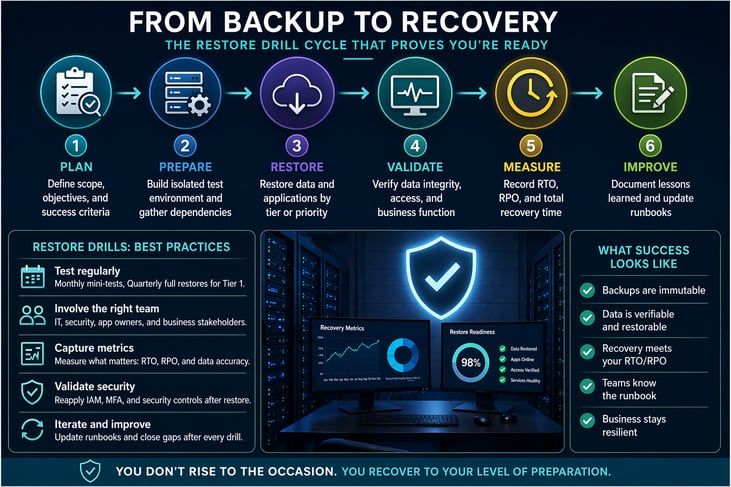
- Monthly: sample file + mailbox restores; SaaS restore validation
- Quarterly: Tier 1 app restore into an isolated environment
- Semi-annually: tabletop exercise (incident response + recovery)
- Annually: broader DR exercise validating major assumptions
What a “Good” Restore Drill Looks Like
- Can we restore the system and access it?
- Is the data correct and complete?
- How long did it take (RTO)?
- How much data did we lose (RPO)?
- What surprised us and what needs remediation?
Don’t Forget SaaS & Identity
- M365/Google restores (mailbox, OneDrive/Drive, SharePoint)
- Identity recovery (MFA resets, conditional access rollbacks, privileged account review)
- API token rotation and third-party integration review
Keeping Data Safe & Compliant
A ransomware-safe retention policy considers operational recovery needs, regulatory obligations, legal hold, malicious deletion risk, and cost/performance.
Set Retention by Data Class & Business Need
- Mission-critical systems: longer retention + more frequent backups
- Standard file shares: moderate retention with versioning
- Endpoints: shorter retention but frequent coverage
- SaaS: retention aligned to compliance and business ops
- Archives: long retention, stored cheaply, immutably where possible
A practical policy might include daily backups retained for 30–60 days, weekly backups for 3–6 months, and monthly backups for 1–7 years, depending on compliance. The point is to make retention intentional, not a default setting.
Ransomware-Safe Deletion Controls
- Use immutability to prevent deletion during retention windows
- Restrict delete permissions and separate retention-change roles
- Require MFA/conditional access for destructive actions
- Alert on delete attempts and retention edits
- Maintain an offline or cross-tenant copy
Align Backups With Disaster Recovery Goals
Define RPO and RTO, then align backup frequency/consistency and restore capacity/runbooks to meet them.
A Practical 3-2-1-1-0 Implementation Plan
- Inventory what you must restore (apps, file services, identity, SaaS, cloud, endpoints) and identify gaps.
- Map workloads to 3-2-1-1-0 (repo locations, immutable/offline copy type, verification, test cadence).
- Implement immutability/offline copies starting with Tier 1 workloads.
- Harden backup administration (separate accounts, MFA, jump host/conditional access, RBAC, patching).
- Automate verification and alerting; report readiness monthly.
- Run restore drills, measure RTO/RPO, and update runbooks.
- Review retention and legal hold alignment; protect retention from malicious deletion.
Self-Assessment: Are You Actually 3-2-1-1-0 Ready?
Architecture
- Do we have at least three logical copies, not just three jobs?
- Do we use at least two media types (disk/object + immutable/offline)?
- Is at least one copy truly off-site and outside the admin blast radius?
- Do we have an immutable or offline copy with retention that can’t be bypassed?
Administration
- Are backup admin accounts separate from daily user accounts?
- Is MFA enforced for all backup admin access (including vendors/MSPs)?
- Is the backup console restricted to a jump host or management network?
- Are destructive actions logged and alerted on?
Verification and Testing
- Do we run automated verification that proves recoverability?
- Do we perform routine restore drills and measure RTO/RPO?
- Do we have documented runbooks for critical restores?
- Do leadership and business owners understand recovery priorities?
Common Pitfalls & How to Avoid Them
- Pitfall 1: Backups share the same identity blast radius as production. Fix: separate admin tiering + immutable retention in a separate security boundary.
- Pitfall 2: Offsite copies are deletable with a single credential. Fix: object lock/WORM + cross-account replication + restricted retention-change roles.
- Pitfall 3: Verification is limited to “job success.” Fix: automate restore validation and integrity checks.
- Pitfall 4: Restore drills are postponed. Fix: schedule drills and start small.
- Pitfall 5: SaaS data is ignored. Fix: include SaaS + identity in scope and test restores.
- Pitfall 6: Retention is default, not policy. Fix: segment retention and protect it from malicious deletion.
Cyber Advisors' Services
Designing a ransomware-resilient backup strategy is part architecture, part security engineering, and part operational discipline. Cyber Advisors helps SMB and mid-market organizations operationalize 3-2-1-1-0 with practical controls that stand up to modern attack paths.
- Backup & Disaster Recovery architecture: repositories, immutability, replication and recovery workflows aligned with RTO/RPO.
- Identity & Access hardening: privileged access modeling, MFA, conditional access, jump hosts, RBAC.
- Ransomware readiness & recovery planning: runbooks, restore drills, incident-to-recovery alignment.
- Managed services & monitoring: verification, alerting, and health checks.
- Security advisory & assessments: validation against real-world attack paths.
Request a 3-2-1-1-0 Scorecard + Backup Architecture Review
We’ll map your current tools to 3-2-1-1-0, identify blast-radius risks, validate immutability and retention controls, and recommend a practical roadmap you can execute.
Request your 3-2-1-1-0 Scorecard + Backup Architecture Review today.
Or schedule a conversation to align backups, DR, and security into one ransomware-ready recovery plan.