

Ransomware damage is not just about how attackers get in—it is about how far they can move once they are inside. In most real-world incidents, the initial foothold is a single endpoint, a stolen credential, or an exposed remote access path. The crisis escalates when the attacker pivots from that first system to everything else: Active Directory, file shares, backups, virtualization hosts, finance platforms, line-of-business applications, and the very tools administrators rely on to restore order.
That “how far” is your blast radius.
For SMB and mid-market organizations, shrinking that blast radius is one of the fastest, most cost-effective ways to reduce downtime, protect critical data, and give your security team the time they need to detect and respond. You do not need to rebuild your entire environment or deploy a shelf of new tools. You need a practical segmentation strategy, disciplined control over remote admin pathways (especially RDP), and a way to validate that your changes truly disrupt lateral movement.
This guide outlines an SMB-ready approach to network segmentation and admin tiering using VLANs, firewall policies, RDP restrictions, and repeatable tests. The objective is not “perfect” segmentation—it is meaningful, proven containment that turns a company-wide ransomware event into a smaller, manageable incident.
How ransomware spreads after initial access
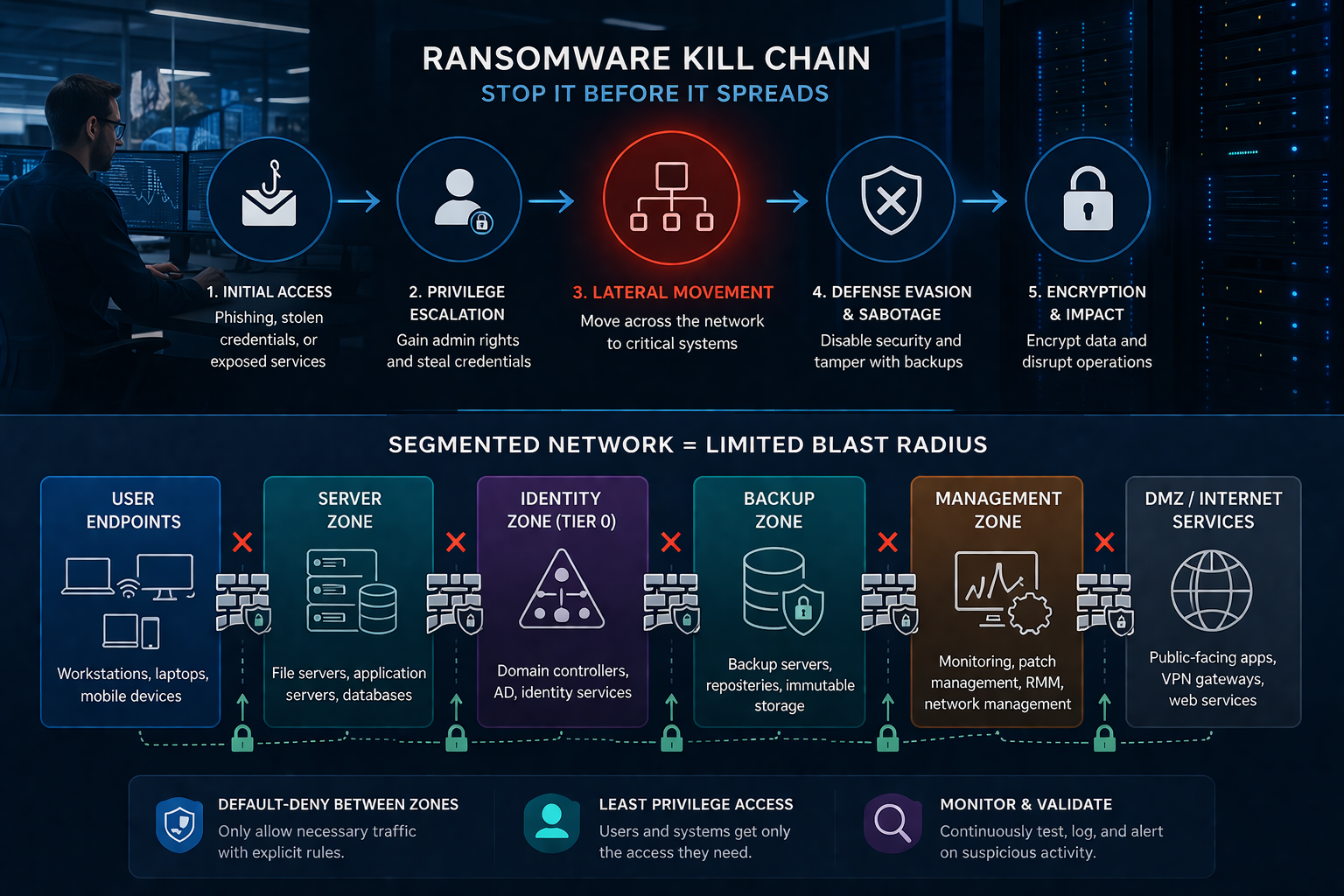
Most ransomware crews follow a disciplined, repeatable playbook. The specific tools may change from case to case, but the overall sequence is remarkably consistent.
- Initial access: Common entry points include phishing, credential stuffing, abuse of remote access (VPN/RDP), compromised edge devices, compromised MSP tooling, and malware delivered via drive-by downloads. In SMB environments, the “weakest link” is often a single workstation with local admin rights, an exposed service, or a reused password that quietly opens the door.
- Establish persistence and escalate privileges: Attackers quickly pivot to one priority: stealing and abusing credentials, especially those with administrative rights. They dump passwords and hashes, hijack browser sessions, capture tokens, and pressure users into approving fraudulent MFA prompts. Once they reach domain admin—or anything close to it—they can rapidly assume control of the environment.
- Lateral movement (the blast radius event): Attackers move “east-west” inside the network using common pathways:
- SMB and file shares (including admin shares like C$)
- RDP to servers and desktops
- Remote management tools (PowerShell remoting, WMI, PsExec, WinRM)
- Admin consoles and centralized management (vCenter, RMM, backup consoles)
- Credential reuse across systems and tiers
- Disable defenses and sabotage recovery: Once attackers gain privileged access, they move quickly to tilt the field in their favor: disabling EDR, stopping critical services, deleting shadow copies, tampering with backups, and then encrypting or exfiltrating data to maximize business disruption and leverage.
- Execute encryption and/or data theft: By the time encryption starts, it’s usually too late to contain.
Key takeaway: You will not be able to stop every initial access attempt. Your true resilience is measured by how effectively you can contain the incident when—inevitably—something slips through..
Segmentation basics for SMB: what to separate first
Segmentation is often treated as a complex “enterprise architecture” effort. In practice, SMBs can make real progress by starting with a small set of high-value boundaries and improving them over time.
Think in zones, not perfection. Your objective is to create practical “speed bumps and guardrails” that limit where a compromised user device can move, while still enabling the business to operate smoothly.
Start with four separation priorities (in this order):
- Identity systems (Active Directory): AD is the control plane for Windows environments. Protect it like the crown jewels.
- Backups and recovery infrastructure: If ransomware can reach backup repositories, backup admin consoles, or backup service accounts, recovery becomes dramatically harder.
- Servers and application tiers: Convenience becomes an attacker’s highway when servers share broad reachability with users.
- User endpoints and general access: User devices should have the least privilege on the network.
If you change nothing else, draw a hard line between user endpoints and your identity and backup systems—and enforce default-deny between those zones. That single move will materially shrink your blast radius and make ransomware far harder to turn into a business-wide outage.
Step 1: Identify your “crown jewels” & map your blast radius
Before you touch VLANs or firewall rules, build a clear blast-radius map. You do not need a perfect CMDB to start—an accurate whiteboard sketch and a simple spreadsheet are enough to show what can reach what, and where containment matters most.
A) Identify your crown jewels
- Domain controllers and identity services (AD, Entra ID / Azure AD, ADFS)
- File servers and collaboration storage
- Backup repositories, backup consoles and immutable storage targets
- Finance and payroll platforms
- ERP/CRM systems
- Virtualization hosts and management planes (vCenter/ESXi/Hyper-V)
- Remote management tools (RMM, software deployment, patch platforms)
- Network infrastructure management (firewall/switch controllers)
- Email and productivity admin portals
B) Identify common lateral movement paths
- From a standard user workstation, what can I reach today?
- Can I RDP to servers from my desk?
- Are SMB shares broadly accessible?
- Are management interfaces reachable from any VLAN?
- Where do privileged users log in from?
C) Decide on the first containment boundary
For most organizations, Phase 1 means: User endpoints → (restricted) → Servers; User endpoints → (blocked) → Identity; User endpoints → (blocked) → Backups.
Step 2: Create a simple zone model
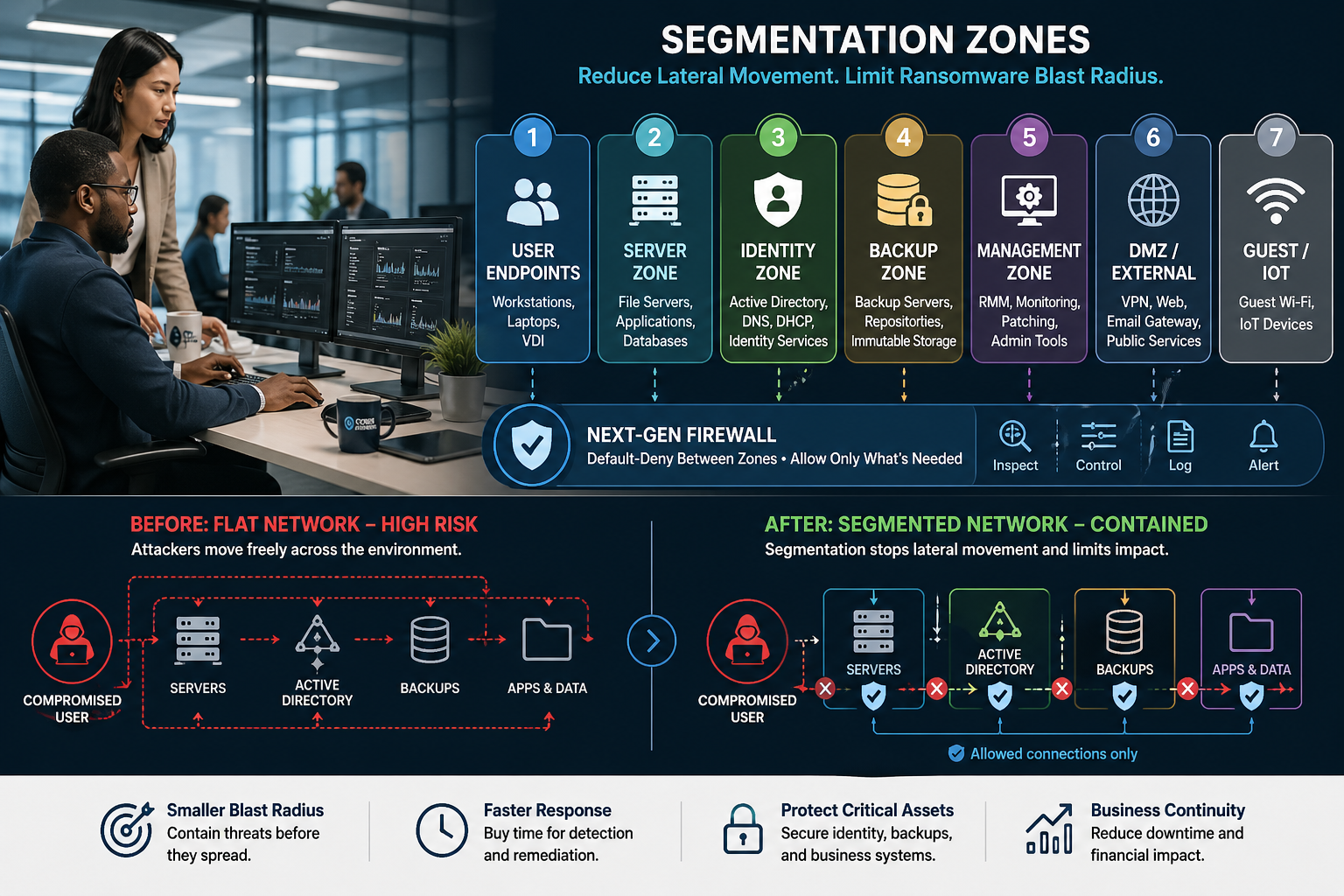
You don’t need 30 micro-segments to start. A practical model for many SMBs is 6–8 zones:
- Zone 1: User endpoints
- Zone 2: Server zone
- Zone 3: Identity zone (Tier 0)
- Zone 4: Backup zone
- Zone 5: Management zone
- Zone 6: DMZ / Internet-facing services
- Zone 7: Voice/IoT/OT (if applicable)
- Zone 8: Guest / BYOD
Pro tip: Build zones as VLANs and enforce policy at a Layer 3 boundary. VLANs without enforcement are not segmentation—they’re just labeling.
Step 3: Implement VLAN segmentation the right way
VLANs reduce the blast radius only when you enforce traffic restrictions between them.
A) Build VLANs around function
- Users (general)
- Servers
- Identity
- Backups
- Management
- Guest
- Voice/IoT
B) Put user endpoints in a constrained VLAN
Create a clear logical boundary so user devices are not “adjacent” to everything.
C) Segment wireless appropriately
- Separate SSIDs/VLANs for corporate, guest, and IoT
- Strong authentication for corporate Wi-Fi (e.g., 802.1X where feasible)
- No bridging between guest and corporate networks
D) Treat VPN users as untrusted until proven otherwise
VPN users should land in a restricted segment, not inside the LAN with broad access.
E) Use a firewall for inter-VLAN controls
The enforcement point is where you apply default-deny and allow lists.
Step 4: Move to default-deny between segments with explicit allow lists
Block by default between zones, then allow only what’s needed. Start with the highest-risk pathways:
A) User VLAN → Identity VLAN
Default: Deny. Allow only:
- DNS to domain controllers (TCP/UDP 53) if DCs host DNS
- Kerberos/LDAP as required (88, 389/636) if you use on-prem AD auth directly
- NTP (123) as needed
- Additional domain services ports as required by design
Note: Many environments require careful port planning. This is normal—and a structured review prevents surprises.
B) User VLAN → Backup VLAN
Default: Deny. Ideally, backups should not be reachable from user endpoints.
C) User VLAN → Server VLAN
Default: Deny. Allow only business-required paths (specific apps/ports to specific servers).
- Application-specific ports (e.g., HTTPS 443, SQL ports) to specific servers
- SMB only to designated file servers
- Printing services to print servers only (if applicable)
Quick win: reduce east-west SMB and RDP.
A note on default-deny: Introduce default-deny gradually, not as a single overnight change. First, define what “normal” looks like in your environment, then methodically tighten access until only business-required paths remain. Every rule should clearly answer: who (source), what (destination), how (port/protocol), and why (business purpose). If you cannot articulate a valid “why,” that rule is a strong candidate for removal.
D) Server VLAN → Identity VLAN
Deny where possible; allow only directory services required for authentication and management.
E) Management VLAN → Everything (tightly controlled)
Restrict management access to specific admin workstations/jump hosts, known tools, and documented ports/destinations.
Step 5: Lock down RDP
A) Remove direct internet exposure (non-negotiable)
If RDP is exposed to the internet, close it and use a secure remote access approach.
B) Require MFA for remote access
MFA should be mandatory for VPN, remote access portals, and privileged accounts.
C) Limit RDP to jump hosts (preferably from managed admin workstations)
- RDP allowed only from approved sources (jump hosts/PAWs)
- RDP is allowed only to approved targets
- Block RDP from user VLAN to servers where feasible
D) Harden RDP configurations
- Network Level Authentication (NLA)
- Restrict clipboard/drive redirection where possible
- Disable saved credentials for RDP sessions
- Strong lockout/monitoring for RDP events
E) Monitor for anomalies
- Failed logons across many hosts
- New RDP connections from unusual sources
- Sessions outside normal hours
- Local admin use via RDP
Step 6: Admin tiering
Even with strong segmentation in place, ransomware frequently rides on stolen credentials. Admin tiering strengthens your defenses by clearly separating privileged operations into defined tiers—and enforcing rules that keep high-value credentials from crossing those boundaries.
Tier model
- Tier 0: Identity/control plane (DCs, PKI, identity infrastructure)
- Tier 1: Servers/infrastructure (server admin, virtualization, backups)
- Tier 2: User endpoints (help desk/workstation admin)
Key rules
- Tier 0 does not log into Tier 1 or Tier 2 systems.
- Tier 1 does not log into Tier 2 systems.
- Privileged accounts are separate from daily-use accounts.
- Admin tools are accessed from PAWs or jump hosts.
Practical controls
- Use PAWs or hardened admin devices/VDI for admin tasks
- Implement jump hosts in a management VLAN with MFA and logging
- Reduce domain admins; remove local admin on endpoints; scope permissions
Step 7: Segment backups like your recovery depends on it
Backups are a primary target in modern ransomware operations. If your backup systems are reachable from compromised endpoints or abused admin credentials, attackers can quickly encrypt or delete them—turning a containable incident into a full-scale recovery crisis.
A) Put backup infrastructure in a separate zone
Backup servers, repositories, and consoles should live in a backup VLAN with restricted access.
B) Restrict access to backup management interfaces
Only allow: Jump host/PAW → backup console; backup server → data sources; monitoring → backup systems (if needed).
Deny: User VLAN → backup VLAN; general server VLAN → backup admin interfaces (unless explicitly required).
C) Use immutable backups & offline/air-gapped options
- 3-2-1-1-0 aligned strategy
- Regular restore testing
- Separate backup credentials (not domain admin)
D) Treat backup admin credentials as Tier 0
Backups are a crown jewel because they control recovery.
E) Log & alert on backup changes
- Backup job deletions
- Retention policy changes
- Repository deletions
- New admin accounts on backup consoles
- Failed/disabled backup jobs
Step 8: EDR visibility + firewall logging
Segmentation buys time. Detection and response use that time.
- Centralize logs (firewall inter-VLAN, auth events, RDP activity, EDR alerts)
- Alert on blocked lateral movement attempts (SMB/RDP attempts, unusual cross-zone traffic)
- Review and tune regularly
- Consider MDR if you lack 24/7 coverage
Validation: tests that confirm segmentation is working
If you cannot demonstrate that your segmentation is working, you are effectively relying on hope. Establish a monthly validation rhythm to confirm that: (1) blocked paths remain blocked, (2) critical business flows still operate as designed, and (3) the right logs and alerts are generated. Run straightforward checks such as “Can a standard user workstation reach backup systems?”, “Is RDP blocked except via approved jump hosts?”, and “Are inter-VLAN deny events consistently logged, reviewed, and acted on?”
How to segment without breaking business workflows
The biggest fear with segmentation is disruption. Poorly executed segmentation can break printing, file access, VoIP, legacy apps, and vendor connections. Observe traffic first, phase in default-deny boundaries, require business owners to justify each exception (source, destination, port, purpose), and communicate changes. Document “temporary” rules and review them monthly.
Common pitfalls & quick wins
Pitfalls
- VLANs without enforcement
- Overly broad firewall rules
- Admin tools used from user endpoints
- VPN users are treated as “inside the network”
- Shared admin accounts and credential reuse
- Backup systems reachable from general networks
- No validation (rule drift)
- Ignoring IoT/VoIP devices
Quick wins
Block User→Backup access, restrict RDP to jump hosts (VPN+MFA), limit SMB to designated file servers, segment domain controllers, and use separate admin accounts with tiering.
a realistic 30-day SMB segmentation plan
Begin with containment boundaries and the paths attackers prize most: map your crown jewels, define core zones (Users, Servers, Identity, Backups, Management), route all inter-VLAN traffic through a single enforcement point, enforce default-deny with explicit business-approved allows, lock RDP behind jump hosts with VPN and MFA, and introduce admin tiering anchored on hardened admin workstations. Close the loop with a formal monthly validation checklist so rules do not drift, and your controls continue to perform as designed.
Why organizations trust Cyber Advisors for segmentation & ransomware containment
Cyber Advisors helps organizations reduce ransomware blast radius with a pragmatic, business-aligned approach:
- Blast-radius mapping and crown jewel identification
- Network segmentation strategy and VLAN design
- Firewall policy engineering (default-deny + least privilege allow lists)
- RDP containment, jump host implementation, and remote access hardening
- Admin tiering and privileged access workflows
- Backup segmentation and immutable recovery architecture
- Validation testing and ongoing governance to prevent rule drift
We prioritize outcomes, not theory: fewer viable paths for lateral movement, stronger, more accountable privileged access and measurable containment you can demonstrate through repeatable, evidence-backed tests.
Cyber Advisors services
If your network is largely flat—or if you cannot clearly answer, “Could ransomware travel from a single workstation to our servers, Active Directory, and backups?”—this is the moment to act. Strengthening containment is one of the fastest, most impactful ways to reduce business disruption, shorten downtime, and safeguard revenue.