
Even the best EDR fails when coverage, policy, or telemetry has gaps. This practical guide shows IT and security leaders how to close blind spots across laptops and servers—so incidents are detected, investigated, and contained in time, every time.
For SMB and mid-market IT/SecOps teams running Microsoft, CrowdStrike, SentinelOne, Sophos, Carbon Black, or similar EDR tools—and anyone preparing for cyber insurance renewals, audits, or SOC 2/ISO/NIST assessments.
Key Takeaways
- Maintain a live asset inventory tied to EDR health, not a static spreadsheet.
- Establish policy baselines by device role and OS; avoid one-size-fits-all defaults.
- Keep exclusions minimal, justified, reviewed quarterly, and monitored.
- Operationalize sensor health monitoring (version, heartbeat, memory, self-protection).
- Enforce tamper protection and administrative separation for EDR control planes.
- Triage offline devices quickly and contain risks during travel, offboarding, and imaging.
- Create server-specific policies that respect uptime needs without weakening detection.
- Don’t neglect Linux coverage and telemetry parity.
- Plan for legacy OS where support is limited; isolate, virtualize, or retire.
- Validate with attack simulation and purple-team exercises; measure MTTD/MTTR, not installs.
EDR Coverage, Policy & Telemetry
The biggest myth in endpoint security is that “we deployed the agent, therefore we’re protected.” Real-world intrusions tell a different story: someone disables a sensor, a gold image is out of date, a server has broad antivirus exclusions, a laptop travels off the domain for months, Linux boxes run headless without self-protection, or the SIEM drops events due to log volume limits. Individually, each gap looks small; together they form an attack path.
Think of EDR as a living control system—coverage (where the sensor runs), policy (what it blocks and logs), and telemetry (what gets to your SOC) must be tuned continuously. The following ten controls eliminate the most common blind spots we see during MDR onboarding and breach response.
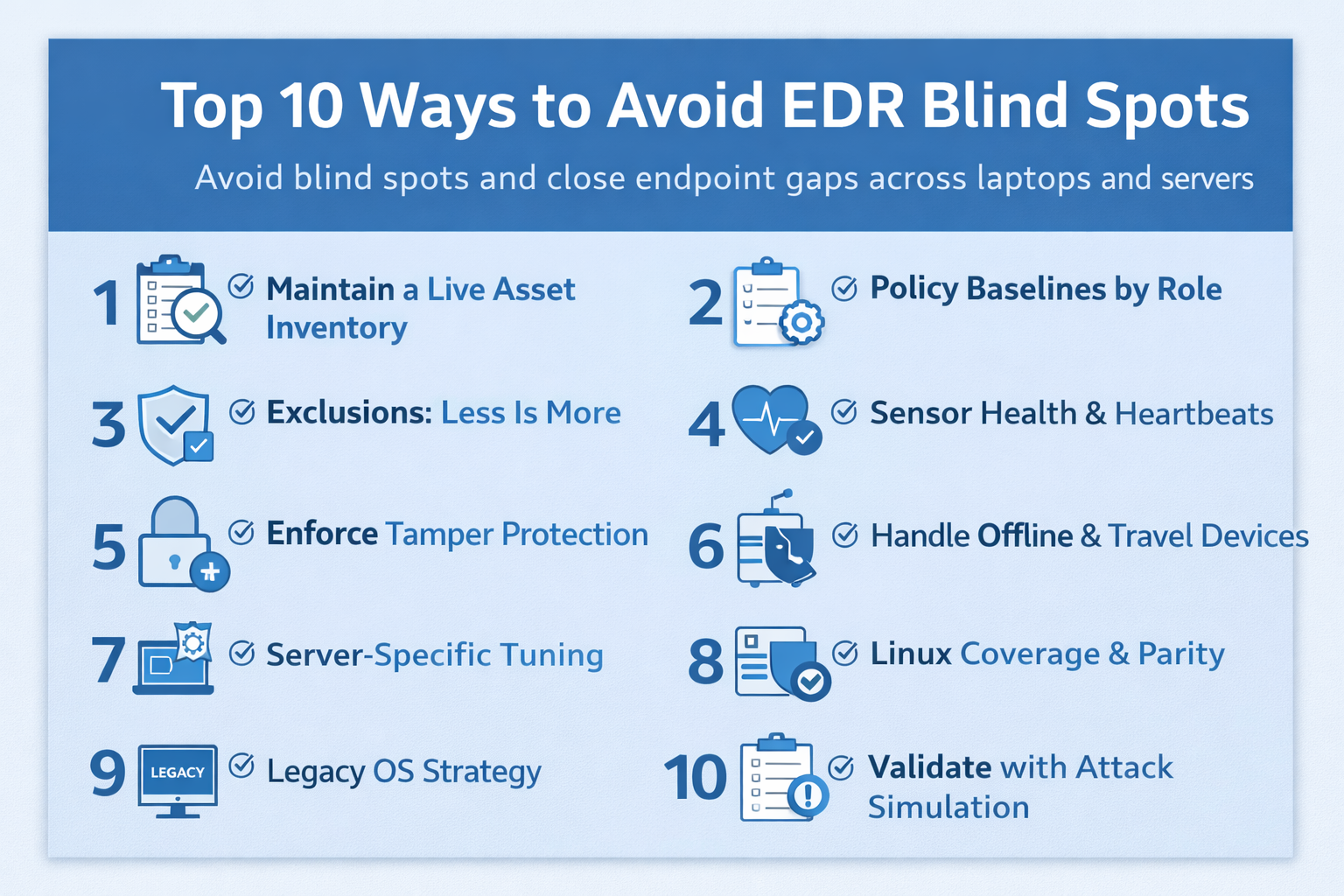
1) Maintain a Live Asset Inventory
Coverage starts with knowing what exists. Static CMDBs and annual audits can’t keep up with hybrid work, cloud VMs, and mergers. The right approach is a live inventory that correlates endpoint identity, hardware/VM metadata, operating system, owner, EDR agent status, sensor version, last heartbeat, and criticality.
Why it matters
- Attackers look for unmanaged or stale devices to establish persistence.
- Cyber insurers, auditors, and frameworks (e.g., NIST CSF) expect evidence of coverage and monitoring.
- Decommissioned or orphaned assets often retain VPN credentials or privileged tooling.
KPIs to track
- Coverage rate: % of in-scope devices with healthy EDR sensors (goal: >98%).
- Mean time to enroll (MTTE): time from device creation to EDR install (goal: <4 hours for laptops, <24 hours for servers).
- Stale devices: systems with no heartbeat >7 days (goal: <1%).
How to implement
- Integrate device sources (Intune/ConfigMgr, Jamf, AD/Azure AD, virtualization, cloud CMDB, MDM) with your EDR API.
- Deduplicate based on unique IDs (serial, UUID) and map “expected” vs. “EDR present.”
- Create an automated “Enroll or Quarantine” workflow for any out-of-compliance device.
- Send daily delta reports to your SOC and IT service desk.
Tip: If you don’t have time to build this, our Endpoint Management and Managed Detection & Response teams can operationalize it for you.
2) Policy Baselines by Role
A single “default” policy is convenient—and dangerous. Laptops, VDI, Domain Controllers, SQL servers, print servers, build agents, and application servers have different behaviors and risks. Build role-based baselines for Windows, macOS, and Linux that specify prevention settings, telemetry levels, script controls, removable media, and lateral movement protections.
Checklist
- Define 6–10 device roles that reflect how you operate (e.g., “Knowledge Worker Laptop,” “Jump Host,” “Web Server,” “Database Server”).
- For each role, define blocking vs. detect-only states for script/PowerShell, macro, and child-process spawning.
- Enable enhanced telemetry for admin consoles and servers with internet exposure.
- Document expectations for alert volumes and what constitutes “normal” for the role.
Pro move: Tie your EDR policy assignment to identity groups in MDM/AD so devices naturally inherit the right baseline.
3) Exclusions: Less Is More
Exclusions are a double-edged sword. They can reduce noise and performance hits, but they also create blind spots that attackers can exploit. Treat exclusions like firewall rules—every entry must be justified, time-bound, and reviewed.
Governance rules
- Require a ticket, business owner, and expiration date for every exclusion.
- Prefer hash-based or code-signed allowances over folder path wildcards.
- Centralize change control; do not allow local admins to add exclusions.
- Quarterly reviews with your SOC to analyze detections bypassed by exclusions.
What to avoid
C:\Program Files\Vendor\*blanket folders.- Excluding
powershell.exe,cmd.exe,wscript.exe, or Office child processes. - Permanent exclusions for build pipelines—use dedicated build agents with stricter monitoring instead.
4) Sensor Health & Heartbeats
Quiet agents are risky agents. Health monitoring should track version drift, heartbeat intervals, CPU/RAM usage, self-protection state, kernel driver status, and event backlog. Any deviation should automatically open a ticket.
Operationalize it
- Set thresholds: e.g., “no heartbeat > 24h,” “version >1 minor behind,” “self-protection off,” “driver unload events > 0.”
- Integrate EDR health APIs with ITSM. Tickets route to the right resolver group by device role/owner.
- Patch cadence: pilot → ring deployment → full rollout. Measure failures and rollbacks.
- Correlate sensor health with telemetry delivery into your SIEM/EDR console; if events aren’t arriving, you’re blind.
KPIs
- Healthy agent rate > 98% across all device roles.
- The median time to restore a failed sensor is <8 business hours.
- Zero devices with self-protection disabled outside change windows.
5) Enforce Tamper Protection
Attackers routinely attempt to kill or disable EDR during hands-on-keyboard phases. Tamper protection prevents uninstallation, service stops, driver unloads, and registry changes—even by local admins.
- Enable strong tamper protection everywhere, including servers and Linux endpoints.
- Require MFA for EDR policy changes, and separate EDR admin accounts from standard IT admin accounts.
- Log and alert on any EDR service restart, driver stop, or a change in protection state.
- Harden management consoles with conditional access and dedicated admin workstations or jump hosts.
Complement this with Vulnerability Management to remove privilege-escalation paths that make tampering easier.
6) Handle Offline & Travel Devices
Laptops go on planes, to conferences, and home. Servers occasionally lose network paths, backups, or proxies. When devices are offline or roaming behind captive portals, your visibility drops.
Design for the real world
- Enable cloud relay and store-and-forward so sensors buffer events until connectivity returns.
- Use device-based geofencing and “first seen from” alerts to spot unexpected logins from new regions.
- Set auto-contain rules when heartbeats age beyond thresholds for high-risk roles (e.g., admin laptops).
- Require VPN or ZTNA with posture checks before accessing sensitive services.
For offboarding, ensure disabling accounts also contains or wipes the endpoint if it has not checked in.
7) Server-Specific Tuning (Without Weakening Detection)
Servers demand precision. Outages are costly, but so are blind spots. Avoid flipping servers into “detect-only” just to quiet alerts. Instead, build deliberate prevention with safe-lists, maintenance windows, and sensor resource caps where supported.
Windows Server patterns
- Separate policies for Domain Controllers, RDS/Terminal Servers, file servers, and SQL.
- Monitor for LSASS read attempts, DCShadow/DCsync, and suspicious service creation.
- Use command-line auditing and protected process light (PPL) where applicable.
Linux & container hosts
- Enable kernel module protections and monitor
sudo,cron, and package manager activity. - Log container runtime events, image pulls, and unexpected socket binding on internet-facing hosts.
- Send both EDR and system audit logs to your SIEM; cross-correlation reduces blind spots.
Service windows: For change control, define maintenance windows that temporarily relax prevention (not disable it) and automatically revert when the window ends.
8) Linux Coverage & Parity
Linux often drives critical business applications, yet many programs have Windows-centric policies. Ensure telemetry and protections reach parity: suspicious network connections, binary executions from temp folders, crypto-miner indicators, kernel module loads, and SSH anomalies.
- Deploy EDR sensors across all Linux distros you support; track kernel/agent compatibility before OS patching.
- Turn on shell activity logging (with privacy rules for developers) and enable alerts for credential exfiltration attempts.
- Harden SSH: enforce MFA for privileged sessions, disable password auth where possible, and monitor agent forwarding.
- Create specific policies for bastion/jump hosts; these are high-value targets and should have enhanced telemetry.
9) Legacy OS Strategy
Unsupported operating systems and applications (think: old Windows Server, legacy Linux kernels, obsolete middleware) can break modern EDR or require degraded modes. Do not ignore them—contain them.
Containment options
- Network isolation: segment into dedicated VLANs with strict allowlists and no direct internet egress.
- Virtualize: move workloads into hardened VMs where compensating controls are feasible.
- Application allowlisting: Use strong allowlisting where EDR prevention is limited.
- Business case review: sunset or replace systems lacking viable controls.
Our consultants routinely build “legacy enclaves” for regulated industries—ask about our Endpoint Management and MDR reference architectures.
10) Validate with Attack Simulation & Purple Teaming
The only proof your EDR works is catching real attacker behaviors. Run routine, safe simulations—PowerShell abuse, credential access, malicious macro execution, lateral movement, and data staging. Validate that your EDR prevents or alerts, your SOC triages, and your playbooks contain.
What to test
- Initial access: malicious Office macro spawning
powershell.exewith encoded commands. - Privilege escalation: suspicious token manipulation and attempts to read LSASS.
- Persistence: scheduled tasks, WMI subscriptions, and startup folder abuse.
- Lateral movement: remote service creation, PsExec/WinRM, SSH with agent forwarding.
- Exfiltration: archive creation and outbound connections to uncommon destinations.
Measure outcomes
- MTTD (mean time to detect) from event to alert creation.
- MTTR (mean time to respond) from alert to containment.
- False positive/negative rates by simulation type.
- Playbook adherence (escalation paths, communications, approvals).
We include these exercises in our SOC Services runbooks and offer facilitated tabletop sessions.
From Gaps to Guardrails: A 30/60/90-Day EDR Roadmap
Here’s a pragmatic rollout plan you can execute without boiling the ocean. Adjust cadence to your change windows and peak business periods.
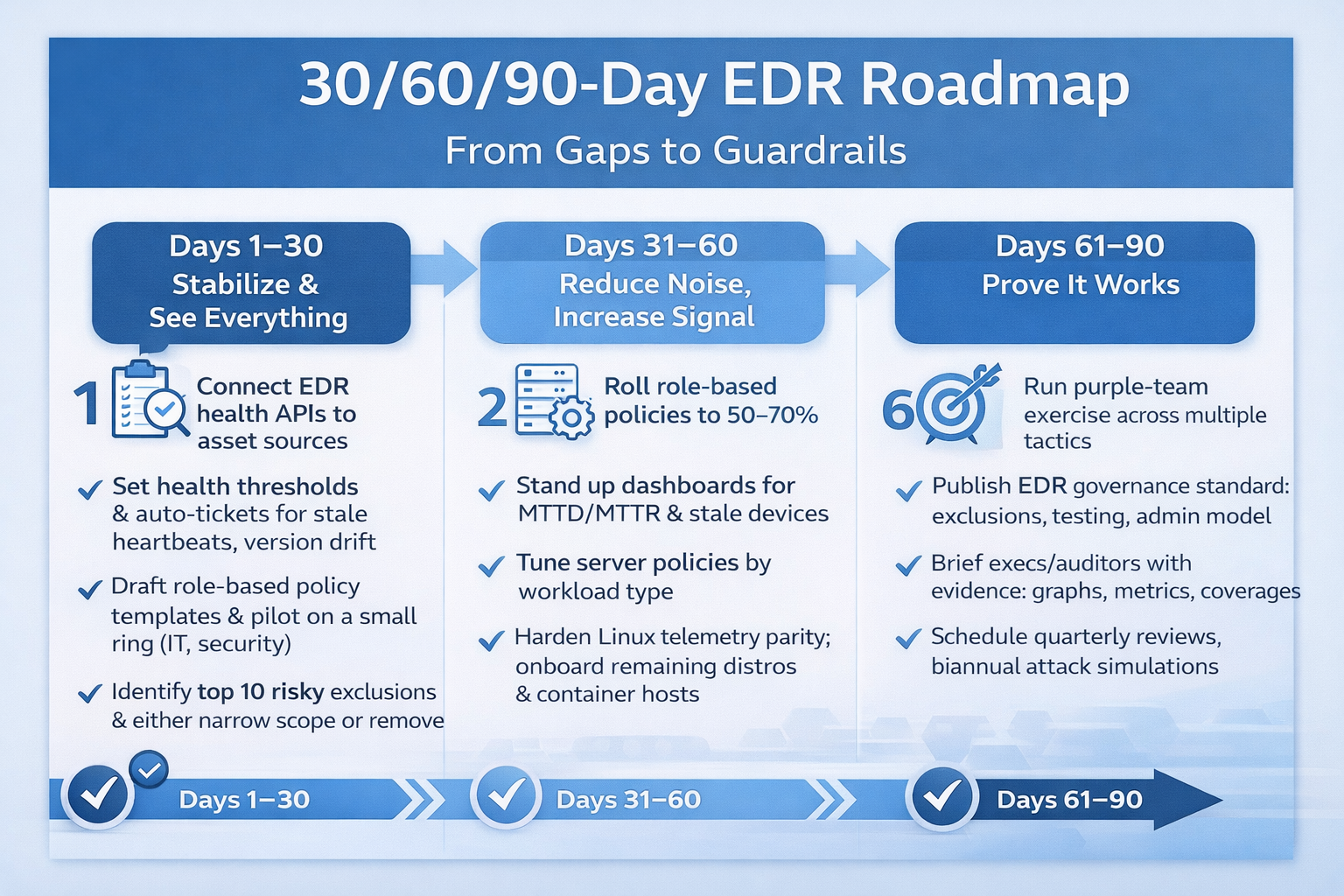
Days 1–30: Stabilize & See Everything
- Connect EDR health APIs to your asset sources; generate the first coverage report.
- Set health thresholds and open auto-tickets for stale heartbeats and version drift.
- Draft role-based policy templates and pilot on a small ring (IT, security, power users).
- Identify the top 10 riskiest exclusions and either narrow the scope or remove them, applying compensating controls.
- Enable tamper protection, MFA on the EDR console, and separate admin identities.
Days 31–60: Reduce Noise, Increase Signal
- Roll out role-based policies to 50–70% of endpoints with a rollback plan.
- Stand up dashboards for MTTD/MTTR, healthy agent rate, and stale devices.
- Tune server policies by workload type; align change windows with prevention states.
- Harden Linux telemetry parity; onboard remaining distros and container hosts.
- Design your legacy enclave: segmentation rules, access workflows, and monitoring.
Days 61–90: Prove It Works
- Run a purple-team exercise across multiple tactics; record metrics end-to-end.
- Publish an EDR governance standard (exclusion policy, admin model, testing cadence).
- Brief executives and auditors with evidence: trend graphs, coverage levels, and response times.
- Schedule quarterly exclusion reviews and biannual attack simulations.
Platform-Agnostic EDR Checklist
| Control | What “Good” Looks Like | Evidence to Save |
|---|---|---|
| Live Inventory | >98% endpoints with healthy sensors; MTTE < 4h laptops / < 24h servers | Automated coverage report; ticket history for enrollments |
| Policy Baselines | 6–10 role-based baselines across OS families; documented alert expectations | Policy matrix by role; change logs; pilot results |
| Exclusions | All exclusions justified, owner assigned, expiration set, quarterly reviewed | Exclusion register; review minutes; SOC analysis |
| Sensor Health | Monitored version, heartbeat, self-protection; auto-ticketing | Health dashboard; MTTR reports; alerting config |
| Tamper Protection | Enabled on 100% devices; EDR console MFA; admin separation | Config screenshots; conditional access policy; admin roster |
| Offline Devices | Store-and-forward enabled; geofencing alerts; auto-contain thresholds | Alert samples; policy docs; incident notes |
| Server Tuning | Workload-specific prevention without blanket detect-only; maintenance windows | Server policy set; change calendar; rollback plans |
| Linux Parity | Telemetry parity with Windows; kernel protections; SSH hardening | Linux policy set; SSH configuration; SIEM events |
| Legacy Strategy | Isolated enclave; allowlisting; retirement plan | Network diagrams, allowlist policy, and deprecation roadmap |
| Validation | Quarterly simulations; tracked MTTD/MTTR; tuned detections | Test scripts; metrics; after-action reviews |
How This Reduces Insurance Premiums and Audit Stress
Carriers and auditors increasingly ask for proof, not promises. The controls above generate evidence—coverage rates, health tickets, exclusion reviews, and simulation results—that demonstrate you’re operating EDR as a living program. That can influence underwriting outcomes, reduce exceptions during audits, and shorten renewal questionnaires.
Most importantly, you reduce dwell time. Real incidents rarely start with “zero visibility everywhere.” They start with one unmanaged laptop, a developer VM with lax policies, or a SQL server with broad exclusions. Closing these gaps shrinks your attack surface and improves your odds when—not if—an attacker tries.
EDR Blind Spots: Frequently Asked Questions
How do I measure if my EDR is “good enough” today?
Start with coverage (>98% healthy), policy maturity (role-based baselines), signal quality (alert precision and SOC handling), and validation (quarterly simulations). If any of these is missing, prioritize it within the next 30 days.
We’re worried prevention will break apps. What should we do?
Use staged rollouts and maintenance windows. For apps that truly need exceptions, prefer hashes or signed binaries and require a time-boxed exception with monitoring. Track application performance and user impact during pilots.
Can we rely on EDR alone?
EDR is one layer. You still need identity protections (MFA/conditional access), hardening, vulnerability management, email security, and backups/BCDR. EDR’s job is to detect and stop hands-on-keyboard activity quickly; it doesn’t replace broader cyber hygiene.
What about macOS & mobile devices?
macOS deserves equal policy attention—especially around scripting, notarization, and system extensions. For mobile (iOS/Android), use MDM with compliance posture and threat defense where appropriate. Tie access to posture checks.
We use multiple EDRs after an acquisition. Is that a problem?
It’s workable temporarily, but it increases management overhead and blind spots. Normalize telemetry into a single SOC workflow and plan consolidation within 6–12 months, with a clear migration path, license co-term, and policy parity.
Why Cyber Advisors for EDR That Actually Works
From fast-growing SMBs to complex mid-market enterprises, Cyber Advisors has helped a diverse mix of organizations—across healthcare, manufacturing, professional services, financial services, and the public sector—turn EDR from “installed” to operationally effective. Our engineers blend endpoint management discipline with 24×7 MDR/SOC practices to close coverage gaps, tune policies by device role, harden Windows/Linux servers without disrupting uptime, and validate outcomes through attack simulation. The result is simple and measurable: laptops and servers that surface real incidents—supported by clean telemetry, strong tamper protection, and the evidence auditors and insurers trust. If you’re ready to move beyond assumptions and ensure your EDR consistently detects, investigates, and contains threats, Cyber Advisors is ready to help.