
In 2026, collaboration platforms aren’t “just” chat and meetings anymore—they’re becoming the operating system for how work gets done. The problem is that many SMB and mid-market organizations are still running on a mix of aging licenses, bolt-on apps, and inconsistent policies. That combination leads to the same three outcomes we see over and over: low adoption, shadow IT, and avoidable security exposure.
The good news: modern collaboration suites deliver a noticeably better “day-one” upgrade—better user experience, stronger security and governance, and native integrations that eliminate swivel-chair work. And because AI features are now embedded directly into most major collaboration tools, 2026 is also the year to make collaboration “AI-ready” without creating a data risk you’ll regret later.
Below are the top five reasons organizations are upgrading in 2026—and a practical, low-friction plan to do it without breaking workflows.
What’s different about collaboration in 2026
Most leadership teams already know collaboration tools matter. What’s changed in 2026 is the risk and reward curve. If you modernize, you can standardize work across messaging, meetings, files, and workflow automation—then measure adoption and continuously improve. If you don’t, you’ll keep paying for fragmented tools, inconsistent experiences, and uncontrolled data sharing (especially as AI assistants make it easy to summarize, copy, and re-use information).
- AI is now part of everyday collaboration: meeting notes, summaries, action items, content drafting, and search are becoming standard expectations.
- Governance is no longer optional: organizations need clearer controls for data classification, DLP, retention, and auditing across collaboration channels.
- Data residency and privacy expectations are rising: many platforms now expand regional options and privacy controls, which matters for regulated industries and distributed workforces.
- Integration sprawl is real: many organizations use multiple unified communications and collaboration tools at once, which makes consistent policy enforcement harder.
With that context, let’s make sure you’re choosing the right tools and stack for 2026—then we’ll walk through the five biggest reasons to upgrade.
Tool selection in 2026: How to choose the right collaboration stack
One of the fastest ways a collaboration upgrade goes sideways is when organizations treat it like a features contest: the longest checklist wins. In 2026, the better approach is to choose a stack that aligns with how your teams actually work—and then verify that security, governance, and AI controls can be enforced consistently.
This section gives you a practical, decision-maker-friendly framework to choose the right collaboration tools, whether you want a single suite (simpler governance) or a best-of-breed mix (more flexibility).
Start with the one question that determines your tool strategy
Do you want collaboration to be “suite-led” or “best-of-breed”?
- Suite-led (common for SMB/mid-market): One primary ecosystem for identity, files, meetings, messaging, and AI. Typically lower friction for governance, security policies, and user adoption.
- Best-of-breed (common for complex environments): Specialized tools selected per workflow (for example: one for meetings, another for chat, another for project delivery). Often more flexible—but requires more discipline and operational ownership to govern securely.
Decision framework: The 7 criteria that matter most
Use these criteria to evaluate platforms and avoid “we bought it, but can’t govern it” regret—especially as AI becomes a default expectation in meetings and messaging.
- Identity + access control fit: Can you enforce MFA/SSO, conditional access, and least privilege across every collaboration surface (chat, files, guest access, mobile, web)?
- Data governance: Can you apply retention, legal hold/eDiscovery, and auditing consistently for messages, files, recordings, and shared links?
- Data protection: Do you have clear controls for sensitive info sharing (labels/classification, DLP, encryption options, and external sharing policies)?
- AI controls and transparency: Can admins control who gets AI features, what data AI can access, and how the platform handles prompts and outputs? Are privacy/security details documented and aligned to your risk tolerance?
- User experience and adoption likelihood: Will your users actually use it for the “real work” (meeting follow-ups, document collaboration, approvals, customer/vendor collaboration), or will they keep defaulting to email and personal apps?
- Integration and workflow value: Can the tool connect to your ticketing, CRM, project system, file storage, and line-of-business apps in a secure, manageable way?
- Operational ownership: Who will manage templates, policies, guest access, lifecycle, training, and ongoing improvements? Collaboration platforms aren’t “set it and forget it” in 2026.
Common collaboration stacks in 2026
Option A: Microsoft 365 + Teams (suite-led)
This route is often the best fit if your organization already relies on Microsoft identity, Office apps, and SharePoint/OneDrive-style file collaboration. Many organizations choose this approach because it’s easier to standardize how people meet, chat, and co-author content—and then enforce governance consistently.
- Best for: organizations that want one primary work hub for messaging, meetings, files, and productivity workflows.
- Strengths to validate: meeting recap/summary workflows, external collaboration patterns, and governance posture (labels/DLP/retention).
- AI note: If you plan to use AI meeting assistance, confirm how summaries, action items, and meeting recaps are produced and shared, and what prerequisites (like transcription) affect outcomes.
Option B: Google Workspace + Meet (suite-led)
This route is often the best fit for organizations standardized on Gmail and Google Docs/Drive workflows—especially when speed, simplicity, and cross-device experience are priorities.
- Best for: teams that live in Google Docs and want seamless drafting/review and lightweight meeting workflows.
- Strengths to validate: external sharing governance, drive/file lifecycle controls, and how AI features are administered and scoped.
- AI note: If you want AI assistance across email, docs, and meetings, confirm what AI features are available for your edition, and how meeting note-taking and follow-up workflows are delivered.
Option C: Slack-centered collaboration (best-of-breed messaging hub)
A Slack-centered approach can work well when real-time messaging is the “center of gravity” for how work moves—especially for product, tech, and fast-moving operations teams. In this model, Slack is the primary collaboration hub and other tools (video meetings, docs, project systems) connect into it.
- Best for: organizations with high chat volume, channel-based operating models, and heavy integration needs.
- Strengths to validate: admin control over AI features, governance for retention and exports (as required), and secure external collaboration for partners.
- AI note: Confirm how AI features are enabled/disabled, what guardrails exist, and how customer data is handled within the vendor’s trust boundary.
Option D: Zoom Workplace-centered meetings (best-of-breed meetings hub)
A Zoom-centered approach can be a strong fit when meeting reliability, large meetings/webinars, and audio/video experience are the top priority. Many organizations pair Zoom with either Microsoft 365 or Google Workspace for files and productivity.
- Best for: organizations where meetings are mission-critical (client-facing teams, training-heavy orgs, large distributed workforces).
- Strengths to validate: meeting lifecycle controls (recordings, transcripts, retention), external participation settings, and AI data handling for summaries.
- AI note: If you enable AI meeting summaries, confirm what data is used (transcripts, chat, shared content), what is stored, and for how long.
Quick comparison table: What to ask in vendor demos
Use this table as a script during demos so you don’t walk out with “cool features” but no governance plan.
| Evaluation Area | Questions to Ask | Why It Matters in 2026 |
|---|---|---|
| External Collaboration | Can we restrict guest access by domain? Can we limit download/copy? Can we time-bound access to shared links? Can we audit what external users accessed? | External sharing is where “everyday collaboration” can become a data leak—especially as files are reused and summarized by AI. |
| DLP + Classification | Can we detect sensitive data in chat/files? Can labels enforce encryption or sharing restrictions? Are there easy user prompts (policy tips) to reduce mistakes? | DLP and labeling let you move fast without losing control—critical as collaboration volume increases. |
| Retention + eDiscovery | Can we retain messages, files, and meeting artifacts according to policy? Can legal hold cover chat and meeting content? Can we export audit logs? | Collaboration content increasingly becomes the system of record. If you can’t retain or investigate, you’re exposed. |
| AI Admin Controls | Can we enable AI for certain groups only? Can we restrict AI access to specific data sources? What logs exist for AI usage and outputs? | AI is no longer “experimental.” It’s becoming default—and you need guardrails to prevent oversharing or uncontrolled summarization. |
| AI Data Handling | What data does AI use (transcript, chat, docs)? What is stored, for how long, and where? Is customer data used to train models by default? | Transparency is how you align AI productivity gains with compliance, privacy, and contractual requirements. |
| Workflow Automation | Can we turn meeting outcomes into tasks? Can we route approvals? How do integrations handle permissions? Who owns and maintains workflows? | The ROI is in removing manual handoffs—while keeping identity and access controls intact. |
Practical recommendations (what we see work in the mid-market)
- If governance is your top concern: prefer a suite-led approach with consistent identity, policy enforcement, and a single “source of truth” for files.
- If user adoption is the top concern: prioritize day-one UX (meetings, file sharing, mobile experience), then formalize lightweight “how we work” standards.
- If AI is a priority: don’t choose based on marketing demos. Choose based on admin controls, data handling transparency, and how AI respects permissions, labels, and retention policies.
- If you need best-of-breed: limit your core tools to a small, intentional set—and document ownership, integrations, and governance up front.
Next, we’ll walk through the five biggest reasons organizations are upgrading collaboration platforms in 2026—and the low-friction plan that keeps people productive while you modernize.
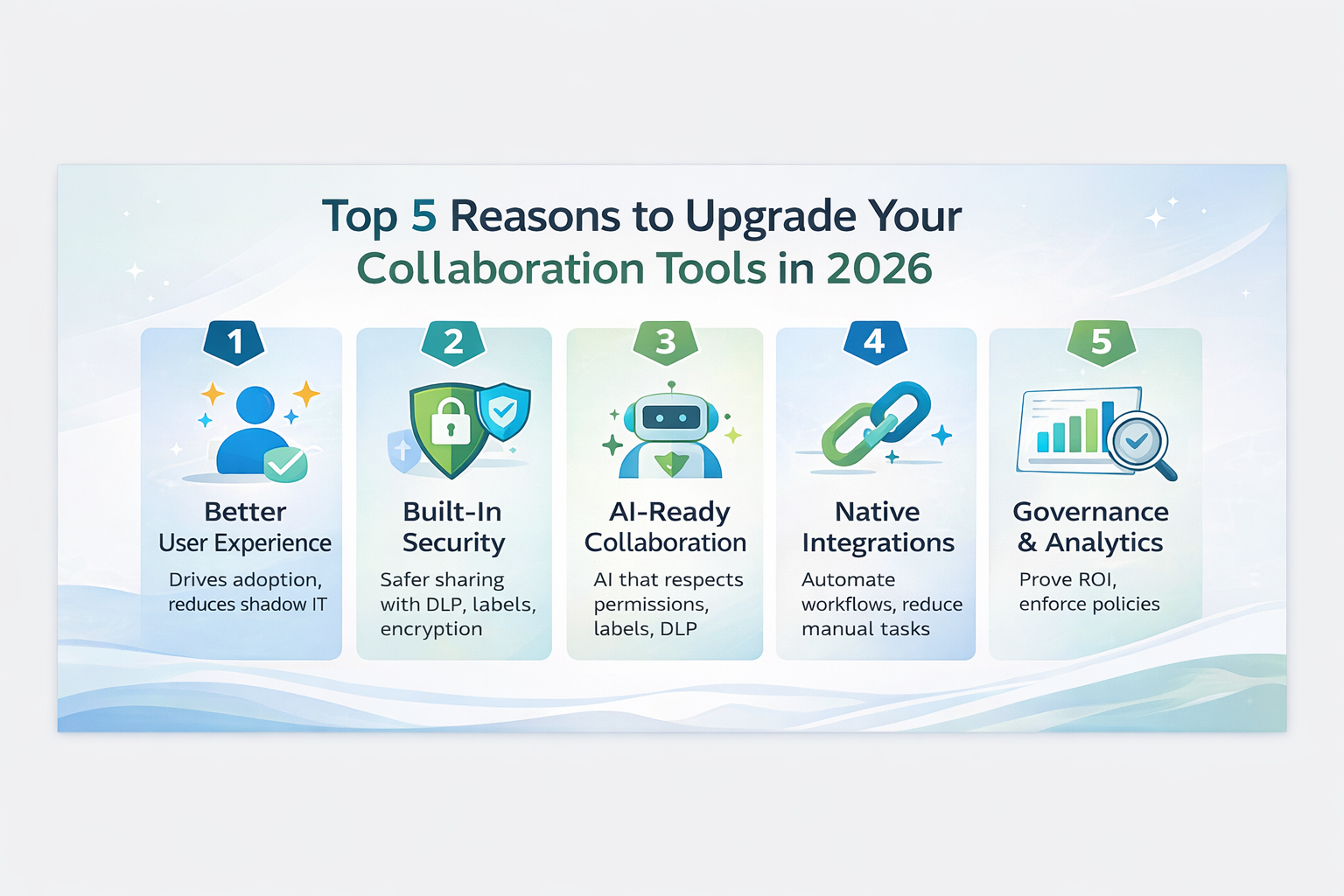
1) Better user experience drives higher adoption
“We have the tools, but people don’t use them” is one of the most expensive problems in IT. Low adoption doesn’t just waste licensing—it pushes teams to work around official systems, which creates shadow IT and data risk. A modern collaboration suite improves the day-to-day experience enough that adoption becomes the default.
What users notice immediately
- Better meetings: improved audio/video reliability, clearer scheduling, and tighter integration between calendar, chat, and files.
- Faster collaboration on content: smoother co-authoring, fewer file version issues, and easier sharing inside and outside the organization.
- More productive async work: fewer “status meetings,” more structured updates, and better ways to track decisions and action items.
- AI assistance where it matters: meeting summaries, highlights, and action items that help teams stay aligned—especially for hybrid work.
AI capabilities can be especially impactful for executives and managers who spend their days context-switching. The difference in 2026 is that AI is increasingly integrated into the platform experience instead of being a separate add-on tool or plugin. That reduces friction and improves consistency—as long as you pair it with the right governance.
Leadership takeaway
Adoption is a security and productivity issue. The best security controls don’t help if teams bypass them. Upgrading to a modern suite can reduce shadow IT by making the approved path the easiest path.
2) Stronger built-in security & safer sharing
Collaboration platforms are one of the largest surfaces for sensitive data movement. Every chat message, link share, file upload, and meeting recording can become a risk if your controls are inconsistent—or if they’re too hard to use. Modern platforms focus on secure-by-default behavior and centralized policy management.
Built-in controls that matter in 2026
- Data Loss Prevention (DLP): policies that help detect and prevent sharing of sensitive information across collaboration locations.
- Classification and sensitivity labels: consistent labeling helps users understand what a file is and what they can do with it—while enabling enforcement behind the scenes.
- Auditing, eDiscovery, and retention: critical for regulated industries and legal readiness, especially when collaboration content becomes “the system of record.”
- Secure external collaboration: better guest access patterns, tighter controls on what external users can see, and improved oversight.
If you’re standardizing on a major collaboration suite, prioritize a consistent policy model across the places where data moves: email, chat, files, meetings, and shared links. The goal is simple: keep collaboration fast, while reducing accidental oversharing.
Why this is a bigger deal in 2026
AI features make it easier than ever to summarize, transform, and redistribute information. That’s great for productivity—unless sensitive data is overshared or pulled into tools without the right controls. DLP and labeling are increasingly used to reduce that risk while preserving collaboration speed.
3) “AI-ready” collaboration needs governance, not guesswork
In 2026, the biggest collaboration upgrades aren’t only about meetings and chat—they’re about how AI interacts with your data. The question to ask isn’t “Do we want AI?” (most organizations do). The question is: Can we adopt AI in collaboration without expanding data exposure?
What “AI-ready” looks like in practice
- AI respects permissions: a user should only see AI-generated results from data they’re authorized to access.
- AI honors labels/encryption where applicable: sensitivity labels and information protection can restrict access and reduce oversharing.
- DLP extends to AI workflows: protect sensitive data in generative AI experiences and reduce leakage to unmanaged AI apps.
- Privacy and compliance posture is clear: vendors publish security and privacy documentation for AI features—review it, and align configuration to your risk tolerance.
Why upgrades matter here
Older collaboration setups often lack consistent identity controls, classification, and policy enforcement across channels. That makes “safe AI” nearly impossible—because AI becomes another layer interacting with already-uncontrolled data. A 2026 upgrade is your chance to standardize:
- Identity and conditional access patterns (who can access what, from where)
- Data classification and retention rules
- DLP policies for sensitive data movement
- Approved apps and integrations
- Auditing and monitoring
When those foundations are in place, you can enable AI features confidently—and avoid the “we turned it on and now we’re nervous” problem.
4) Native integrations reduce swivel-chair work & create measurable productivity gains
Many organizations don’t realize how much time is lost to manual copy/paste workflows: updating tickets, moving meeting notes into project tools, chasing approvals over email, or re-entering information across systems. Modern collaboration suites increasingly include native integrations and workflow automation that eliminate that friction.
Where integration upgrades pay off fastest
- Meetings → tasks: capturing action items and creating tasks automatically rather than relying on someone’s memory.
- Chat → tickets: turning service conversations into trackable work without retyping details.
- Docs → approvals: routing documents through structured review flows instead of email threads.
- Search → knowledge: making it easier for teams to find the “current answer” instead of reinventing it.
A practical integration principle
Don’t integrate everything on day one. Start with a shortlist of high-value workflows and ensure they align with:
- Identity and access control (least privilege)
- Data classification and retention requirements
- DLP and monitoring expectations
- Operational ownership (who maintains the integration)
This is one of the biggest differences between a collaboration upgrade that “feels nicer” and one that actually produces a measurable ROI.
5) Governance & analytics let you prove ROI & continuously improve
In 2026, leadership teams are asking a tougher question about IT investments: Are we getting measurable value? Collaboration tools can absolutely deliver that value—but only if you can measure adoption, reduce fragmentation, and enforce consistent policies.
Analytics that matter
- Adoption and usage: Are teams using the standard platform, or defaulting to side channels?
- Meeting effectiveness: Are meetings turning into decisions and actions—or just calendar noise?
- External collaboration patterns: How often are files shared externally? Are controls being followed?
- Security signal: DLP policy matches, risky sharing events, and policy exceptions that indicate training needs.
Leadership takeaway
Collaboration upgrades shouldn’t be framed as “a nicer chat app.” They should be framed as an operational system that can be governed, measured, and improved—like any other core platform.
How to plan a low-friction collaboration upgrade in 2026
Upgrading collaboration tools can be straightforward—or painful—depending on how you approach it. The difference is usually not the technology. It’s the plan. Below is a proven approach that minimizes disruption and maximizes adoption.
Step 1: Define what “better” means (before you migrate)
Start by documenting the outcomes you want. A few examples:
- Reduce shadow IT by consolidating tools
- Improve meeting effectiveness and documentation
- Standardize external collaboration and sharing controls
- Deploy DLP, labeling, and retention policies consistently
- Enable AI features with guardrails (permissions + labels + DLP)
Step 2: Baseline your current state
You can’t improve what you don’t understand. Assess:
- What tools are in use (official and unofficial)
- Where your sensitive data lives (files, chat, email, recordings)
- How external sharing is happening today
- What compliance requirements apply (retention, legal hold, audit)
- Identity posture (MFA, conditional access, device trust)
Step 3: Build security & governance in parallel with UX improvements
This is the step most organizations miss. They migrate first, then try to bolt on governance later. In 2026, that’s especially risky because AI features can amplify oversharing if your data isn’t classified and controlled. Use your platform’s built-in capabilities for:
- DLP policies aligned to your risk profile
- Sensitivity labels that match business realities (not just “Confidential” vs “Not Confidential”)
- AI privacy and security configuration based on vendor guidance and your compliance posture
- Auditing and retention for legal and operational readiness
Step 4: Pilot with a real team (not a lab environment)
Choose a pilot group that reflects your organization’s reality—hybrid schedules, external collaboration, sensitive data, and day-to-day urgency. During the pilot, focus on:
- Top workflows (meetings, chat, file collaboration, approvals)
- External sharing patterns
- Mobile experience and remote access
- Help desk readiness and knowledge articles
- Policy tuning (DLP false positives, label usability)
Step 5: Execute migration in waves with clear milestones
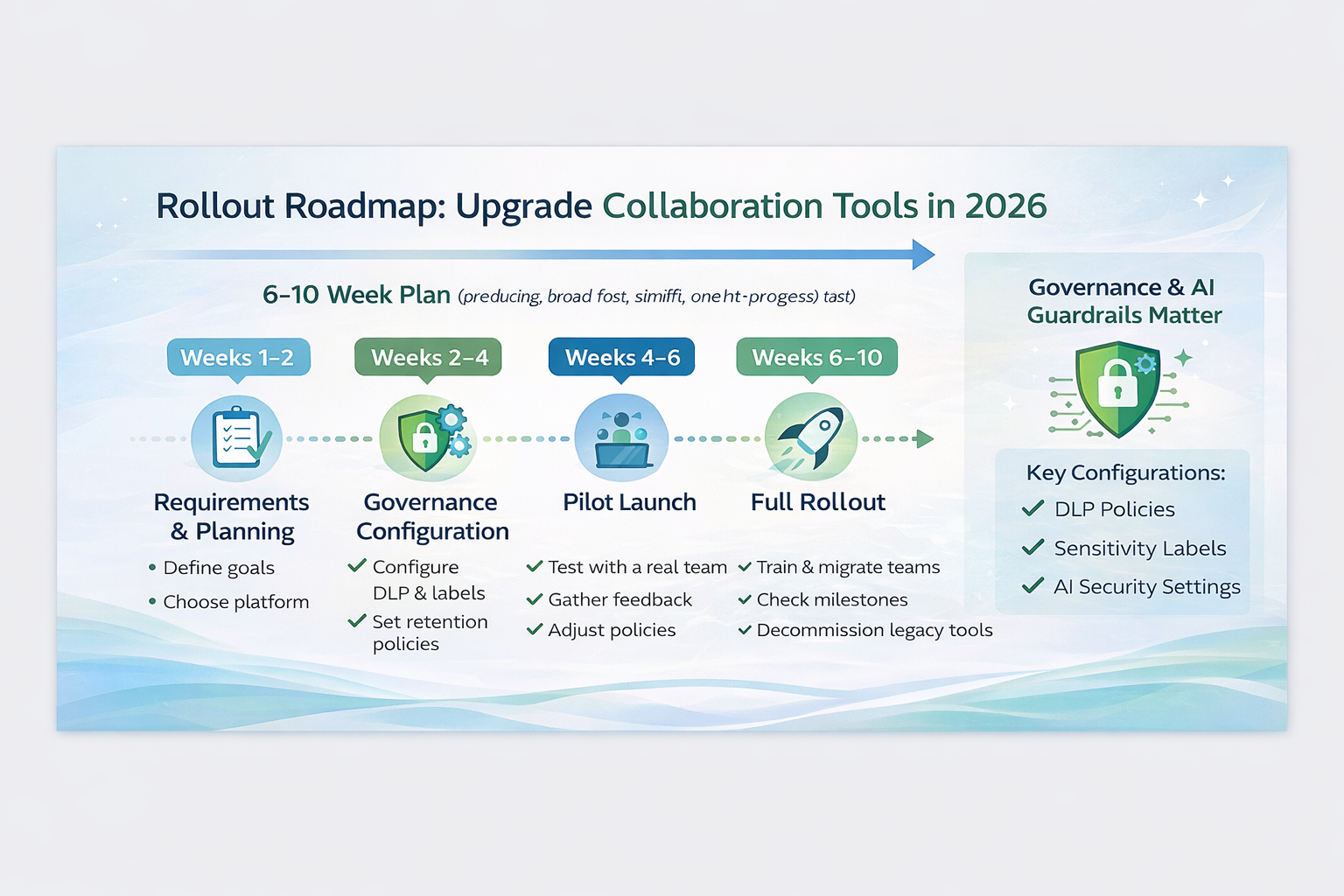
A common low-friction timeline for SMB/mid-market upgrades is 6–10 weeks, depending on complexity:
- Weeks 1–2: discovery, requirements, licensing, target architecture
- Weeks 2–4: governance configuration (labels, DLP, retention), integration planning
- Weeks 4–6: pilot launch + adjustments
- Weeks 6–10: phased rollout by department, training, and decommissioning legacy tools
Step 6: Measure success with adoption & security metrics
Define success metrics you can report to leadership:
- Reduction in tool sprawl (licenses eliminated, apps decommissioned)
- Active usage rates in standard collaboration channels
- Meeting-to-action outcomes (task creation, follow-through)
- DLP events and resolution trends (training impact)
- External sharing policy compliance and exceptions
The goal isn’t perfection on day one. The goal is a governed platform you can improve continuously.
Common pitfalls & how to avoid them
Pitfall: Upgrading tools without upgrading habits
Collaboration is behavioral. If your culture relies on “meeting = progress,” a new platform won’t fix that. Pair upgrades with lightweight norms: decision logs, meeting notes, action item owners, and fewer status meetings.
Pitfall: Turning on AI without guardrails
AI can be transformative—but only if permissions, labeling, and DLP are in place. Use published vendor guidance for AI privacy/security and align configurations to your data risk posture.
Pitfall: Over-integrating too soon
Start with 2–3 high-value integrations that reduce the most manual work, then expand once ownership and security are proven. Apply least-privilege access and strong API oversight so integrations don’t become an invisible back door.
Pitfall: Under-investing in training
Training doesn’t need to be expensive, but it must be intentional. Offer role-based training (executives, managers, power users) and simple “how we work here” guides. Modern tools are easier to use, but people still need a shared playbook.
What to do next: Get your 2026 Collaboration Upgrade Plan
If you’re considering a collaboration upgrade in 2026, the best first step is a short assessment that answers:
- Which platform and license mix fits your workflows and compliance needs?
- What governance controls (DLP, labels, retention) should be enabled from day one?
- How do we migrate content and users with minimal disruption?
- What training plan will drive adoption and reduce shadow IT?
- How will we measure ROI and continuously improve?
Ready to Modernize the Way Your Teams Communicate?
Cyber Advisors partners with organizations of all sizes across a wide range of industries to help them evaluate what’s working (and what isn’t) in today’s collaboration and communication environment—then turn that insight into a practical, high-impact upgrade plan. From assessing platforms, workflows, security and governance requirements, and user adoption barriers to designing the right roadmap and implementing improvements with minimal disruption, we help clients modernize communication tools to measurably improve productivity, resilience, and the employee experience. If you’re ready to reduce friction, strengthen security, and get more value from the tools your teams use every day, reach out to Cyber Advisors to discuss your unique communication goals and challenges—and we’ll help you build a clear path forward.