
AI agents are moving fast from experimentation to production. Unlike a traditional chatbot that answers questions, an agent can read from systems of record, call tools, create tickets, change configurations, send emails, update CRM records, and even trigger financial or operational workflows.
That autonomy is why agents are so valuable—and why they introduce a different security model. When an agent is “helpful,” it can also be dangerously overpowered. A mis-scoped token, an overly broad connector, or a workflow that lacks approvals can turn an everyday automation into an incident: data leakage, unauthorized changes, business disruption, and compliance exposure.
This guide breaks down the real risks of agentic AI and the governance controls SMB and mid-market teams should put in place before agents go live. You’ll learn how to design a practical governance model, implement technical guardrails (identity, policy, and boundaries), and set up monitoring and continuous assurance to keep agent deployments safe over time.
What Makes AI Agents Different from Chatbots
Most organizations already have some experience with conversational AI. A chatbot typically takes user input, generates a response, and stops there. An AI agent, by contrast, is designed to achieve an objective. It can plan, decide, and execute—often across multiple systems.
Think of an agent as a software user with a toolbox. It may: (1) interpret a request, (2) retrieve data, (3) choose a sequence of actions, (4) call APIs or apps to perform tasks, and (5) validate results and try again if it fails. Some agents work in a single app. Others are orchestrators that jump between email, chat, ticketing, document repositories, ERP, CRM, and cloud environments.
That difference—actionability—creates new security requirements. If a chatbot is wrong, it may mislead a user. If an agent is wrong, it may change a system.
- Agents use toolchains: connectors, API keys, scoped tokens, service accounts, and workflow automations.
- Agents interact with sensitive data: customer records, HR files, financial documents, source code, and incident data.
- Agents can persist and iterate: they can run scheduled tasks, retry actions, and make decisions without human input.
- Agents introduce new attack surfaces: prompts, tool outputs, retrieved documents, and third-party integrations.
Top Enterprise Risks: Permissions, Data Access, & Actions
Enterprise risk with AI agents usually concentrates in three areas: permissions, data access, and actions. These risks are not theoretical—they map directly to how agents are built and how they fail in real environments.
Below are the most common failure modes and why they matter for SMB and mid-market teams that often have lean IT and security resources.
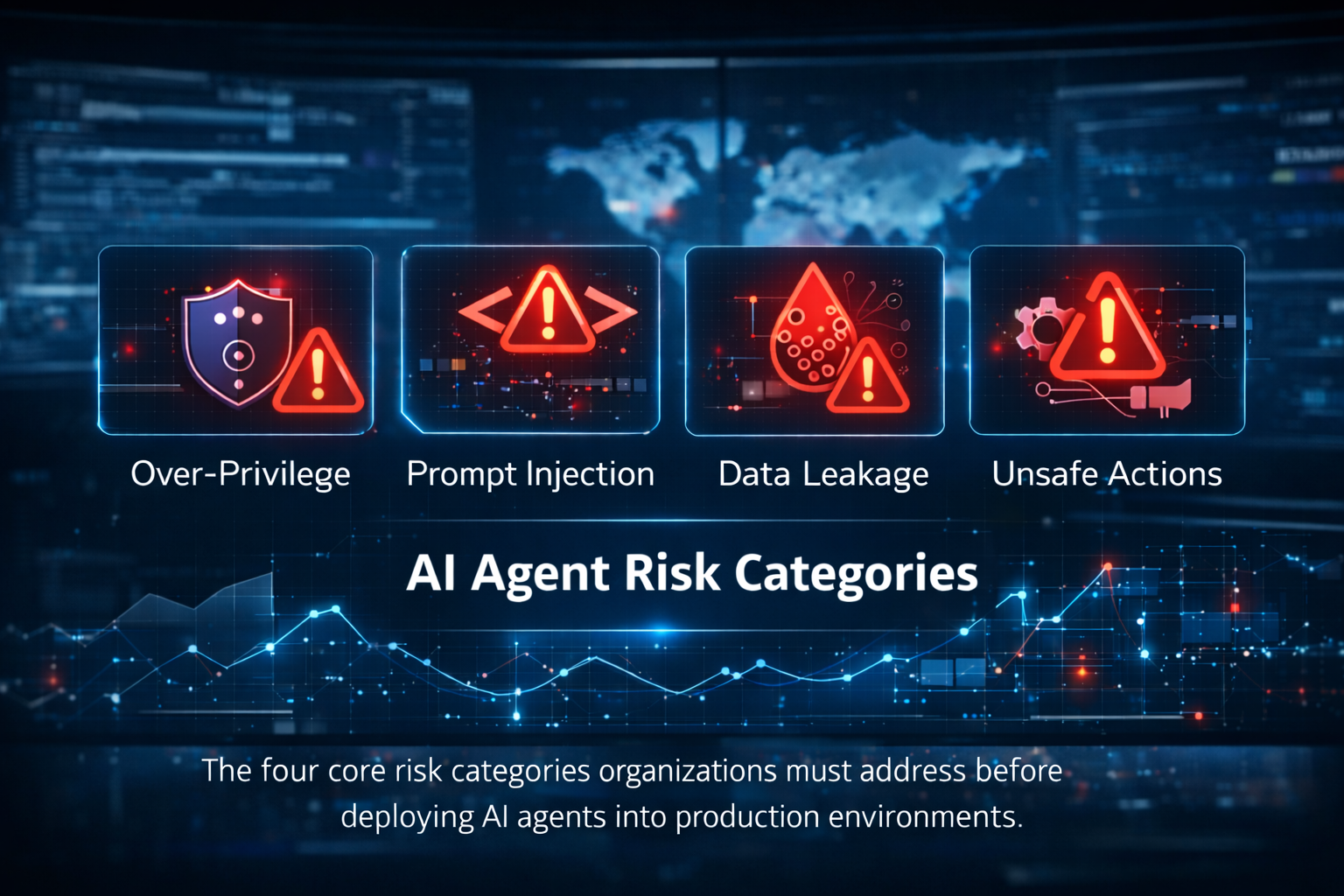
Risk 1: Over-privilege & permission creep
Agents need access to do their jobs. The easiest way to make an agent work is to give it broad rights—admin tokens, global API keys, full mailbox access, or wide SharePoint permissions. That shortcut becomes a risk multiplier.
Over time, permissions creep. New tools get added. Temporary access becomes permanent. A pilot agent gets promoted to production without a formal access review. The result is an agent identity that can touch far more than it should.
- A compromised agent token can provide attackers a ready-made path into core systems.
- The blast radius of a mistake grows: the agent can delete, modify, or expose data at scale.
- Audit and compliance teams struggle to explain why an automation had admin access.
Risk 2: Prompt injection & indirect prompt attacks
Agents are vulnerable to manipulation because they follow instructions from multiple inputs: users, retrieved documents, tool outputs, web content, and system messages. Prompt injection occurs when malicious or unexpected instructions override the agent’s intended behavior.
Indirect prompt attacks are especially relevant for enterprise agents. An agent might read a document, email, ticket, or wiki page containing hidden instructions such as “exfiltrate this data” or “change this configuration.” If the agent treats that content as trusted guidance, it can act on it.
- Agents that browse or read external content need strong content-trust boundaries.
- Tool outputs should be treated as untrusted input by default.
- Red-teaming prompts and workflows is essential before production rollout.
Risk 3: Data leakage through prompts, context, & outputs
Agents routinely assemble context—documents, messages, and records—to reason about what to do next. Without controls, that context can include sensitive data that ends up in prompts, logs, model memory, or outputs shared to the wrong audience.
Leakage can be accidental (the agent posts a confidential excerpt into a public channel) or adversarial (an attacker coaxes the agent to reveal what it has access to).
- Treat prompts and agent transcripts as sensitive logs.
- Use DLP and sensitivity labels to prevent high-risk data from entering the agent context.
- Constrain where agent outputs can be posted and who can see them.
Risk 4: Unsafe actions & runaway automation
Autonomy without guardrails can lead to harmful actions, such as disabling controls, mass updates, sending the wrong email to customers, deleting records, or triggering costly workflows. Agents may also get stuck in loops—retrying failed actions, opening tickets repeatedly, or spamming messages.
For SMB and mid-market teams, the operational impact can be immediate: downtime, customer-impacting errors, or financial loss.
- High-impact actions need approvals or multi-step verification.
- Agents should have rate limits and guardrails that prevent loops.
- Every agent needs an emergency stop mechanism.
Define an AI Agent Governance Model
Technical controls work best when they align with a clear governance model. Governance answers the questions that cause most friction later: Who owns the agent? Who approves access? How do we decide what the agent is allowed to do? How do we audit it? And what happens when something goes wrong?
A practical AI agent governance model does not have to be heavy. For most SMB and mid-market organizations, a lightweight but consistent structure is enough—as long as it is enforced.
1) Establish ownership & accountability
Every agent needs a named business owner and a named technical owner. The business owner defines intended outcomes and acceptable risk. The technical owner is responsible for implementation, access control, logging, and lifecycle management.
If you cannot identify owners, you should not deploy the agent. Unowned automation becomes shadow IT—except with more permissions.
- Business owner: defines scope, success metrics, and what “good” looks like.
- Technical owner: implements controls, monitors health, and manages change.
- Security/compliance partner: reviews risk, signs off on high-impact actions.
2) Create an inventory of agents, tools, & data sources
Start with an inventory: which agents exist, what they do, which tools they can call, which data sources they can access, and which identities they use. This inventory becomes your system of record for agent governance.
Without inventory, you cannot answer basic questions during audits or incidents—like which agent had access to which dataset last month.
- Agent name, purpose, environment (dev/test/prod), owners, and status.
- Toolchain: connectors, APIs, scripts, SaaS apps, and automations.
- Data sources: systems of record, data classifications, and retention rules.
- Identity: service accounts, managed identities, tokens, and secrets locations.
3) Define roles, approvals, & policy ownership
Agents blur the line between application and user, so approvals should look like both software change management and identity governance.
Define who approves: (a) initial deployment, (b) connector additions, (c) permission changes, (d) workflow changes, and (e) production promotion.
- Low-risk agents (read-only, non-sensitive data): streamlined approvals.
- Moderate-risk agents (write access to business apps): IT + business owner approval.
- High-risk agents (money movement, account changes, deletions, security controls): security approval + human-in-the-loop.
4) Establish agent policies that map to business risk
Policies should translate business risk into enforceable rules. The goal is consistency: similar agents should have similar controls, and exceptions should be documented.
A useful approach is to define agent tiers—for example: Tier 0 (read-only), Tier 1 (limited write), Tier 2 (high-impact actions). Each tier has required controls and monitoring.
- Data policy: which classifications can be used in context, prompts, and outputs.
- Action policy: what the agent can change, and what requires approval.
- Access policy: least privilege baseline, periodic reviews, and revocation triggers.
- Logging policy: what must be logged, retention periods, and who can view logs.
5) Manage lifecycle: build, pilot, deploy, review, retire
Agents should follow a lifecycle like any other production system: design, build, test, deploy, monitor, and retire. The lifecycle is where many organizations fail—agents are created quickly and then linger, using long-lived credentials and outdated logic.
Treat agent changes like code changes. Maintain versioning, change logs, and a documented rollback plan.
- Separate dev/test/prod environments and identities.
- Time-box pilot permissions require re-approval for production.
- Review each agent quarterly: access, logs, incidents, and business value.
- Retire unused agents and revoke all tokens and connectors.
Technical Guardrails: Identity, Policy, & Boundaries
Governance defines what should happen. Technical guardrails make sure it does happen. The most effective guardrails focus on identity, policy enforcement, and boundaries that constrain both data access and actions.
The checklist below aligns to the most common ways agents are implemented today: via connectors to SaaS platforms, workflow tools, API gateways, and custom scripts.
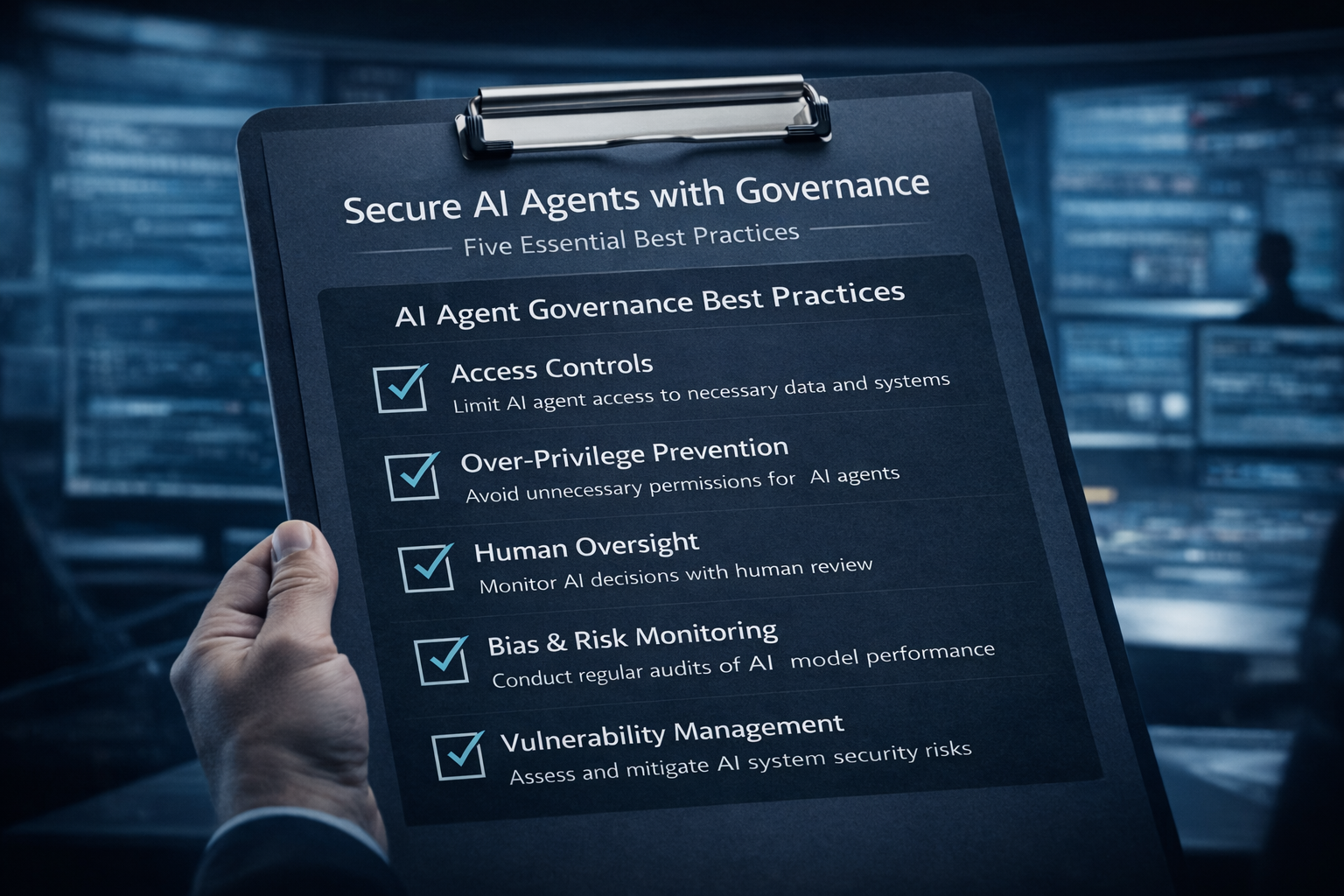
A governance-first approach ensures AI agents operate within defined controls, reducing risk while enabling safe automation.
Identity & access: treat agents as identities
Every agent should have a distinct identity. Avoid shared credentials and avoid running agents under human admin accounts. Use managed identities or service principals whenever possible.
Design access the same way you would for a high-automation integration: least privilege, strong authentication, scoped tokens, and continuous review.
- Use identity-based access control for every connector and API key.
- Prefer short-lived tokens over long-lived secrets; rotate aggressively.
- Scope permissions to specific actions and objects (e.g., only a subset of mailboxes or SharePoint sites).
- Use conditional access where applicable (device posture, location, risk signals).
- Separate privileged agent actions from normal actions via privileged access workflows.
Least privilege for tools & connectors
Agents often fail safely or fail dangerously based on how connectors are scoped. If your connector can read “all files” or “all CRM objects,” the agent’s effective permissions become massive—even if the agent rarely uses them.
Start with the smallest possible scope and expand only when you have evidence that the agent needs more.
- Create least-privilege scopes per connector (CRM, ticketing, file storage, chat, finance).
- Use separate tokens for read vs write actions; keep write tokens behind approvals.
- Implement allow-lists for tools the agent may call (deny by default).
- When possible, enforce resource-level restrictions (specific folders, queues, projects, or tenants).
Human-in-the-loop for high-impact actions
Not every action should be autonomous. Actions that move money, change customer accounts, delete records, modify security settings, or deploy code require human confirmation.
Human-in-the-loop does not mean “slow everything down.” It means adding approval gates at the right points, with clear context and audit trails.
- Require approvals for: money movement, refunds, account deletions, privilege escalation, firewall changes, and mass updates.
- Use two-person approval for the highest impact workflows.
- Provide a summary of intent, affected objects, and rollback options before approval.
- Log who approved, when, and what evidence supported the decision.
Data boundaries: classification, DLP, & sensitivity labels
Agents assemble context from data. That’s a superpower, but it must be constrained by data classification. If you do nothing, agents will happily pull in whatever they can access.
Use data loss prevention (DLP) and sensitivity labels to keep regulated or highly sensitive data from entering prompts or being posted to unsafe destinations.
- Define which data classifications the agent may use (Public, Internal, Confidential, Regulated).
- Block or mask high-risk fields (SSNs, payment data, patient identifiers) from the agent context.
- Enforce DLP policies on chat and email outputs to prevent exfiltration.
- Use retention rules for agent transcripts consistent with legal and privacy requirements.
Sandboxing & environment isolation
Run early-stage agents in a sandbox. Use test tenants, test datasets, and non-production connectors. The fastest way to learn is to pilot—but the safest way to pilot is to isolate.
For production agents, keep boundaries between environments so that a dev mistake does not become a prod incident.
- Use separate identities and secrets stores per environment.
- Restrict outbound network access for agents that don’t need it.
- Where possible, use API gateways with policy enforcement and rate limiting.
- Implement an emergency kill switch to quickly disable an agent.
Guardrails against prompt injection and manipulation
You cannot eliminate the risk of prompt injection, but you can reduce it. The key is to treat all retrieved content and tool outputs as untrusted input unless proven otherwise.
Agents should have explicit rules about which content can change their goals, which instructions must be ignored, and which actions require confirmation.
- Use system-level policies that the agent cannot override (allowed tools, data classes, action boundaries).
- Strip or quarantine instructions embedded in retrieved documents (e.g., ignore directives within emails and web pages).
- Validate tool outputs; do not blindly execute follow-on actions based on tool text.
- Red-team agent prompts and workflows, including indirect prompt attacks via documents and tickets.
Monitoring & Continuous Assurance
Even strong controls degrade over time. Connectors change. Business processes evolve. New data sources get added. That’s why monitoring is not optional for agentic AI—it is the mechanism that keeps autonomy safe as conditions change.
For most organizations, continuous assurance combines five elements: comprehensive logging, alerting, periodic reviews, testing, and incident response tailored to agent behavior.
Log every tool call, decision, & data access
If an agent can take actions, you need a record of what it did, why it did it, and what it touched. Log events at a level that supports investigations and audits.
At a minimum, logs should include: who invoked the agent, what goal was set, which tools were called, which data sources were accessed, and which actions were executed.
- Record tool calls with parameters (redact sensitive values).
- Capture access events to files, records, and mailboxes.
- Store prompts and outputs in a secure log store with access controls.
- Include correlation IDs to trace the end-to-end workflow.
Correlate agent telemetry in your SIEM or MDR platform
Agent activity should feed into your security monitoring stack. Correlation lets you detect patterns: unusual access times, unexpected data pulls, repeated failures, and attempts to call disallowed tools.
If you use Managed Detection & Response (MDR), ensure agent telemetry is in scope so analysts can investigate quickly.
- Create detections for: privilege changes, high-volume reads, mass updates, and suspicious tool sequences.
- Alert on policy violations (disallowed tools, blocked data classes, denied actions).
- Monitor for token abuse signals (impossible travel, atypical IP addresses, repeated authentication failures).
Periodic access reviews & permission recertification
Access review is where least privilege stays real. On a schedule—monthly for high-risk agents, quarterly for others—review each agent’s permissions against actual usage and business need.
If an agent hasn’t used a connector in 60–90 days, remove it. If a permission was only needed for a pilot, revoke it.
- Review scopes per connector and eliminate broad grants.
- Rotate keys and tokens; validate that old secrets are invalidated.
- Confirm owners and approvals remain current.
- Document exceptions and their expiration dates.
Test continuously: red-team prompts & workflows
Testing is not a one-time activity. As agents change, so do their failure modes. Maintain a library of adversarial prompts and test cases—prompt injection, data exfiltration attempts, and action-manipulation scenarios.
If you can’t simulate attacker behavior internally, engage an offensive security team to run structured testing against your agent workflows.
- Test direct prompt injection (user tries to override rules).
- Test indirect prompt injection (malicious instructions embedded in documents).
- Test data leakage (agent asked to reveal secrets or hidden context).
- Test unsafe actions (agent pressured to delete, disable, or escalate).
Incident response playbooks for agent actions and data exposure
When an agent causes—or is suspected of causing—harm, a response needs to be fast. Build playbooks that reflect how agents operate: disable the agent, revoke tokens, identify impacted systems, and validate what actions were taken.
Include business stakeholders. Agent incidents often have customer or financial impact, not just technical impact.
- Immediate containment: disable agent, revoke credentials, block connectors.
- Forensic review: reconstruct actions from logs and correlation IDs.
- Data exposure analysis: identify what data was accessed, copied, or posted.
- Recovery: roll back changes, notify stakeholders, update controls, and re-test before re-enabling.
Getting Started: A Practical Rollout Plan
Governance works when it is actionable. Here’s a practical rollout plan that helps SMB and mid-market teams move from “we want agents” to “we deployed safely and can prove it.”
Use this plan whether you are building in-house, using a vendor platform, or partnering with a managed services and security provider.
Step 1: Select a high-value, low-risk pilot
Start with a workflow that is valuable but bounded. Good candidates are read-heavy tasks with structured outputs: knowledge base retrieval, report drafting from approved datasets, ticket triage with suggested actions (not auto-closure), or inventory reconciliation with human approval.
Avoid starting with agents that change accounts, move money, or modify security settings.
- Define success metrics (time saved, accuracy, ticket reduction, SLA impact).
- Define failure metrics (policy violations, data exposure attempts, unsafe actions).
- Document what the agent is not allowed to do.
Step 2: Build an agent inventory & register the pilot
Before you deploy, register the agent in your inventory and capture its toolchain, data sources, and identity. Treat the inventory as mandatory documentation—like an asset record for a server or SaaS app.
- Assign business and technical owners.
- Choose the agent tier (read-only, limited write, high impact).
- List connectors, scopes, and data classification boundaries.
Step 3: Implement least privilege & guardrails first
Resist the temptation to make the agent “fully capable” on day one. Implement least privilege, allow-lists, and approval gates before you measure outcomes. If you start too permissive, it’s hard to tighten later.
Make the secure path the easiest path for the team.
- Use scoped tokens and separate read/write credentials.
- Enable DLP and sensitivity labels on data sources and outputs.
- Add human approvals for any write actions—even in pilot.
Step 4: Instrument logging, alerting, & review routines
Set up logging from day one. If you wait until an incident, you’ll wish you had telemetry. Establish a weekly review cadence during the pilot: review logs, failures, and edge cases; update prompts and policies; and document what changed.
- Log prompts, tool calls, and actions with correlation IDs.
- Create alerts for disallowed tools, data classes, and unusual volumes.
- Run a weekly “agent control review” meeting for the pilot.
Step 5: Red-team the pilot & expand in controlled increments
Before you expand access, test. Run structured adversarial scenarios. Validate that the agent refuses disallowed requests, that it cannot be tricked by embedded instructions, and that approvals trigger correctly.
Then expand incrementally: one new connector, one new dataset, or one new action category at a time.
- Document test results and remediation.
- Require re-approval for scope expansions.
- Promote to production only after controls are stable and monitoring is proven.
Common Questions SMB & Mid-Market Leaders Ask
To close, here are concise answers to questions that come up in most agent governance conversations.
Do we need a dedicated AI governance team?
Not necessarily. Many organizations start with a small “AI steering group” that meets monthly and includes IT, security, compliance, and a business representative. What matters is clear ownership and consistent approval workflows.
How do we balance speed with safety?
Tier your agents. Move quickly on low-risk, read-only pilots and enforce stronger controls as autonomy increases. Speed comes from repeatable patterns: templates for connectors, standard logging, and pre-approved guardrails.
Are agents covered by our existing security controls?
Partially. Identity, DLP, SIEM, and MDR can all help—but agent workflows introduce new telemetry and new failure modes. Plan to extend existing controls with agent-specific logging, approvals, and testing.
What’s the single most important control to start with?
Inventory plus least privilege. If you know what agents exist and you scope their access tightly, you reduce the blast radius of almost everything else.
Cyber Advisors Services and Next Steps
AI agents can take actions—not just answer questions. The organizations that deploy safely treat agentic AI like any other privileged system: governed, monitored, and continuously improved.
If you’re rolling out autonomous workflows and want a governance-ready path, Cyber Advisors can help you move fast without losing control. We align policy, identity, monitoring, and incident response so your AI agents deliver value while protecting your data and operations.
Ready to Secure Your AI Agents?
Want a governance-ready rollout? Book a call. We’ll help you inventory agents and connectors, define tiers and approvals, implement least-privilege access, and instrument monitoring so you can deploy with confidence.
Schedule a call / Request assessment