

Most SaaS risk does not come from sophisticated actors “hacking the cloud.” It comes from quiet, everyday configuration drift: an over-shared folder, a bypassed MFA policy, a third-party app granted broad permissions, or a critical logging setting that was never enabled. For SMB and mid-market organizations, the issue is rarely a lack of intent or effort. It's that SaaS security is fragmented across dozens—sometimes hundreds—of admin consoles, products, and owners, all continuously changing as the business evolves.
SaaS Security Posture Management (SSPM) gives IT and security teams a disciplined, repeatable way to regain control. With SSPM, you can define secure baselines, continuously detect misconfigurations and risky integrations, and demonstrate control alignment across the SaaS platforms your business depends on—especially Microsoft 365, Google Workspace, and Salesforce. For organizations that need to be both agile and secure, SSPM is a practical path to strengthening SaaS defenses without slowing down the business.
In this guide, we’ll cover:
- Why SaaS security posture breaks down in real environments
- What SSPM is (and what it isn’t)
- The SSPM control areas that matter most
- How to roll out SSPM without disrupting the business
- Mapping SSPM findings to compliance and audits
- What to look for in an SSPM program or provider
- A low-friction next step: a posture assessment and 30-day baseline roadmap
Why SaaS security posture breaks down in real environments
If your organization runs Microsoft 365 or Google Workspace, you are already operating in a world where identity and configuration form the new perimeter. When you add Salesforce, you introduce a high-value data platform that reaches deeply into marketing, finance, and customer support workflows. Each of these platforms is engineered with significant vendor investment in security. However, default configurations, the breadth of available features, and the way teams actually deploy and use SaaS create real gaps—exposures that determined attackers and well-meaning users alike can unintentionally exploit.
1) SaaS sprawl & shadow IT
SaaS adoption accelerates because it is simple to initiate. A team leader can authorize a subscription, provision a new tool, and connect it to Microsoft 365 or Google within minutes. That speed is powerful for agility—and a clear challenge for governance. Every additional SaaS tool typically introduces:
- Another place data can live or be copied
- Another set of users and roles
- Another set of admin settings
- Another set of integrations and tokens
- Another set of audit logs you may or may not be collecting
Over time, that sprawl creates critical “unknown unknowns”: applications that retain access long after the business has stopped using them, accounts that are never deprovisioned, and integrations that no one clearly owns—but that still have a path into your data and operations.
2) Configuration drift over time
Even if you begin with a strong, well-designed baseline, your SaaS posture will change over time. Configuration drift occurs as new features are introduced, administrators relax settings to resolve immediate operational issues, integrations request broad permission scopes, and incremental changes accumulate without a disciplined, recurring review process.
3) Identity gaps: users, admins, & service accounts
In SaaS, identity is the primary front door—and most breaches still begin at that layer. Posture degrades when MFA is applied inconsistently, legacy authentication remains enabled, administrative privileges are broadly assigned, service accounts are left unmanaged, and OAuth applications or API tokens are approved without structured review or ongoing oversight.
4) Ownership is scattered
Microsoft 365 is often formally “owned” by IT. Google Workspace may be jointly managed by IT and digital or collaboration teams. Salesforce is frequently governed by Sales Operations. When responsibility is distributed this way without a single accountable owner for security posture, baselines drift, evidence becomes fragmented, and audits turn into reactive, time-consuming exercises instead of a predictable, controlled process.
What SSPM is & isn’t
SSPM in plain language
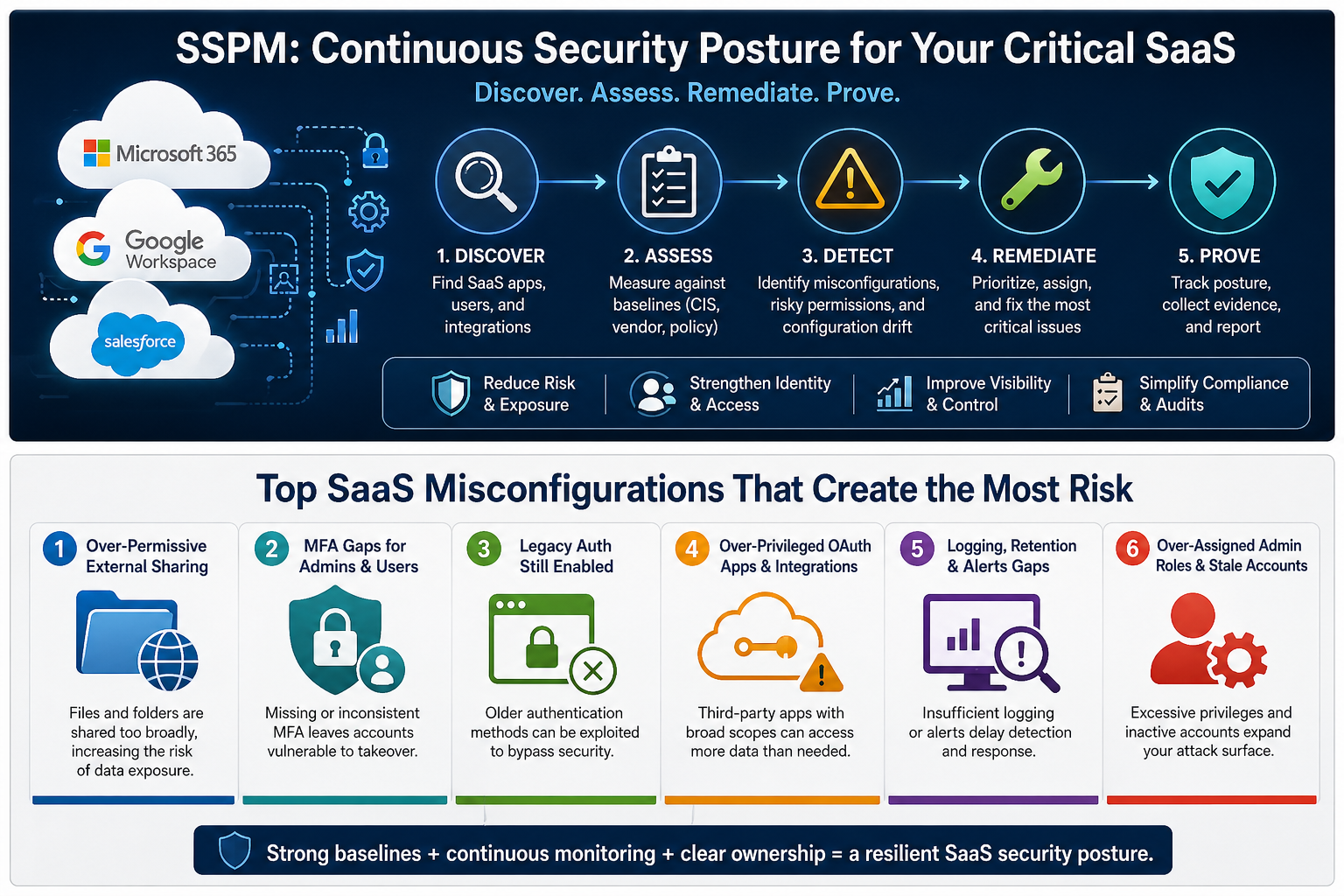
SSPM is continuous control monitoring purpose-built for SaaS. It enables you to discover SaaS applications and integrations, measure configurations against defined baselines (including vendor guidance, CIS benchmarks, and your internal policies), detect misconfigurations and risky changes in real time, prioritize and route findings for remediation, and report posture trends in a way that informs leaders and satisfies auditors.
What SSPM is not
SSPM does not replace endpoint security, network security, or your SOC/MDR program—and it is not a “set and forget” control. It delivers the greatest value when it is anchored to a clear baseline policy, defined remediation owners, and a disciplined operating workflow: detect → ticket → fix → verify.
SSPM vs CSPM vs CASB vs SSE
- CSPM secures cloud infrastructure (AWS/Azure/GCP).
- SSPM secures SaaS configurations (M365/Google/Salesforce).
- CASB helps discover/enforce cloud policies and protect data.
- SSE delivers cloud-based security controls (often CASB + ZTNA + SWG + DLP).
Common quick wins
- External sharing settings are too permissive
- MFA gaps for admins or high-risk groups
- Legacy auth is still enabled
- OAuth apps with dangerous scopes
- Logging/retention gaps and missing alerts
- Over-assigned admin roles and stale privileged accounts
The SSPM control areas that matter most
Control area 1: Identity & access
Goal: Make credential compromise harder and limit blast radius.
- Require MFA for all users; stronger methods for admins/privileged roles.
- Use conditional/context-aware access for admin portals and high-risk apps.
- Minimize admin privileges; separate admin accounts; consider just-in-time elevation.
- Govern service accounts and monitor for unusual activity.
- Review OAuth apps/tokens; require admin approval and periodic reviews.
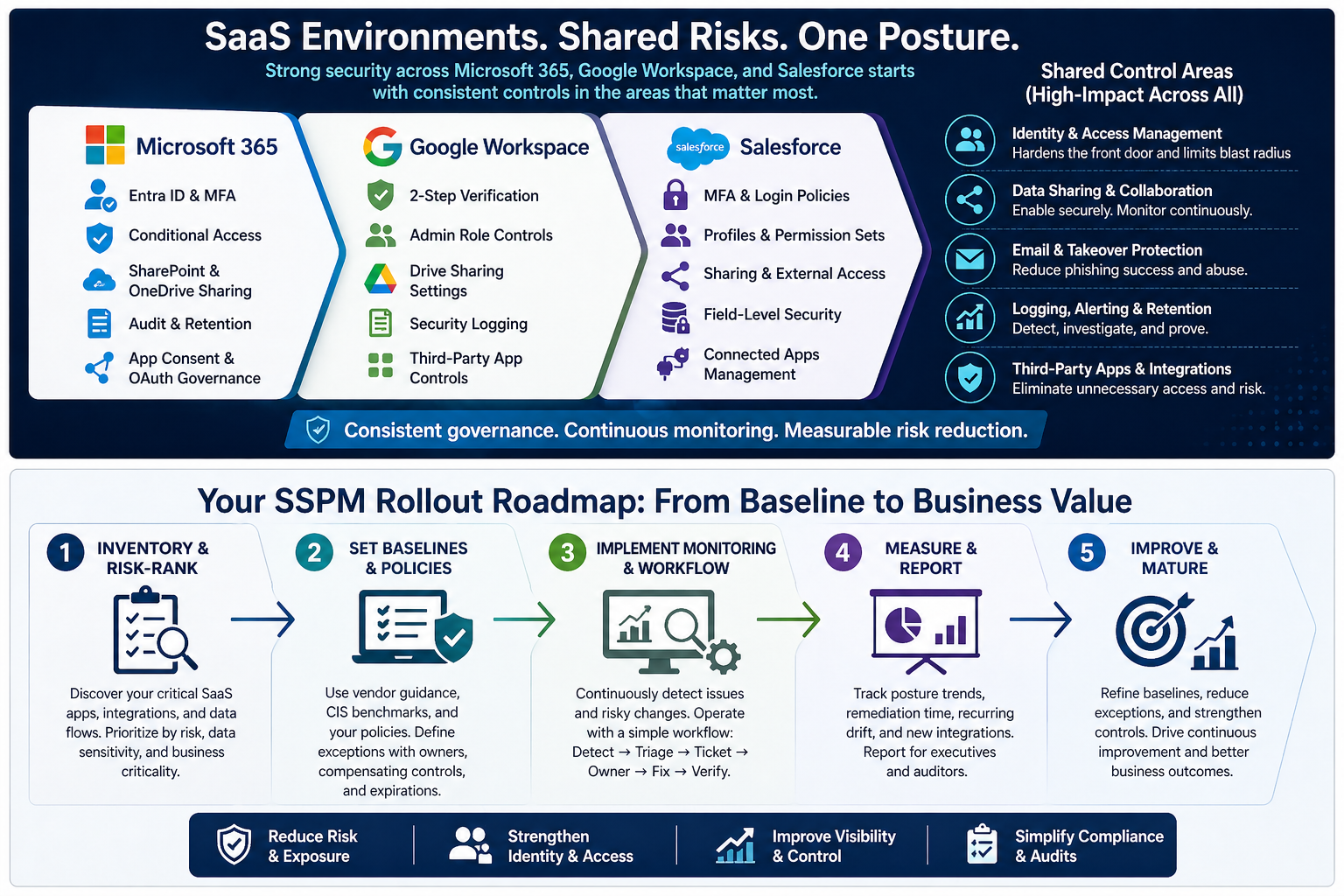
Starter baselines: M365 (MFA + block legacy auth + Conditional Access + app consent governance), Google (2SV + tighten admin roles + third-party OAuth controls), Salesforce (MFA + hardened sessions + least-privilege profiles/permission sets).
Control area 2: Data sharing & external collaboration
Goal: Enable collaboration without uncontrolled data distribution.
- Define external sharing policy by data type and group.
- Restrict “anyone with link”; require expiration/authentication where appropriate.
- Control guest access; tie external collaboration to sponsorship.
- Monitor and remediate oversharing (public links, risky permissions, forwarding).
Control area 3: Email & account takeover protections
Goal: Reduce phishing success and limit the impact of compromised accounts.
- External forwarding restricted
- Alerts for suspicious inbox rules and risky sign-ins
- Anti-phishing protections enabled (where available)
- Domain authentication aligned (SPF/DKIM/DMARC, where applicable)
Control area 4: Logging, alerting, & retention
Goal: Be able to answer “what happened?” and prove it.
- Logging enabled and retained per policy
- Alerts configured and routed to responders
- Admin actions audited
- Configuration changes tracked over time
Control area 5: Third-party apps & integration permissions
Goal: Prevent “permanent backdoors” created by OAuth apps, API tokens, and connected services.
- Discover all connected apps/tokens/integrations
- Assign owners and define purpose
- Review scopes/permissions; deny high-risk scopes by default
- Re-approve on a schedule (quarterly for high-risk apps)
- Revoke unused access
How to roll out SSPM without disrupting the business
Phase 1: Inventory critical SaaS & risk-rank
Inventory your core SaaS platforms and adjacent systems (such as HR, finance, payroll, and support), along with identity/SSO coverage and key integration and data flows. Then, rank each based on data sensitivity, level of external collaboration, integration depth, and overall business criticality.
Phase 2: Set baselines using CIS & vendor guidance
Start with vendor-recommended security settings, then strengthen them by layering in relevant CIS benchmarks. From there, incorporate your own policy requirements—such as retention standards, access review cadence, and boundaries for external sharing. Establish a formal exception process with named owners, documented compensating controls, and clear expiration dates so risk does not become permanent by default.
Phase 3: Implement continuous monitoring & workflow
Use a simple operating model: Detect → Triage → Ticket → Owner → Fix → Verify → Report. Start with the most impactful categories (identity gaps, oversharing, risky OAuth apps, missing logs/retention) and expand over time.
Phase 4: Measure, report, & tune
Track posture trends by platform and category, time-to-remediate, recurring drift themes, exceptions, and new integrations. Report in business terms for executives and in evidence terms for auditors.
Mapping SSPM findings to compliance & audits
SSPM transforms “we think we are aligned” into continuous, defensible evidence. For SOC 2 and ISO 27001 programs, SSPM reinforces key control areas such as access control, change management, logging and monitoring, and vendor and integration governance. For HIPAA-regulated environments, SSPM helps operationalize audit controls through logging, strengthen access controls, and enforce structured third-party governance.
Evidence collection & audit trails
- Baseline definitions and policy alignment
- Configuration state snapshots with timestamps
- Change history (who/what/when)
- Ticket trails for remediation and verification
- Exceptions with approvals and expirations
What to look for in an SSPM program or provider
- Depth of coverage: meaningful controls for M365/Google/Salesforce, including tenant and sub-tenant nuances.
- Alert fidelity: context-aware guidance and a remediation order aligned to real-world attacker paths.
- Integrations: ticketing + SIEM/SOAR workflows so findings become action.
- Reporting: posture trends for leaders and evidence-ready exports for audits.
- Operational ownership: clear triage, routing, verification, and exception/risk acceptance handling.
How to make SSPM stick
To keep SSPM both lightweight and effective, put three elements in place: (1) clearly defined owners for each SaaS platform and control area, (2) a structured exception process with explicit expiration dates, and (3) a recurring monthly posture review that tracks trend lines, open high‑severity items, and newly introduced integrations.
Common pitfalls & how to avoid them
- Tool-first deployment: build workflow and ownership first.
- Fixing everything at once: prioritize identity gaps, oversharing, risky OAuth apps, and missing logs.
- Over-restricting collaboration: use tiered policies and clear exceptions.
- Ignoring SaaS outside SSO: inventory and bring apps under SSO where feasible.
- Weak recovery paths: document help desk verification and privileged recovery flows.
- No measurement: track posture trends and time-to-remediate.
Cyber Advisors services & next steps
If your goal is to close SaaS security gaps without slowing down the business, the most effective place to start is with a clear baseline and a practical, repeatable operating model.
Cyber Advisors can help you stand up a low-friction SSPM program focused on Microsoft 365, Google Workspace, and Salesforce. In 30 days, we will deliver:
- Baseline assessment aligned to vendor guidance and CIS-informed best practices
- Integration inventory (OAuth apps, connected apps, tokens) with risk ranking
- Prioritized remediation roadmap with owners, timelines, and “what might break” notes
- Continuous monitoring workflow design (detect → ticket → fix → verify)
- Executive and audit-ready reporting approach, including evidence collection