

Ransomware has changed. In 2026, “encrypt the files” is only one piece of a bigger business model. Modern ransomware groups steal data first, weaponize identity, disable recovery options, and spread laterally to maximize downtime.
If your ransomware plan starts and ends with backups, you may still be one compromised credential away from days—or weeks—of disruption.
This guide explains what actually works for SMB and mid-market organizations: layered prevention and detection, containment, immutable backups, recovery testing, and business continuity so you can restore clean and resume operations quickly. You’ll also get a practical 30–60–90 day roadmap to raise ransomware resilience without boiling the ocean.
How Modern Ransomware Bypasses “Backup-Only” Strategies
Backups are necessary. They are not sufficient. That’s not hype; it’s a reflection of how ransomware operators now attack entire environments, not just files.
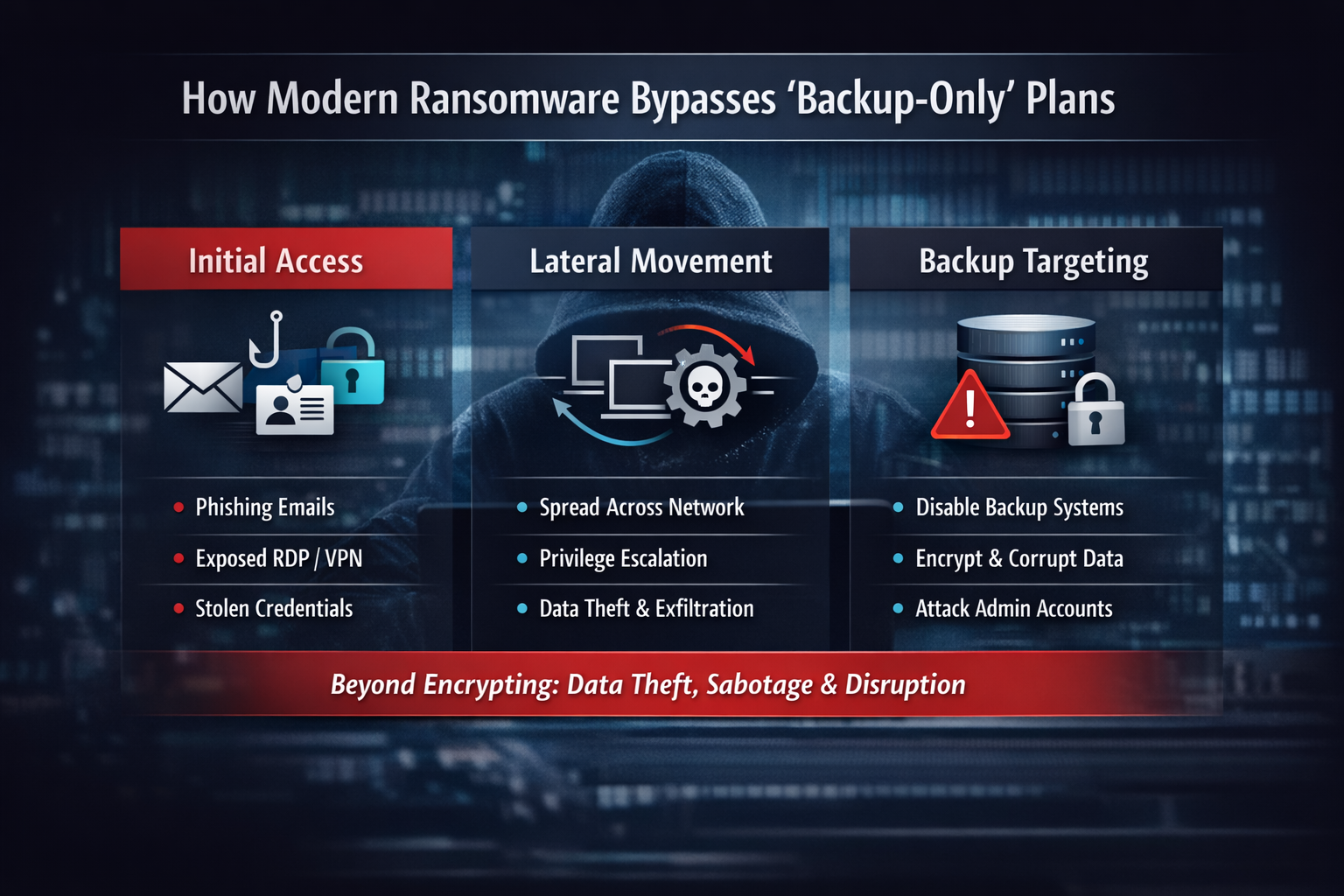
Initial Access: Phishing, Exposed RDP/VPN, & Identity Abuse
- Phishing that captures credentials, tricks users into approving MFA prompts, or delivers malware that steals browser tokens.
- Exposed remote access services (RDP, VPN portals, remote management tools) with weak passwords, missing MFA, or unpatched vulnerabilities.
- Password reuse, credential stuffing, and third-party compromise.
- OAuth/identity abuse where attackers create or hijack tokens and app registrations to persist without “malware.”
The shift is important: attackers want identity first, because identity is the master key to cloud apps, email, remote access, and admin tools.
Hands-on-Keyboard Attacks & Privilege Escalation
- Enumerate Active Directory and cloud identity.
- Escalate privileges via misconfigurations, unpatched systems, token theft, or credential dumping.
- Move laterally using legitimate admin tools (PowerShell, WMI, RMM, remote desktop).
- Tamper with endpoint security, logging, and monitoring where possible.
Why Attackers Target Backup Consoles & Admin Accounts
- Deleting snapshots or backup sets.
- Encrypting online, writable repositories.
- Stealing backup admin credentials or using domain admin rights to access backup infrastructure.
- Altering retention so backups quietly expire.
- Disabling backup jobs so restore points are missing when you need them most.
If backup administration is not separated from the rest of your admin stack, ransomware operators will treat it as an easy win.
Data Theft Changes the “Just Restore” Mindset
Even if you can restore systems, data theft creates additional consequences: privacy notifications, legal and contractual exposure, reputational harm, and follow-on fraud. The best ransomware plan aims to prevent intrusion and contain it quickly—so you don’t have to test recovery in the worst possible conditions.\
The Layered Resilience Model
Ransomware resilience is a system, not a tool. Effective programs build defense-in-depth around five outcomes:
- Prevent: Reduce initial access and privilege escalation.
- Detect: Identify suspicious activity early.
- Contain: Stop lateral movement and limit blast radius.
- Recover: Restore clean, verified systems quickly and in the right order.
- Continue: Keep critical operations moving while recovery happens.
Prevent: Make Initial Access & Escalation Hard
Identity is the New Perimeter
- MFA everywhere, especially for admins and remote access. Prefer phishing-resistant methods where feasible; block legacy authentication.
- Conditional access / risk-based policies (step-up MFA for risky sign-ins, new devices, unusual locations).
- Least privilege by default: remove local admin rights unless documented; review privileged group membership regularly.
- Separate admin accounts for high-privilege roles; limit where those accounts can log in.
- Fast offboarding and stale account cleanup.
- Long passphrases plus breached-password detection.
Practical test: If one user’s credentials are stolen today, could an attacker reach domain admin or global admin within hours? If the answer is “maybe,” identity controls need attention.
Email Security Still Matters
- Impersonation detection and advanced URL/attachment controls.
- DMARC, SPF, and DKIM configured correctly to reduce spoofing.
- Short, frequent user training plus an easy “report phishing” path.
- Guardrails against inbox rules abuse, auto-forwarding, and risky OAuth consent.
Patch & Vulnerability Management
- Maintain an asset inventory (endpoints, servers, network devices, cloud, SaaS).
- Prioritize patching for VPN/remote access, identity components, domain controllers, hypervisors, and backup servers.
- Run routine vulnerability scans and track remediation.
If you can’t answer “what percent of critical systems are fully patched within 14 days?” you’re guessing.
Detect: Catch the Attack Before the “Big Bang”
EDR + MDR: Detection You Can Operationalize
EDR provides telemetry and control. MDR adds 24/7 monitoring, triage, and guided response—critical for organizations without round-the-clock security staffing.
- Behavioral detections (not only signatures).
- Rapid containment actions (isolate host, kill process, block indicators).
- Coverage across endpoints and servers, with health monitoring.
- Clear escalation procedures and communication paths.
- Outcome reporting: time to detect, time to contain, confirmed scope.
If you only review alerts during business hours, assume attackers will act overnight, weekends, and holidays.
Centralized Logging & High-Signal Alerts
- Identity logs (cloud identity and Active Directory).
- EDR telemetry and endpoint event logs.
- Firewall and VPN logs.
- Backup console logs.
Prioritize high-signal detections: unusual privileged changes, new admin accounts, suspicious inbox rules or OAuth consent, lateral movement spikes, and backup deletion/retention changes.
Contain: Limit the Blast Radius
Network Segmentation to Stop Lateral Movement
- Separate user networks from server networks.
- Isolate critical systems (identity, backups, finance, OT/IoT).
- Restrict east-west traffic with explicit allow rules.
- Limit administrative protocols (RDP, SMB, WinRM) to controlled management networks.
Admin Tiering: Protect the “Keys to the Kingdom”
Separate administrative functions so a compromise in one area doesn’t automatically grant access everywhere. Use separate admin accounts, stronger authentication, and restricted access for high-privilege roles.
Rapid Isolation Playbooks
- Isolate endpoints via EDR.
- Disable suspicious accounts and revoke sessions.
- Block malicious IPs/domains.
- Temporarily restrict remote access if needed.
- Freeze changes in identity and backup systems.
- Preserve logs and evidence.
A Quick Scenario: How an “Okay” Environment Becomes a Multi-Week Outage
- An attacker compromises one employee via phishing and captures a session token.
- They use that foothold to access email and find invoices, vendor contacts, and internal terminology.
- They pivot into remote access because MFA is inconsistent across tools.
- They find a shared admin account and escalate privileges.
- They map the environment, tamper with defenses, and exfiltrate data.
- They access the backup console and delete recent restore points.
- They trigger encryption across endpoints and file servers.
This scenario is common because the failure is the lack of layers: identity hardening, admin separation, segmentation, immutable backups, and tested restores.
Containment Details That Pay Off Fast
- Management-only admin access: restrict privileged access to approved devices/networks.
- Lateral movement speed bumps: block common pivot paths unless explicitly needed.
- RMM hardening: MFA, least privilege, monitoring, and alerting on unusual activity.
- Break glass procedures: pre-defined emergency actions and clear authority to execute.
Recovery: The Order of Operations Matters
- Core networking and access (firewalls, DNS/DHCP, VPN configurations as appropriate).
- Identity and authentication services (directory services, identity provider, MFA components).
- Core infrastructure services (virtualization platform, management tooling, certificate services).
- Business-critical applications and databases.
- File services and collaboration tools.
- Remaining systems and endpoints.
What Clean Restore Validation Looks Like in Practice
- Vulnerability and malware scanning of restored images.
- Review privileged accounts/groups for unauthorized changes.
- Verify security agents are present, healthy, and reporting.
- Log review for persistence indicators (tasks/services/startup scripts).
- Application-level testing (auth, transactions, integrations).
Business Continuity Examples
- Billing and collections: alternate invoicing workflows and approvals.
- Customer support: alternate intake channels and routing.
- Order fulfillment/production: manual scheduling prioritization process.
- Field teams: minimum secure access method during disruption.
Coordination With Cyber Insurance & Legal
- How to contact the insurer and breach coach.
- Approvals required before engaging forensics/negotiation.
- Evidence and log preservation requirements.
- Who is authorized to make time-sensitive decisions.
Recover: Immutable Backups + Clean, Tested Restores
Immutable Backups & Ransomware-Safe Retention
Immutability means backup data cannot be modified or deleted during a defined retention period, even by an admin account.
- 3-2-1-1-0: 3 copies, 2 media, 1 offsite, 1 immutable/offline, 0 errors verified.
- Separate backup administration with MFA and least privilege.
- Isolate backup infrastructure with restricted access.
- Retention long enough to survive dwell time.
- Offline/air-gapped copies for the most critical systems.
Recovery Testing
- Scheduled restore drills for critical systems with pass/fail criteria.
- Clean restore validation and integrity checks.
- RTO/RPO measured per system and tracked.
- Dependency mapping and documented restoration order.
- Runbooks with owners and escalation paths.
- A “0 errors” mindset: treat backup errors as production incidents.
Key Recovery Metrics Leaders Should Track
- Time to detect and time to contain.
- RTO/RPO achievement by system tier.
- Percent of critical systems with tested restores and runbooks.
- Backup health and “0 errors” verification rates.
- Tabletop exercise frequency and closure of action items.
Continue: Business Continuity Keeps Operations Moving
Business Continuity Is Not an IT Document
- Which processes keep revenue flowing?
- What’s the minimum tech required?
- What manual workarounds exist?
- Who makes decisions about shutdowns, communications, and emergency spend?
- Which vendors must be engaged immediately?
- What are legal/regulatory notification triggers?
- How will employees communicate if email/chat are unavailable?
Tabletop Exercises & Executive Decision-Making
Tabletops are the fastest way to find gaps. Include execs plus IT/security/legal/HR/finance/comms, use realistic injects, force decisions, and create action items with owners and deadlines.
Core Controls SMB Teams Can Operationalize
- Identity hardening (MFA + conditional access + least privilege + separate admin accounts).
- EDR with 24/7 MDR monitoring and defined containment actions.
- Practical segmentation and restricted admin pathways.
- Immutable backups with separate administration and long-enough retention.
- Restore testing with clean validation and documented runbooks.
- Incident response playbooks plus annual (or more frequent) tabletop exercises.
- Business continuity tied to real workflows.
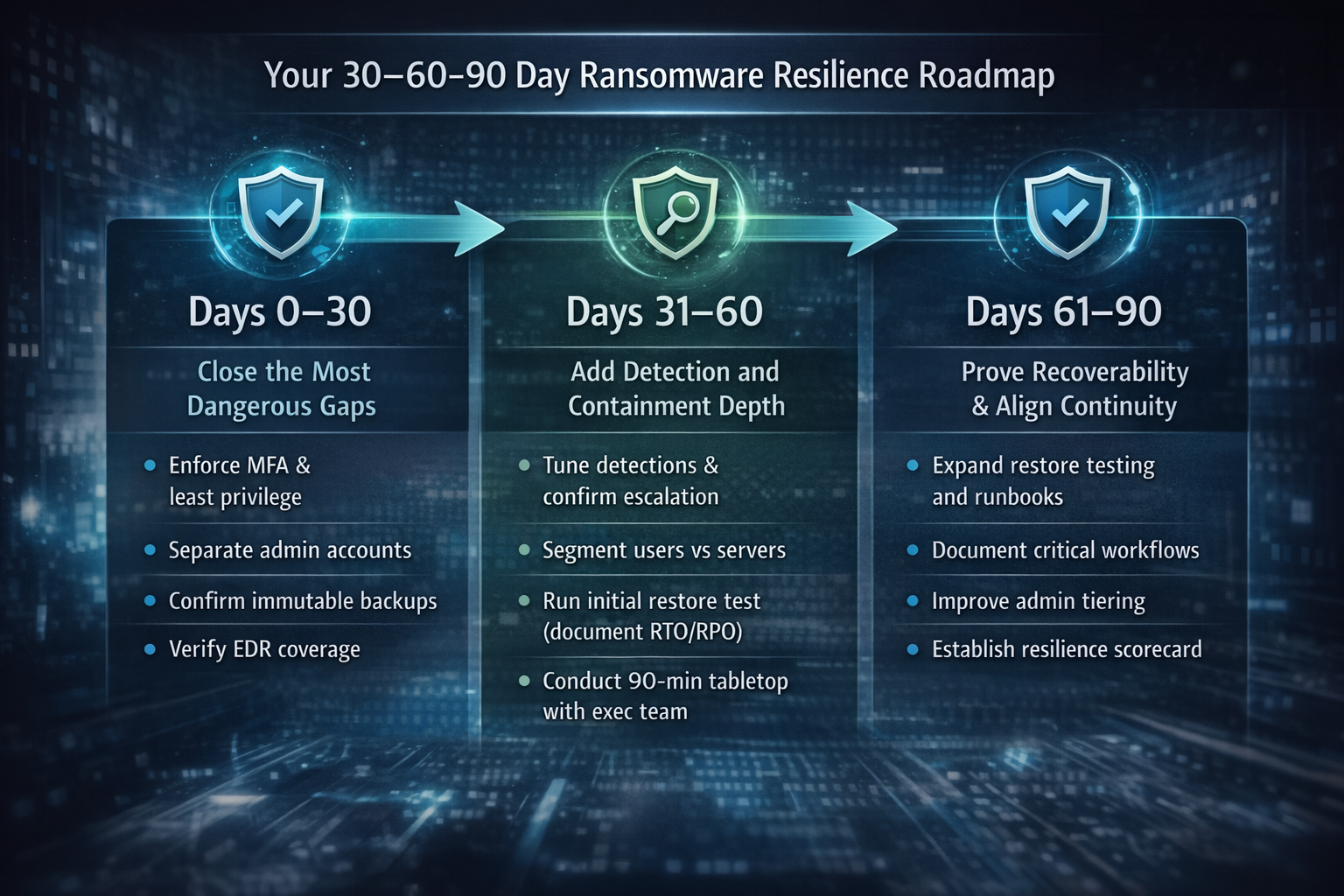
Your 30–60–90 Day Ransomware Resilience Roadmap
Days 0–30: Close the Most Dangerous Gaps
- Enforce MFA and review conditional access; remove unnecessary privileged access.
- Separate admin accounts for high-privilege roles.
- Implement immutability for at least one critical backup copy; separate backup admins and enforce MFA.
- Verify EDR coverage and sensor health; strengthen email protections; resolve backup errors.
- Create a basic containment playbook and validate out-of-band contact lists.
Days 31–60: Detection & Containment
- Tune high-signal detections and confirm 24/7 escalation.
- Segment users vs servers; isolate identity/backup infrastructure; restrict admin protocols.
- Run one realistic restore test and document RTO/RPO and dependencies.
- Run a short executive tabletop and assign owners.
Days 61–90: Prove Recoverability & Align Continuity
- Expand restore testing to top critical systems; build runbooks and a quarterly drill cadence.
- Document critical workflows, minimum tech needs, manual workarounds; validate vendor activation steps.
- Improve privileged access separation (admin tiering, device restrictions, stronger auth).
- Establish a resilience scorecard and review monthly.
Common Pitfalls That Undermine Readiness
- Backups without immutability, admin separation, or restore testing.
- Flat networks with unrestricted lateral movement.
- Shared admin accounts and weak privileged access hygiene.
- Alerts not monitored after hours.
- Continuity plans not practiced or tied to real workflows.
- No documented RTO/RPO by system.
What “Good” Looks Like
- MFA everywhere + conditional access; legacy auth disabled.
- EDR across endpoints/servers + 24/7 MDR.
- Centralized identity/EDR/firewall/VPN/backup logging with tuned high-signal alerts.
- Segmentation plus restricted admin protocols and separate privileged accounts.
- Immutable backups (3-2-1-1-0) with separate administration and “0 errors” verification.
- Tested restores with clean validation, runbooks, and dependency mapping.
- Practiced incident response and business continuity.
How Cyber Advisors Helps
Ransomware readiness is about how components are designed, governed, monitored, and tested together—not just which tools you own.
- Ransomware Resilience Assessment: backup immutability/configuration, identity posture, segmentation, detection coverage, and recovery readiness—delivered as a prioritized scorecard and roadmap.
- Immutable Backup Strategy (3-2-1-1-0): architecture, configuration, admin separation, retention strategy, and ongoing verification.
- Managed Detection & Response (MDR): 24/7 monitoring, threat hunting, and guided response.
- Network Segmentation and Hardening: practical designs that reduce lateral movement and protect identity/backup systems.
- Incident Response + Tabletop Exercises: executive-ready tabletop sessions and playbooks that work in real scenarios.
- Business Continuity Planning: technical recovery aligned to critical workflows.
If you want to know whether your current plan would withstand a 2026-style ransomware attack, the fastest path is an honest scorecard that covers more than backups.
Schedule a call with Cyber Advisors. We’ll review backup immutability, identity protections, segmentation, and recovery testing—and deliver a 30–60–90 day plan to reduce risk and improve recoverability.