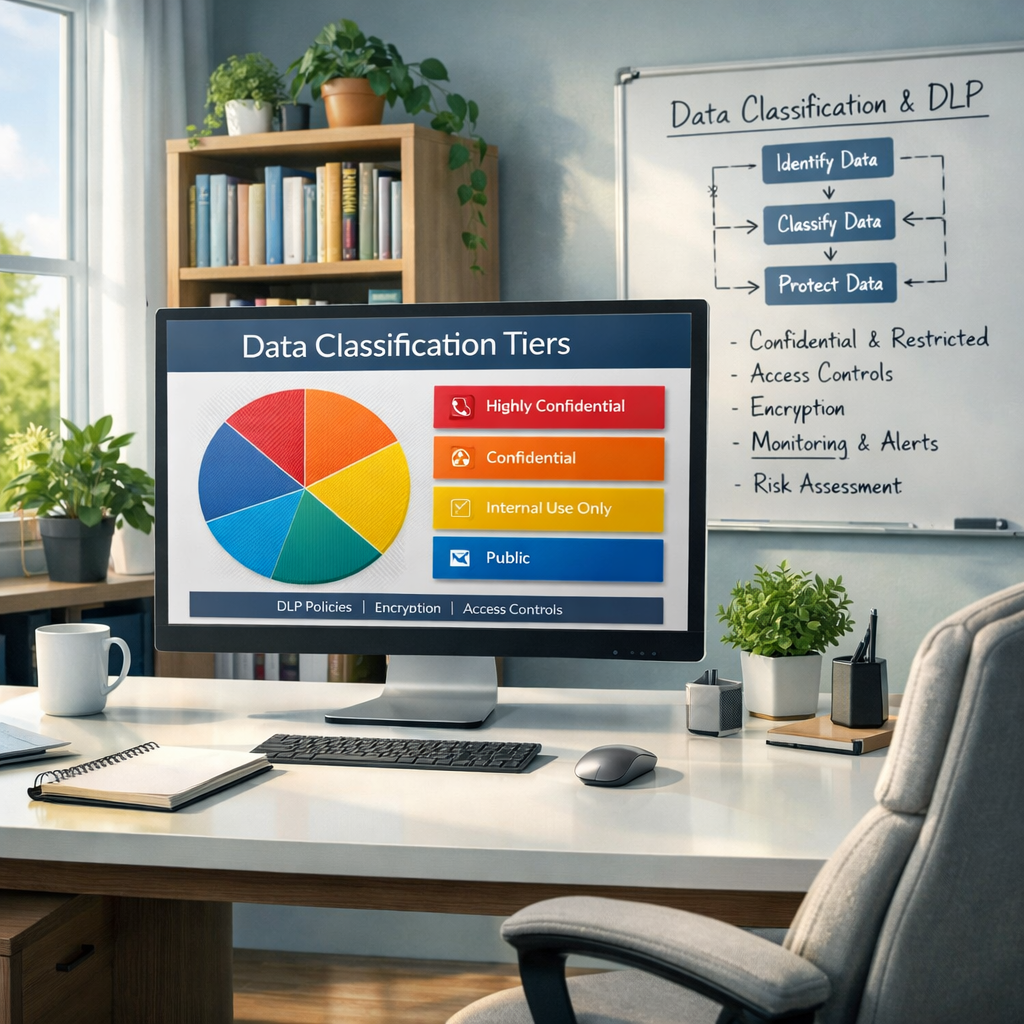
Most data loss prevention (DLP) programs fail for a simple reason: the organization never agreed on what “sensitive” means. This guide gives SMBs a practical 3–4 tier classification model and shows how to map labels to controls so DLP and compliance actually work in day-to-day operations.
Why classification is the foundation of DLP
DLP tools are rule engines. They need a clear signal to decide what to allow, block, encrypt, quarantine, or alert on. Without classification, DLP has to “guess” sensitivity using content patterns and generic rules. That creates three predictable problems:
- DLP only finds a fraction of your sensitive data. Pattern matching catches obvious identifiers, but it won’t reliably identify contracts, HR investigations, legal strategy, customer lists, or product designs.
- False positives destroy confidence. If DLP blocks legitimate work or warns constantly, users stop trusting it and create workarounds—often increasing risk.
- IT becomes the bottleneck. Without a shared model, every DLP decision becomes an argument. Classification creates shared language, aligns business impact to controls, and turns compliance into daily behavior.
A simple 3–4 tier classification model for SMBs
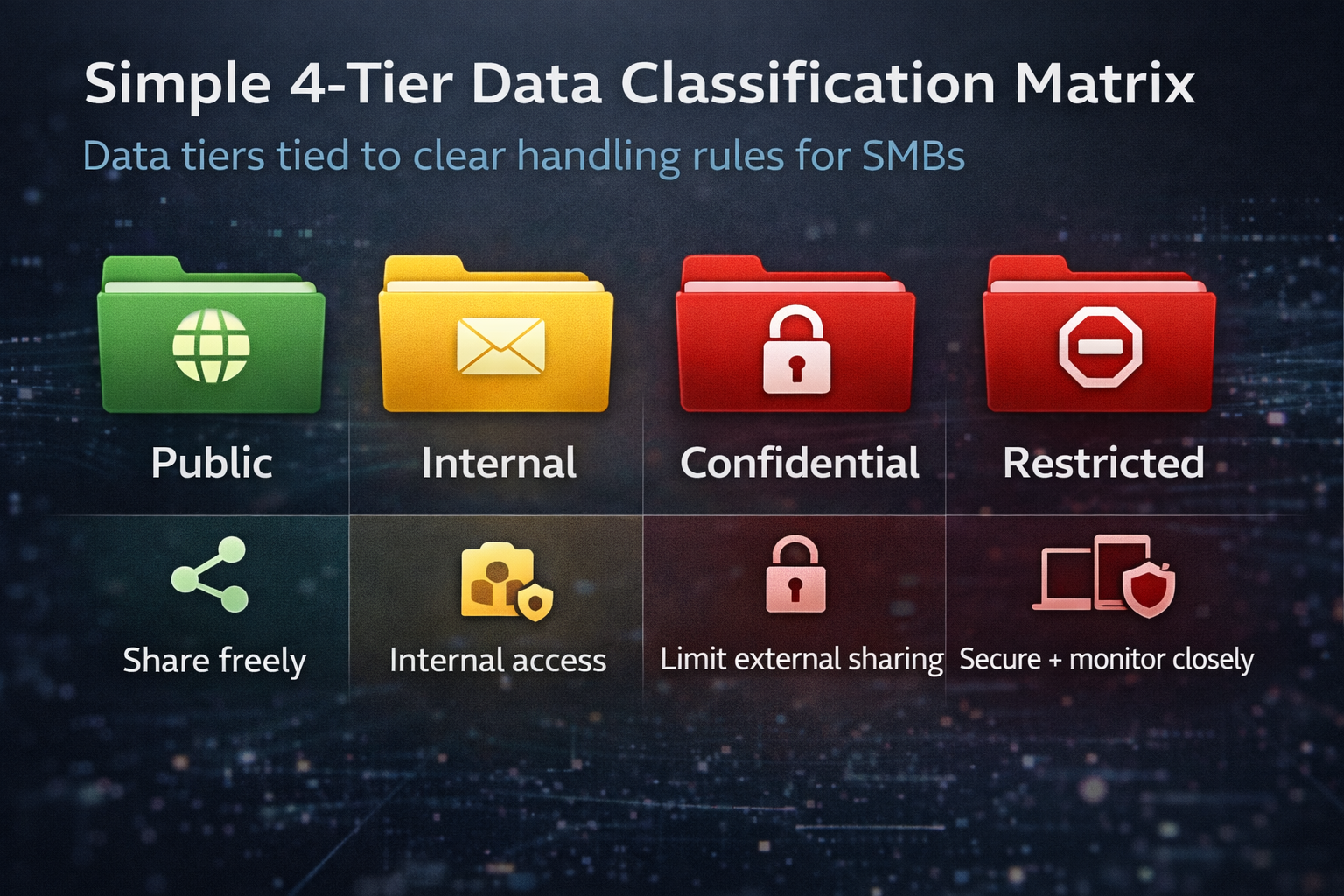
Your scheme must be small enough for people to remember. Most SMBs can get excellent results with three or four tiers:
Tier 1: Public
Definition: Approved for public release.
Examples: Marketing materials, published content.
Handling: Share freely; protect integrity (who can edit/publish).
Tier 2: Internal
Definition: For employees and approved partners, not for broad distribution.
Examples: Internal process docs, general meeting notes.
Handling: Keep in approved corporate systems; authenticated access; avoid “anyone with the link.”
Tier 3: Confidential
Definition: Significant harm if disclosed.
Examples: Customer lists, pricing, contracts, non-public financials, HR records.
Handling: Need-to-know access; external sharing limited and monitored; stronger retention + logging.
Tier 4: Restricted (optional but recommended)
Definition: Severe harm if disclosed or altered.
Examples: Secrets/credentials, incident investigation files, board materials, regulated high-risk datasets.
Handling: Strict least-privilege; approvals for access/sharing; enhanced monitoring; strong device requirements.
Quick decision checklist
- Would it hurt us if this were public? (No → Public; minor → Internal; significant → Confidential; severe → Restricted)
- Is it regulated or contractually protected? (Usually Confidential/Restricted)
- Does it include secrets, privileged material, or sensitive personal info? (Often Restricted)
- Do we need to limit access to a small group? (Confidential/Restricted)
Common failure modes & how to avoid them
- Too many labels: Keep it to 3–4.
- No ownership: Assign data owners for major categories (HR, Finance, Sales Ops, Legal, IT/Security).
- Unclear handling rules: Publish a one-page matrix and train from it.
- Users do all the work: Use a hybrid approach: automate + prompt + accountable overrides.
- Controls don’t match business impact: Restrict only what truly needs it.
- No measurement: Track policy hits, false positives, overrides, and leakage events.
Examples of what belongs in each tier
Public
- Website copy, brochures, and published case studies
- Press announcements
- Public webinars and decks
Internal
- Internal “how-to” docs without credentials or client-sensitive details
- Routine project plans and meeting notes
- Internal training materials
Confidential
- Proposals, quotes, pricing sheets
- Customer contracts and contact lists
- HR records (investigations, benefits enrollment)
- Forecasts, budgets, and non-public financial reporting
- Detailed security documentation (depending on sensitivity)
Restricted
- Passwords, keys, certificates, vault exports, secrets
- Security incident details and investigation notes
- Board packets, legal privilege documents, M&A planning
- Regulated datasets with high-impact exposure risk
Tip: Publish a short “by department” example list (Sales, HR, Finance, IT, Legal). That’s what drives adoption.
How to label & handle data: people + process + tools
- Define scope: Start with 5–10 high-risk categories (contracts, customer lists, HR records, secrets, etc.).
- Assign owners and stewards: Data owners decide; IT/security implements and tunes; compliance/legal validates.
- Create a handling matrix: Storage, sharing, access, transmission, protection, retention.
- Choose a labeling approach: Hybrid works best for most SMBs (auto-label obvious, prompt likely, accountable overrides).
- Use your existing platform: Microsoft 365 or Google Workspace can usually cover v1 if configured well.
Map each tier to controls
IDENTITY & ACCESS
- MFA for everyone (baseline)
- Conditional/context-aware access for Confidential/Restricted
- Group-based permissions and regular access reviews for sensitive repositories
Sharing
- Internal: Default to org-only sharing; discourage anonymous links
- Confidential: Authenticated links, expirations, partner-domain limits
- Restricted: External sharing prohibited by default; approvals + managed devices
Encryption & protection
- Verify encryption in transit and at rest
- Use label-based protections where available (forward/print limits, view-only, re-auth prompts)
Endpoint controls
- Baseline: device encryption, patching SLAs, screen locks
- Confidential/Restricted: EDR, device compliance checks, restrict access from unmanaged devices
Monitoring & response
- Enable audit logs and retain long enough to investigate
- Alert on high-signal events (anonymous links, personal-domain sharing, mass downloads)
- Tie Restricted events to incident response playbooks
High-signal policies to implement first
- Stop anonymous links for Confidential/Restricted
- Control external sharing by domain
- Block Restricted exfiltration paths (personal email, public links, unmanaged devices)
- Detect “mass behavior” (downloads, link creation, unusual sign-ins)
A practical handling matrix (what “different” actually means)
The most useful artifact in a classification program is a one-page handling matrix. It prevents endless debates and gives users a fast answer. Adapt the following to your tools and risk tolerance.
Storage
- Public: Approved publishing repositories
- Internal: Corporate cloud storage only
- Confidential: Restricted sites/drives; avoid unmanaged local storage
- Restricted: Dedicated restricted repositories or vaults
Sharing
- Public: Share publicly
- Internal: Internal sharing; partners as needed; avoid anonymous links
- Confidential: Authenticated links + expiration; partner-domain limits
- Restricted: Prohibited by default; approvals + secure transfer
Email and messaging
- Confidential: Prefer links; warn/block outbound to personal domains
- Restricted: Do not email as attachments; use approved secure methods
Device requirements
- Confidential: Compliant devices for download; EDR required
- Restricted: Managed devices only; restrict copy/paste/download where supported
Tip: Make the default label Internal for new documents/emails to reduce accidental oversharing.
Who decides what’s sensitive: data owners, policy owners, & IT
- Data owners (business): Define what’s Confidential/Restricted and approve exceptions.
- Security/IT: Implement controls, monitor/tune policies, provide safe alternatives.
- Compliance/legal: Validate regulatory mapping, retention, and audit evidence.
Microsoft 365 & Google Workspace: keep the user experience simple
Microsoft 365 (Purview labels + DLP)
- Create only 3–4 labels with short tooltips.
- Start with label-based DLP rules (e.g., Confidential → warn/block anonymous links).
- Use auto-labeling carefully: automate high-confidence, recommend for moderate confidence.
- Control the biggest leakage paths first (links, personal domains, auto-forwarding, unmanaged devices).
Google Workspace (Drive/Gmail DLP)
- Map your handling matrix to Drive/Gmail policies (policy-first approach).
- Restrict risky sharing defaults (“anyone with the link”).
- Use strong-signal DLP rules validated in a pilot.
- Provide a safe alternative when blocking to prevent shadow IT.
Turning tiers into DLP policy: a control-by-control mapping
Use this as a roadmap. You don’t need everything on day one.
Identity controls
- Internal: MFA; block legacy auth
- Confidential: Conditional access; MFA re-prompts for high-risk actions
- Restricted: Separate admin accounts; privileged access; just-in-time access; frequent reviews
Sharing controls
- Internal: Org-only links; warn on anonymous link creation
- Confidential: Authenticated links + expirations; partner-domain allowlist
- Restricted: Disable public/anonymous; block external unless exception-approved; managed devices only
Email controls
- Confidential: Warn/block to personal domains; prefer links over attachments
- Restricted: Block outbound attachments; require secure transfer methods
Endpoint controls
- Confidential: EDR; restrict unmanaged device downloads
- Restricted: Managed-only; restrict removable media; monitor exports where relevant
Monitoring controls
- Confidential: Alerts for unusual sharing, mass downloads, risky sign-ins
- Restricted: High-priority alerts + incident response steps; automated containment where feasible
Common scenarios & how the model resolves them
- Sales sharing a proposal: Usually Confidential → authenticated link + expiration; avoid attachments.
- HR sharing benefits files: Confidential/Restricted → approved partner domain or secure transfer.
- Passwords in spreadsheets: Restricted → move to a credential vault; enforce via policy.
- Board materials: Restricted → view-only, managed devices, no forwarding/printing.
- Vendor collaboration folder: Internal/Confidential → dedicated shared space, partner restrictions, minimal access.
How to keep productivity high while tightening controls
- Default to safe collaboration (Internal defaults, org-only sharing).
- Block only the highest-risk actions first; warn/justify for Confidential early on.
- Provide an approved alternative every time you block something.
- Measure friction as seriously as risk; tune noisy policies.
- Treat exceptions as data; repeated exceptions indicate a workflow you should formalize.
Compliance & audit evidence
Classification makes audits easier because you can show:
- Documented classification standard + handling matrix
- DLP and sharing policy settings
- Access control and conditional access evidence
- Logging/monitoring evidence and incident response linkage
- Training records, exceptions with audit trail, and monthly review cadence
Quick-start: the first 30 days
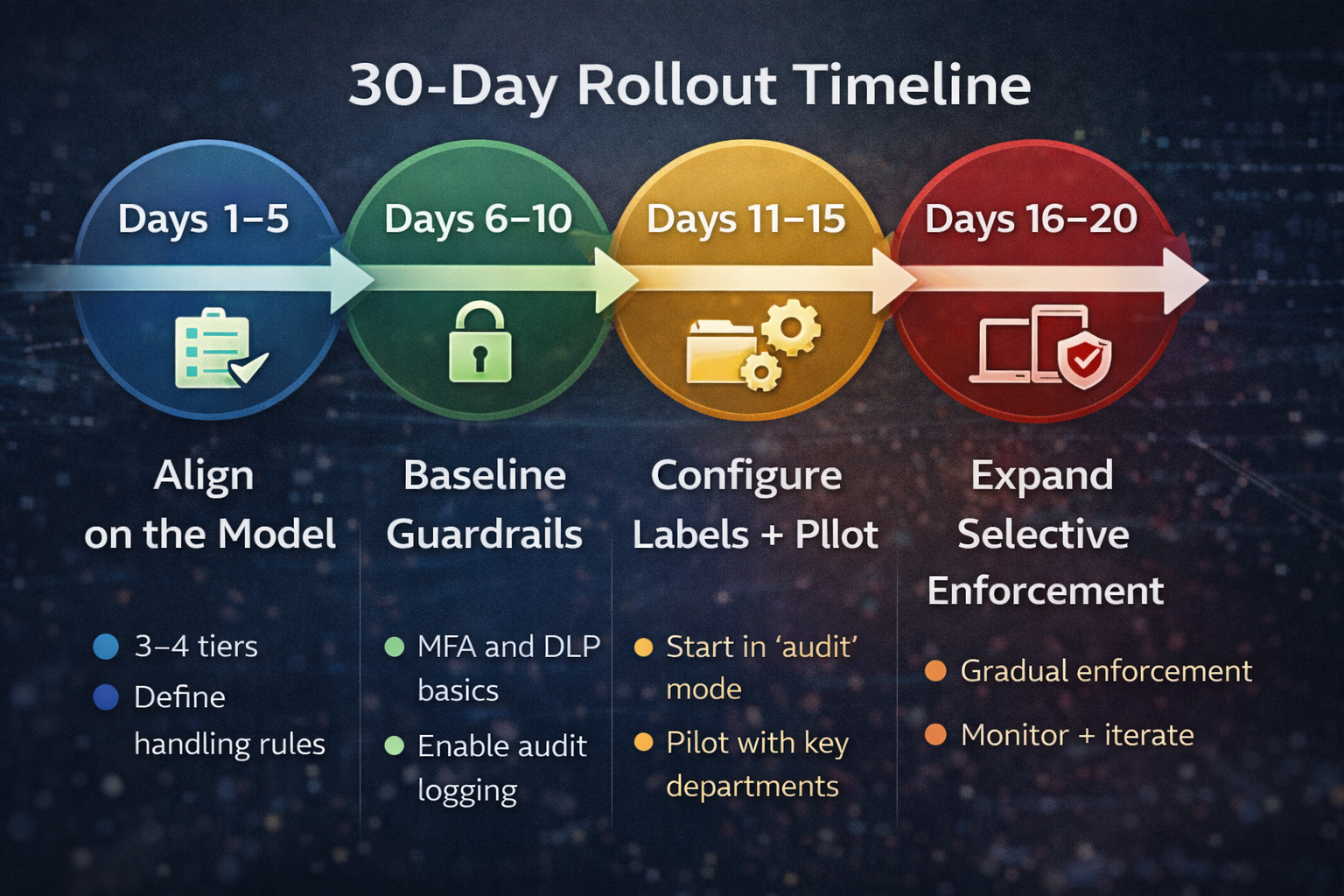
Days 1–5: Align on the model
- Choose 3–4 tiers and definitions
- Identify 5–10 high-risk data categories
- Assign data owners
- Draft the one-page handling matrix
Days 6–10: Baseline guardrails
- MFA everywhere
- Sharing defaults that reduce anonymous exposure
- Enable audit logging and confirm retention
Days 11–15: Configure labels & pilot
- Create labels/categories
- Start DLP in audit/warn mode
- Pilot with Sales + HR + Finance
Days 16–20: Tune
- Review hits and false positives
- Adjust rules and exception workflow
- Publish cheat sheet + short training
Days 21–30: Selective enforcement + expand
- Enforce authenticated sharing for Confidential/Restricted
- Block the highest-risk Restricted actions first
- Expand to all users; schedule monthly reviews
Momentum matters: a practical v1 beats a perfect plan that never ships.
What success looks like (simple metrics)
- Policy hits by tier (are we seeing sensitive data where we expect it?)
- User overrides/downgrades (are policies too strict or labels unclear?)
- Anonymous links created (near-zero for Confidential/Restricted)
- External shares to unapproved domains (down and trending down)
- Confirmed exposure events and time to detection (fewer, faster)
CYber Advisors Can Help
If you want DLP and compliance controls to actually work, classification has to be practical, owned by the business, and mapped to concrete, real-world controls—not just turned on in a console and forgotten. That means your labels must be simple enough for employees to use correctly under pressure, clearly defined so that business owners—not just IT—can decide what belongs in each tier, and tightly linked to specific actions, such as who can share, how data can be sent, and what happens when something goes wrong. When classification is treated as an operational standard instead of a one-time configuration, your DLP policies stop guessing, false positives drop, and the controls you pay for start driving consistent, auditable behavior across the organization.
Cyber Advisors helps SMBs and mid-market organizations reduce risk without slowing the business. We can help you:
- Define a right-sized 3–4 tier classification model tailored to your workflows
- Identify your highest-risk data types and map them to handling rules
- Configure and tune Microsoft Purview sensitivity labels + DLP (or Google Workspace DLP)
- Reduce oversharing with secure sharing defaults, conditional access, and identity hardening
- Operationalize with training, exception workflows, and measurable metrics
- Connect classification to incident response and ongoing managed security monitoring
If your current DLP program feels noisy, ineffective, or constantly bypassed, it’s usually not because the tool is wrong—it’s because the organization never agreed on “what sensitive means.” Fix that, and the rest gets much easier.