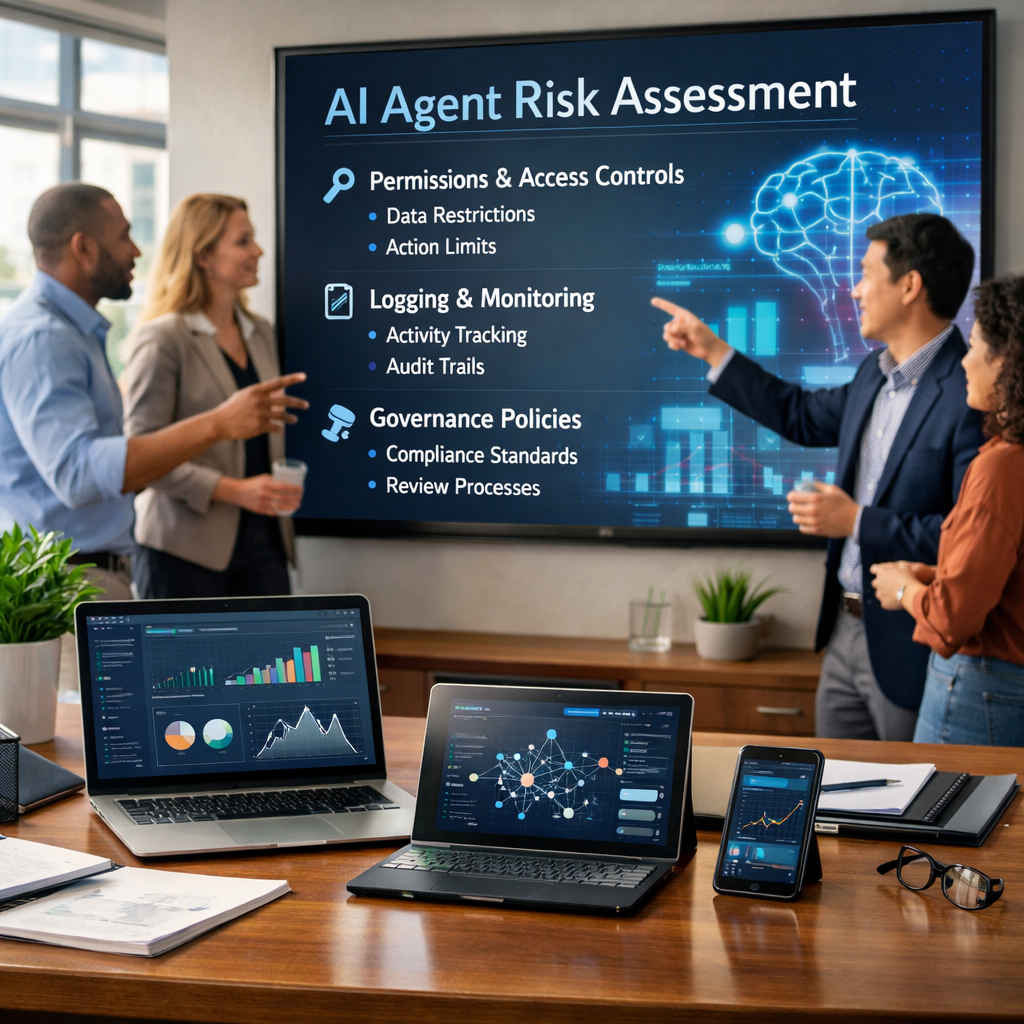
Before you connect an AI agent to your data and tools, you need clear answers about permissions, logging, vendor terms, and fail-safes. Use this checklist to reduce risk without slowing innovation.
Why AI Agents Change Your Risk Profile
If you’ve been evaluating generative AI for the last couple of years, you’ve likely built a mental model around “chatbots”: users ask questions, the model responds, and the main risks revolve around bad answers, sensitive data in prompts, and compliance with where content is stored.
Agentic AI is different.
An “AI agent” is typically a system that can plan tasks, call tools (APIs), take actions in other systems, and iterate until it completes an objective. That might be as simple as “summarize the week’s support tickets and open follow-up tasks,” or as powerful as “identify overdue invoices, draft customer emails, and schedule collection calls.”
That shift—from “answering” to “doing”—changes your security and operational risk profile in four ways:
- Privilege becomes the primary risk. A chatbot can leak data, but an agent can modify systems.
- Visibility becomes non-negotiable. If you can’t reconstruct actions end-to-end, you can’t investigate or prove compliance.
- Attack paths multiply. Prompt injection, malicious documents, compromised integrations, and vendor-side issues all matter more.
- Governance must be continuous. Agents change via prompts, tools, workflows, and vendor releases.
The goal of an agentic AI risk assessment isn’t to slow innovation. It’s to ensure you deploy agents the way you deploy any powerful automation: with identity controls, logging, change management, and an incident response plan.
The 10 Questions & What “Good” Looks Like
Below is a practical checklist you can use to evaluate an AI agent before deployment. For each question, you’ll see what “good” looks like and what red flags to watch for.
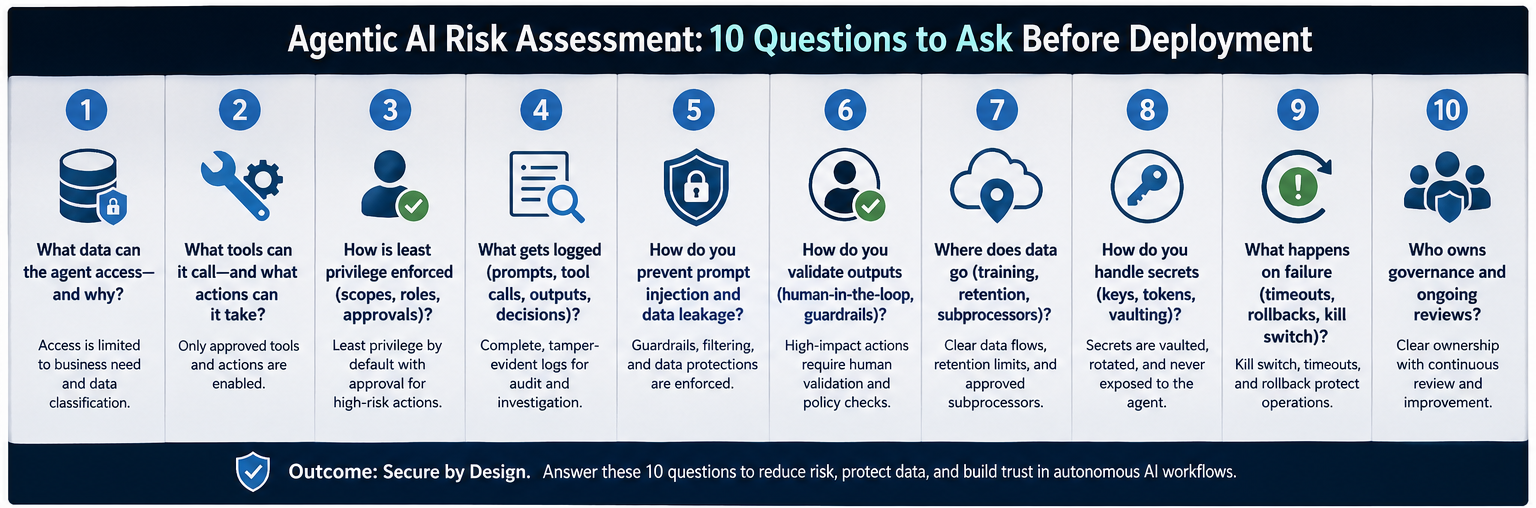
1) What data can the agent access? why?
What “good” looks like
- A documented data map (sources, access method, sensitivity classification).
- Purpose limitation and minimum necessary access.
- Segmentation (separate agents/identities for separate domains).
Red flags
- “It needs access to everything.”
- No data classification or unclear ownership.
- One agent identity spans regulated datasets.
Implementation tip: Map data sources and classify sensitivity before connecting them.
2) What tools can it call & what actions can it take?
What “good” looks like
- Tool inventory with documented actions and risk tiers.
- Tiered permissions (read-first; narrow write where needed).
- Guardrails for high-risk actions (approvals, limits, break-glass).
Red flags
- Tools enabled “just in case.”
- Admin-level actions in cloud/IAM/finance/endpoint tools.
- No approvals for system-of-record changes.
Implementation tip: Require approvals for high-risk actions—especially those involving money, identity, or production changes.
3) How is least privilege enforced (scopes, roles, approvals)?
What “good” looks like
- Dedicated service identities (not shared with humans).
- Minimized OAuth scopes reviewed regularly.
- RBAC + Conditional Access applied to the agent identity.
- Just-in-time access for elevated actions.
Red flags
- Long-lived tokens with broad scopes.
- Shared credentials in prompts/code/config files.
- No Conditional Access for non-human identities.
Implementation tip: Treat agent identities like privileged service accounts.
4) What gets logged (prompts, tool calls, outputs, decisions)?
What “good” looks like
- Centralized logs for prompts, retrieval references, tool calls, decisions, and actions.
- Correlation IDs across systems.
- Retention aligned to compliance and investigations.
- Masking/redaction and controlled access to sensitive logs.
Red flags
- Only success/failure logs.
- Vendor logs you can’t export to your SIEM.
- Logs are stored where security can’t access them.
Implementation tip: If you can’t audit it, you can’t govern it.
5) How do you prevent prompt injection & data leakage?
What “good” looks like
- Separation of system instructions and untrusted content.
- Sanitation/labeling of retrieved content.
- Allow-lists for actions and destinations.
- DLP controls where applicable.
- Red teaming before go-live.
Red flags
- Agents that read email/web/documents and execute actions without validation.
- No restrictions on external calls or data egress.
- “The model will know what not to do.”
Implementation tip: Assume untrusted content will try to manipulate the agent.
6) How do you validate outputs (human-in-the-loop, guardrails)?
What “good” looks like
- Human review for external comms, finance, identity, and production changes.
- Guardrails and structured validation.
- Safe defaults (stop and escalate on low confidence/missing data).
Red flags
- Autonomous execution in customer-facing or regulated workflows.
- No measurable acceptance criteria.
- No feedback loop for continuous improvement.
Implementation tip: Start assistive; earn autonomy through proven controls.
7) Where does data go (training, retention, subprocessors)?
What “good” looks like
- Clear commitments on training usage and retention.
- Documented subprocessors and hosting regions.
- Contractual incident notification, auditability, and standards.
- Alignment with regulatory needs.
Red flags
- Vague “improve services” language without controls.
- Undisclosed or frequently changing subprocessors without notice.
- Weak breach notification and accountability.
Implementation tip: Confirm retention/training/subprocessors before procurement is final.
8) How do you handle secrets (keys, tokens, vaulting)?
What “good” looks like
- No secrets in prompts or repos.
- Vaulted secrets and short-lived tokens.
- Rotation policies and separation of duties.
Red flags
- Hardcoded keys or copied tokens.
- Same key across dev/test/prod.
- No rotation plan.
Implementation tip: If an agent token is stolen, it can become a fast-moving breach.
9) What happens on failure (timeouts, rollbacks, kill switch)?
What “good” looks like
- Timeouts/rate limits.
- Idempotency checks to prevent duplicates.
- Rollback procedures for write actions.
- Kill switch + tested runbooks.
Red flags
- No rollback path.
- No clear owner to disable the agent.
- “We’ll fix it manually.”
Implementation tip: Build a kill switch and a rollback before going live.
10) Who owns governance & ongoing reviews?
What “good” looks like
- Named owners across security, IT ops, business workflow and vendor management.
- Change management for tools/data/prompt/model changes.
- Periodic access and log reviews.
- Metrics for detection and response effectiveness.
Red flags
- No shared accountability.
- No review cadence.
- No decommissioning plan.
Implementation tip: If you can’t name the owner, you can’t govern it.
Vendor & Contract Gotchas
Even teams with strong technical controls get surprised by vendor terms. Pay close attention to retention defaults, training clauses, subprocessors/regions, indemnity/liability, and auditability.
Implementation Checks Before Go-Live
- Create an agent system diagram (data, tools, identities, logs).
- Separate dev/test/prod identities and secrets.
- Apply IAM and conditional access to agent identities.
- Build detection and alerting for tool connections, permission changes, spikes, and failures.
- Run adversarial tests (prompt injection, malicious docs, confused deputy).
- Define stop conditions for escalation to humans.
- Prove reversibility for write actions.
Incident Response for Autonomous Workflows
Containment: disable agent, revoke tokens, rotate secrets, block destinations.
Investigation: pull correlated logs, identify entry point, determine impact.
Eradication: tighten scopes, patch guardrails, update runbooks.
Recovery: roll back changes, validate integrity, re-enable in staged mode.
Lessons learned: add detections, refine governance, re-test.
Scorecard Template
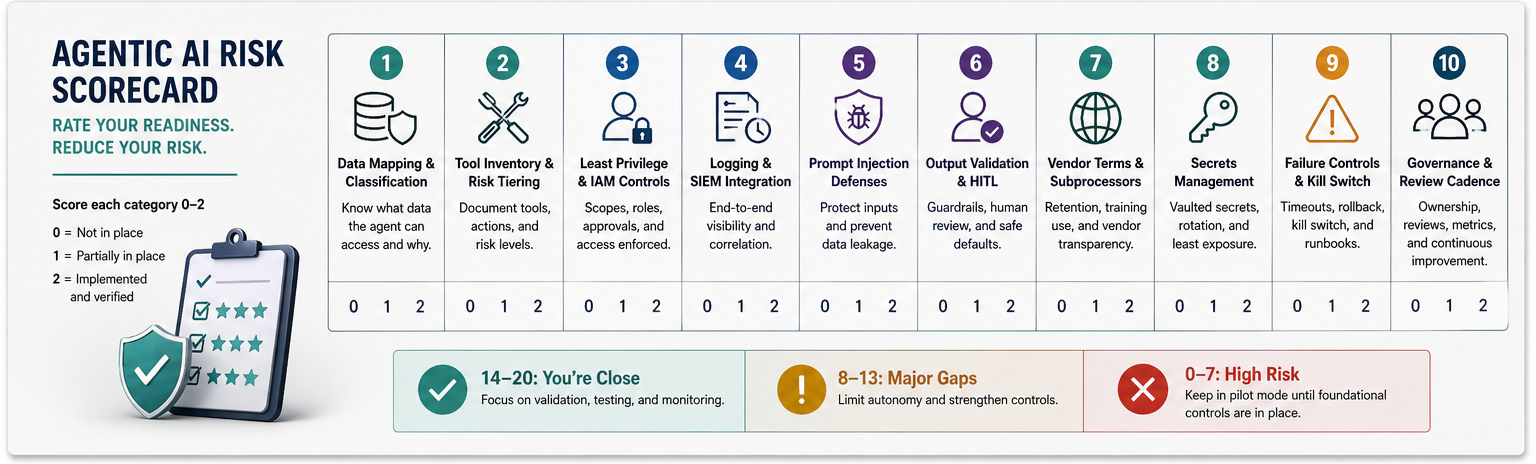
Score each category 0–2 (0 = Not in place, 1 = Partial, 2 = Implemented and verified).
| Category | 0 | 1 | 2 |
|---|---|---|---|
| Data mapping & classification | None | Partial | Complete and current |
| Tool inventory & risk tiering | None | Partial | Complete with approvals |
| Least privilege & IAM controls | None | Some | Enforced + reviewed |
| Logging & SIEM integration | None | Partial | End-to-end correlation |
| Prompt injection defenses | None | Some | Tested + monitored |
| Output validation & HITL | None | Some | Defined + enforced |
| Vendor terms & subprocessors | Unknown | Reviewed | Contractually confirmed |
| Secrets management | Ad hoc | Vaulted | Vaulted + rotated |
| Failure controls & kill switch | None | Partial | Tested runbooks |
| Governance & review cadence | None | Informal | Formal + metrics |
Next steps:
- Score 14–20: You’re close. Focus on testing and monitoring.
- Score 8–13: Major gaps. Limit autonomy and tighten controls.
- Score 0–7: Keep in pilot mode until foundational controls exist.
Practical ExamplesTRANSLATING THE CHECKLIST INTO REAL DECISIONS
Example A: Support Ticket Triage Agent
Recommended design: read-only CRM/KB, draft-only external messages, logging with ticket + source IDs, review before send.
Common mistakes: over-permissioned CRM writes, auto-send emails, and no attachment scanning.
Example B: Finance Collections Agent
Recommended design: draft-only emails, domain allow-lists, rate limits, human approval for amounts, pause on ERP failures.
Common mistakes: changing invoice status, runaway drafts and poor audit trail.
Example C: IT Operations Change Agent
Recommended design: recommend-only first, approval-gated temp credentials, strong separation for production and rollback evidence.
Common mistakes: direct production changes, no rollback, weak detection.
Architecture Patterns That Reduce Agent Risk
- Split the planner from the executor so that the policy is enforced at the execution layer.
- Use policy-as-code for tool call restrictions and approvals.
- Prefer structured outputs with validation over free-form text.
- Gate retrieval and sanitize untrusted content in RAG workflows.
- Design for a limited blast radius with segmentation, limits, and isolation.
A Lightweight Governance Model for SMB &Mid-Market Teams
Simple RACI: Responsible (build/operate), Accountable (risk owner), Consulted (legal/compliance/data owners), Informed (exec sponsor).
Cadence: pre-deployment review; weekly for first 30 days; monthly ops; quarterly access/vendor review.
What You Can Safely Automate First
Safer starting points: summarization, drafting, recommendations, normalization.
High-risk until controls mature: identity changes, financial transactions, production changes, exporting regulated data.
Cyber Advisors' Services & Next Steps
Agentic AI can be a competitive advantage—but only if it’s deployed with the same rigor you apply to identity, cloud, and automation. Cyber Advisors helps SMB and mid-market organizations deploy AI safely and confidently through:
- vCISO / Security Leadership Services
- Managed Detection & Response (MDR)
- Identity & Access Management (IAM) / Conditional Access
- Microsoft 365 Security & Compliance (DLP, Purview)
- Security Risk Assessments & Roadmapping
- Security Awareness Training / Phishing Testing
Schedule a 30-minute readiness review to identify quick wins & build a safe go-live roadmap.